

TL;DR: Faceted search lets shoppers work down a catalog by price, brand, and size without hitting a dead end, and a solid build has lifted conversion and organic revenue for Optimum7 clients. A careless one floods search engines with duplicate filter URLs and buries rankings instead. This guide covers Shopify, BigCommerce, and Magento setup, the SEO safeguards, and the B2B distributor angle.
A shopper lands on your category page, scans past forty near-identical products, and closes the tab without buying anything. Ecommerce faceted search is the feature built to stop that: it lets customers narrow a catalog by price, brand, size, and a dozen other attributes until the products left on screen are the ones they came for. Check your own site analytics: how many category-page visitors browse for two minutes and leave without adding a single item to cart? A missing or broken filter is usually the reason.
Optimum7 has built faceted search into BigCommerce, Shopify, Volusion, and Magento stores ranging from a few hundred SKUs to catalogs with tens of thousands, and the pattern holds across every one: filtering stops being optional once a catalog crosses a few hundred products. Implemented carelessly, those same filters can flood search engines with duplicate URL combinations and quietly erase months of SEO work. This guide covers the definition, the platform-specific setup for Shopify, BigCommerce, and Magento, the SEO safeguards against cannibalized rankings, and the B2B distributor angle.
What Is Faceted Search?
Faceted search is a filtering system built around specific attribute values, like price range, brand, material, or color, that a shopper selects to work a product catalog down to what they want. The result set updates instantly, with no full page reload. Each attribute a customer can filter by, price, brand, material, is a facet; each specific value they select within it, under $50, Nike, cotton, is a filter. People use the two words interchangeably in everyday conversation, but on a real platform the distinction shapes how filter groups get built: a facet is the category, a filter is the choice inside it.
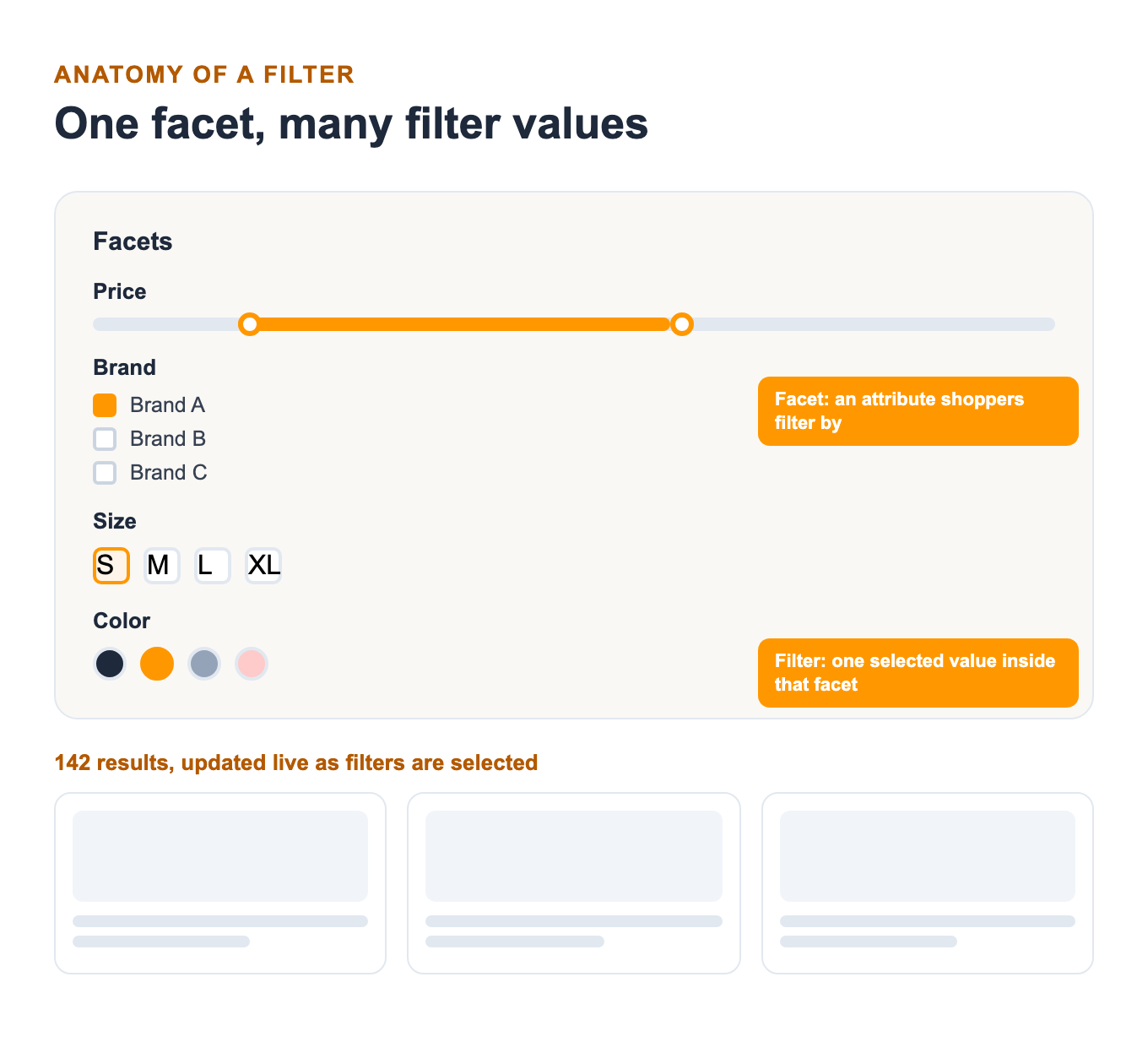
Faceted navigation shows up almost everywhere large catalogs exist: Amazon’s left-hand filter rail, BigCommerce’s default category sidebar, Shopify’s Search & Discovery panel. The underlying mechanic stays the same in every case: attribute data attached to each product gets indexed once, then queried instantly every time a shopper clicks a checkbox.
Five Ways Faceted Search Improves Ecommerce Performance
Five measurable effects earn faceted search its place in the budget, and most of them show up the moment an existing filter setup starts breaking down somewhere between discovery and checkout. When was the last time you watched a real customer session recording on your own category pages?
1. Faster Product Discovery on Large Catalogs
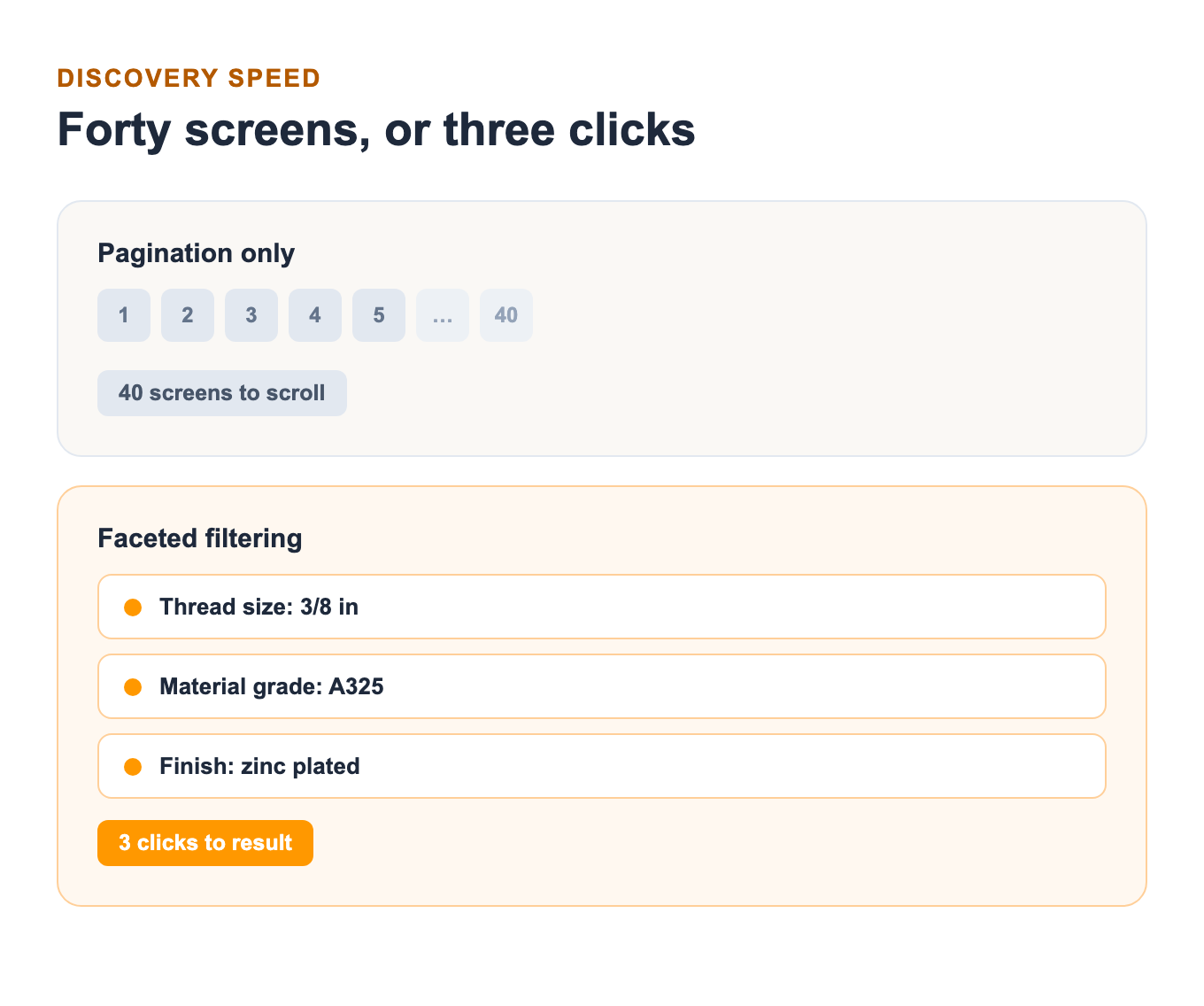
The larger a catalog gets, the more a shopper depends on filters instead of pagination to find what they came for. Someone searching a 20,000-product industrial parts catalog for one specific fastener size and grade will abandon the search long before paging through forty screens of results; filtering by thread size, material grade, and finish gets them there in three clicks instead of forty. The gap between pagination and filtering only widens as catalogs grow. Ask shoppers what keeps them on a site, and product findability tops nearly every other design factor they name.
2. Eliminates Null Search Results on Filter
A shopper who narrows a catalog down to zero results rarely broadens the search. Instead, they assume the store simply doesn’t carry the item, even when a close match sits two clicks away. A well-built faceted search interface never shows a blank page. When a filter combination returns nothing, it should relax the tightest constraint automatically and surface the closest available matches instead of a dead end.
3. A Shopping Experience Customers Finish
For a shopper without a specific SKU in mind, filtering carries the entire shopping experience. Eliminate 90% of a catalog in four clicks, and a buying decision comes faster, with more confidence, than paging through results in whatever order they loaded. This confidence gets carts through checkout instead of leaving them abandoned mid-browse.
4. Valuable Data-Driven Insights
Every filter click leaves behind a data point about shopper intent, something a plain search box never captures. A spike in customers filtering a furniture catalog by “under $500” signals a price-sensitivity trend worth acting on in merchandising and ad targeting before it shows up anywhere else. Optimum7 has used filter-click data exactly this way: redirecting paid search budget toward the price tiers and attributes shoppers were already favoring, weeks before that trend showed up in sales reports.
5. Increase in eCommerce Site Sales
Too many options create their own kind of paralysis. Behavioral research on choice overload, most famously a study offering shoppers six jam flavors versus twenty-four, found the smaller, curated set converted at a dramatically higher rate even though the larger display drew more initial interest. Faceted search resolves this tension without cutting inventory: the catalog stays large while each individual shopper only ever sees the handful of options matching what they asked for.
The Technology Behind Real-Time Faceted Filtering
A pre-built index powers faceted search, queried instantly on every click instead of hitting the live database directly. Product attributes, price, brand, size, availability, get indexed once into a search engine built for exactly this kind of filtering, so the storefront can update result counts and product grids in place using AJAX, no full page reload required.
Stores typically handle this in one of three ways: through the search functionality built into the platform itself, through a dedicated third-party search tool layered on top, or through a custom-built index using a search engine like Elasticsearch, usually paired with a front-end framework like React or Vue for the filter interface itself. Elasticsearch and comparable engines like Algolia, Klevu, and Searchspring exist because relational databases are slow at the kind of faceted counting a filter sidebar needs done in milliseconds: how many results match this color, this price range, and this brand, simultaneously, across every combination a shopper might click next.
Faceted Search on Shopify, BigCommerce, and Magento
The mechanics of faceted search stay consistent across platforms, but the ceiling on what’s possible without custom development does not. Shopify, BigCommerce, and Magento each ship a different default, and knowing the limit before a catalog outgrows it saves a rebuild later.
Shopify Faceted Search: The Search & Discovery App
Shopify’s native filtering runs through its Search & Discovery app, which reads product tags, variants, and metafields to build filter groups automatically on collection pages. It works well for catalogs built on straightforward variant structures, but stores that lean on long metafield lists for attributes like material composition or compatibility codes run into a hard ceiling. Shopify’s collection filtering also does not canonicalize every parameter combination on its own, so stores running Search & Discovery at scale still need the crawl-budget safeguards covered later in this guide, a gap Optimum7 has documented in detail for implementing faceted navigation on Shopify Plus without creating SEO issues.
Catalogs that hit that ceiling, or need filter logic the app doesn’t expose, typically move to a custom Storefront API build instead of forcing more data into a metafield list than Shopify was built to hold. Optimum7’s Shopify development team builds these custom filter setups routinely for catalogs that outgrow the app’s defaults.
BigCommerce Faceted Search: What’s Built In
BigCommerce ships faceted search natively across every plan tier, configured through product attributes and custom fields directly in the control panel, with no separate app install required. Filtered category URLs get a canonical tag back to the base page by default too, one less SEO safeguard a development team has to build from scratch. This native support is one reason BigCommerce shows up often in Optimum7’s BigCommerce development work for B2B and industrial catalogs: the filtering a distributor needs (spec sheets, compatibility fields, tiered pricing visibility) can usually be built with what the platform already includes, without paying for a third-party search app on top of the platform fee. Faceted navigation on BigCommerce still benefits from a manual crawl audit once a catalog passes a few thousand SKUs, since the platform’s defaults catch the obvious cases but miss the edge cases a real audit finds.
Magento Faceted Search: Layered Navigation and EAV Attributes
Magento, now Adobe Commerce, calls its version layered navigation, built directly on the platform’s EAV attribute system, entity-attribute-value. Magento catalogs can support unusually deep and specific filter sets without custom development, all on that same EAV foundation. The tradeoff is configuration complexity: layered navigation requires more manual attribute-to-filter mapping than Shopify’s automatic tagging or BigCommerce’s control panel toggles, and Magento development projects for faceted search typically run a longer setup timeline than the other two platforms.
Faceted Search Platforms Compared: Native, App, or Custom Build
Choosing between a platform’s native filtering, a dedicated search app, and a fully custom build comes down to catalog size, budget, and how much control the SEO and merchandising teams need over URL generation.

| Approach | Best For | SEO Control |
|---|---|---|
| Native platform filtering | Catalogs under a few thousand SKUs with straightforward attributes | Limited to what the platform’s defaults expose for canonical and robots handling |
| Dedicated search app | Mid-size to large catalogs needing faster, more relevant results without custom development | Moderate; typically exposes canonical and noindex settings |
| Custom Elasticsearch or API build | High-SKU-count or B2B catalogs with unusual attribute structures or ERP-driven data | Full; the engineering team decides exactly which filter URLs get crawled |
The right call also depends on which platform the rest of the store runs on; see our full breakdown of how to choose an ecommerce platform for the tradeoffs beyond search alone. The custom build row is where Optimum7’s custom advanced filter development work usually starts.
Faceted Search SEO: Avoiding Crawl Budget Waste
Every filter combination a shopper can click, in theory, generates its own crawlable URL, and an unmanaged faceted navigation setup can multiply a few hundred product pages into tens of thousands of near-duplicate ones without anyone noticing until rankings start slipping. How many of those URLs is your own site letting search engines crawl right now?
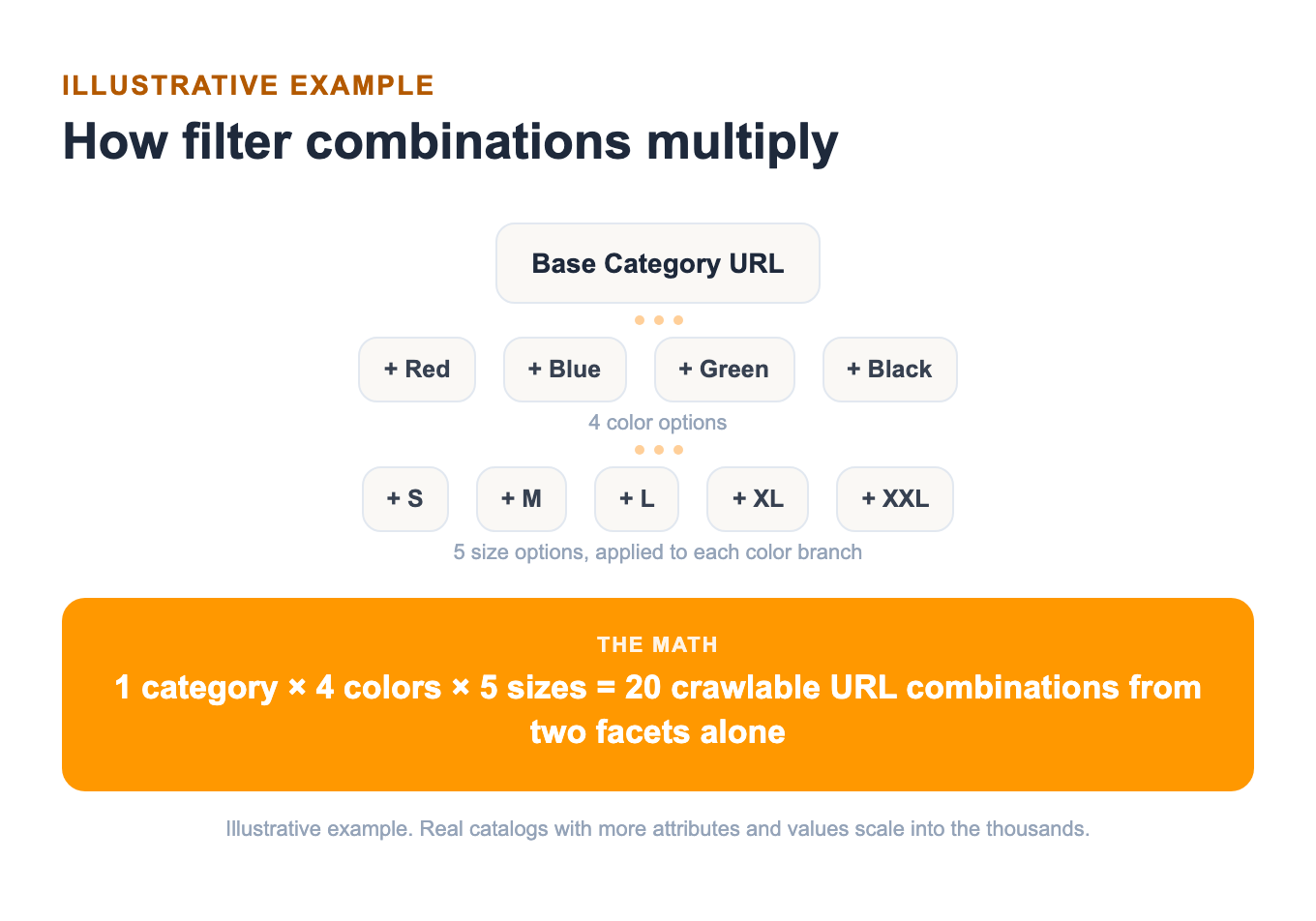
Google has said as much directly about this exact failure mode.
The fix is straightforward, if it’s applied deliberately: apply canonical tags pointing filtered URLs back to the base category page, block low-value parameter combinations in robots.txt, and return a real 404 for filter combinations with zero results instead of serving a soft-404 page that still gets crawled. For the broader technical SEO practices beyond faceted navigation specifically, Optimum7’s guide on how SEO works covers crawl budget, indexing, and ranking factors in more depth.
Optimum7 ran exactly this kind of cleanup for an industrial parts distributor whose faceted navigation had grown large enough to dilute crawl focus across the entire site.
Faceted Search for B2B and Distributor Catalogs
B2B and distributor catalogs need faceted search just as urgently as consumer stores, and the facets themselves look different: buyers filter by thread size and material grade instead of color and style, and the filter sidebar often has to expose tiered or account-specific pricing a public consumer storefront never shows, the same account-aware complexity covered in Optimum7’s guide to building a B2B ecommerce platform for distributors.
Two Optimum7 engagements show what that looks like in practice, one built around ERP-driven spec data through an ecommerce migration, the other around dual-audience account rules.
The lesson from both engagements is the same: B2B faceted search has to account for who is buying as much as what they’re buying.
Faceted Search Best Practices for Better Conversion
Faceted search failures tend to trace back to the same four fixable mistakes.
Real Faceted Search Examples From Optimum7 Clients
Three Optimum7 clients on three different platforms rebuilt their filtering, and each can point to the numbers that followed.
FAQ – Faceted Search for eCommerce
How do you set up faceted search on an ecommerce site?
Start by identifying the attributes shoppers filter by: price, brand, size, category specs. Index those in a search tool built for faceted counting, whether that’s a platform’s built-in filtering, a dedicated app, or a custom Elasticsearch build. Configure canonical tags and robots rules before launch, not after, so search engines never index the full space of filter combinations.
What is the difference between a facet and a filter?
A facet is the attribute category itself, like price, brand, or color, while a filter is the specific value a shopper selects within that facet, like under $50, Nike, or blue. The terms get used interchangeably in casual conversation, but the distinction matters when configuring filter groups on a real platform.
What is faceted navigation SEO, and why does it matter?
Faceted navigation SEO is the set of technical safeguards, canonical tags, robots.txt rules, real 404s for empty combinations, that keep filter URLs from being crawled and indexed as duplicate content. Without it, a filtering system built to help shoppers can accidentally bury a site’s real pages under thousands of near-identical filtered URLs.
Does faceted search work for B2B and distributor catalogs?
Yes, and the facets often carry more weight for B2B buyers than for consumer shoppers. Distributor and industrial catalogs typically filter by spec fields: thread size, material grade, compatibility code. Pricing on these sidebars often flexes by account or order volume too, something a retail storefront never has to handle.
Which ecommerce platforms support faceted search natively?
BigCommerce includes faceted search out of the box on every plan tier. Shopify offers it through the built-in Search & Discovery app, with a hard ceiling on metafield-based filters at scale. Magento supports it through layered navigation built on the platform’s EAV attribute system, which allows deep filter sets but requires more manual configuration than the other two.
Faceted search touches product data, platform configuration, and technical SEO all at once. Few catalogs beyond a few thousand SKUs get away with a simple app install. Optimum7’s development team builds and audits faceted search across BigCommerce, Shopify, and Magento stores; get in touch to see what a working filter setup would look like on your own catalog.
About the author: Duran Inci is the CEO and Co-Founder of Optimum7, an ecommerce development and digital marketing agency. He helps mid-market and enterprise brands scale revenue through conversion optimization, SEO, and custom ecommerce solutions.