

TL;DR: There is no single best ecommerce platform, only the best one for your catalog, budget, team, and growth stage. Hosted platforms like Shopify and BigCommerce fit the widest range of stores; WooCommerce, Magento, and headless earn their complexity when a real constraint forces it. This guide compares every major platform in depth, gives you a decision framework, and shows how to migrate without losing rankings or revenue.
The best ecommerce platform is the one that runs your specific catalog, checkout, and back office with the least friction, at a cost your margins can carry. Have you ever chosen a platform on its monthly price, then watched app and transaction fees quietly double its real running cost? For a typical seller that means a hosted platform like Shopify or BigCommerce; for a WordPress-native brand it might mean WooCommerce; for an enterprise with a bespoke storefront, headless. The question worth answering is which one fits how you sell, and answering it well takes more than a ranked list.
Guides that rank for this question are written by the platforms themselves or by affiliates paid per signup, so the “winner” tends to be whoever wrote the page. Optimum7 builds and migrates stores on every major platform, which is a different vantage point: this guide is the honest version, covering how the platforms genuinely differ, exactly which one fits your situation, and what it takes to move off the one that is holding you back.
Ecommerce Basics: How Selling Online Works
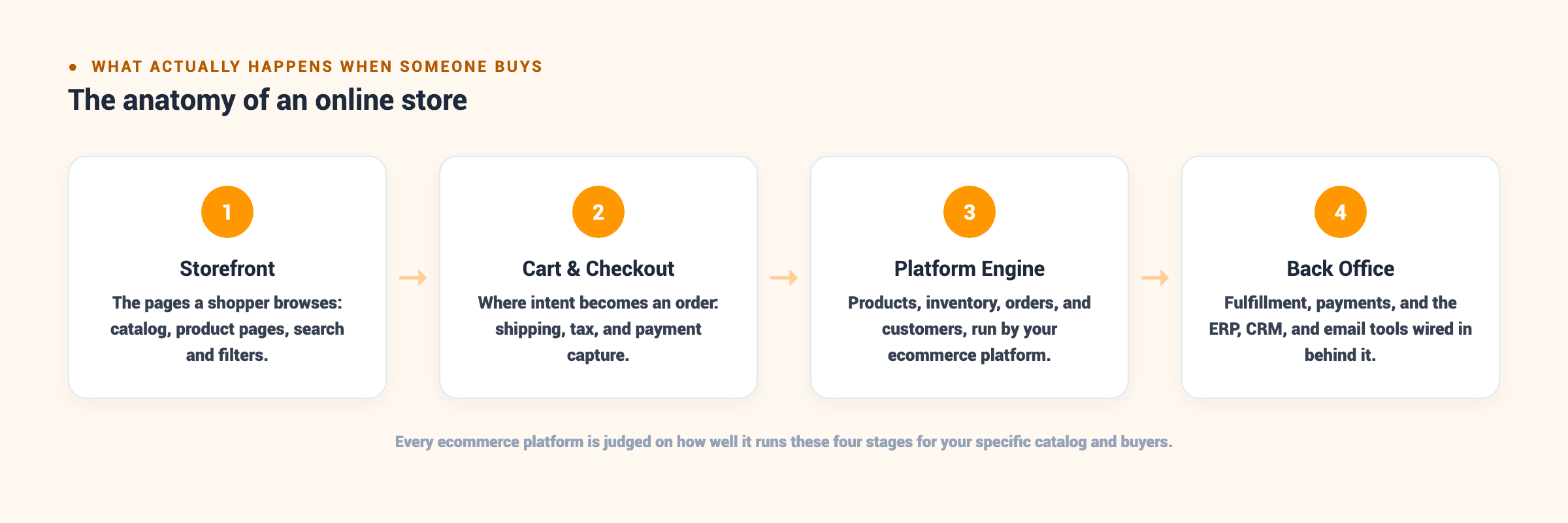
Every online sale moves through the same four stages, and understanding them is what turns “best platform” from a popularity contest into a real decision. The storefront is everything a shopper sees: the homepage, category pages, product pages, search, and filters. The cart and checkout is where intent becomes an order, capturing shipping, tax, discounts, and payment. The platform engine records that order against inventory and the customer record, and holds the product catalog itself. The back office is everything wired in behind the sale: payment settlement, fulfillment, and the ERP, CRM, and email systems that keep the business running.
A platform’s entire job is to run those four stages smoothly for your specific catalog and buyers, and each stage is where a wrong platform quietly costs money. A storefront that cannot model your product options forces workarounds that confuse shoppers. A checkout you cannot customize blocks the payment terms your B2B buyers expect. A platform engine with a low variant ceiling caps how you structure the catalog. A back office that will not integrate cleanly with your ERP turns every order into manual data entry. The platform either removes that friction or becomes it.
This is why “best ecommerce platform” is the wrong question in isolation. A store selling three subscription boxes and a store selling 40,000 industrial SKUs with vehicle-fitment data share almost nothing at the platform layer: different catalog complexity, different checkout needs, different back-office integrations, different budgets. The store owner who asks “what is the best platform” is really asking five narrower questions about catalog, B2B, budget, maintenance, and growth, which Part 6 turns into a framework. The honest answer changes with every one of them.
First, the Vocabulary Every New Seller Needs
If you are brand new to selling online, a handful of terms do most of the work in every platform comparison. Here is the plain-language version, so the rest of this guide reads clearly.

| Term | What it means |
|---|---|
| Hosted vs. self-hosted | A hosted (SaaS) platform runs the servers, security, and updates for a monthly fee; self-hosted gives you the software to run on servers you rent and maintain. This is the first fork in the road. |
| Domain, hosting, and SSL | Your address (yourstore.com), the server that serves the pages, and the certificate that encrypts checkout and shows the padlock. Hosted platforms bundle hosting and SSL; self-hosted means arranging both. |
| Payment gateway vs. processor | The gateway captures card details at checkout; the processor moves the money. Using an outside gateway can trigger an extra platform fee, a real line item at volume. |
| Theme vs. custom build | A theme is a prebuilt design you configure; a custom build is a storefront engineered to your needs. Themes launch fast and cheap; custom work is what a theme cannot do. |
| SKU, variant, and catalog | A SKU is one sellable item, a variant is a version of a product (size or color), and the catalog is all of them. Variant and SKU limits are where a growing catalog hits a platform’s ceiling. |
If you are still at the idea stage, our guide on how to start an ecommerce business covers the groundwork that comes before platform choice: validating demand, sourcing, and pricing. If you already sell and feel boxed in by your current platform, the comparison, decision framework, and migration playbook below are where to focus.
Hosted, Open-Source, and Headless: The Three Architectures
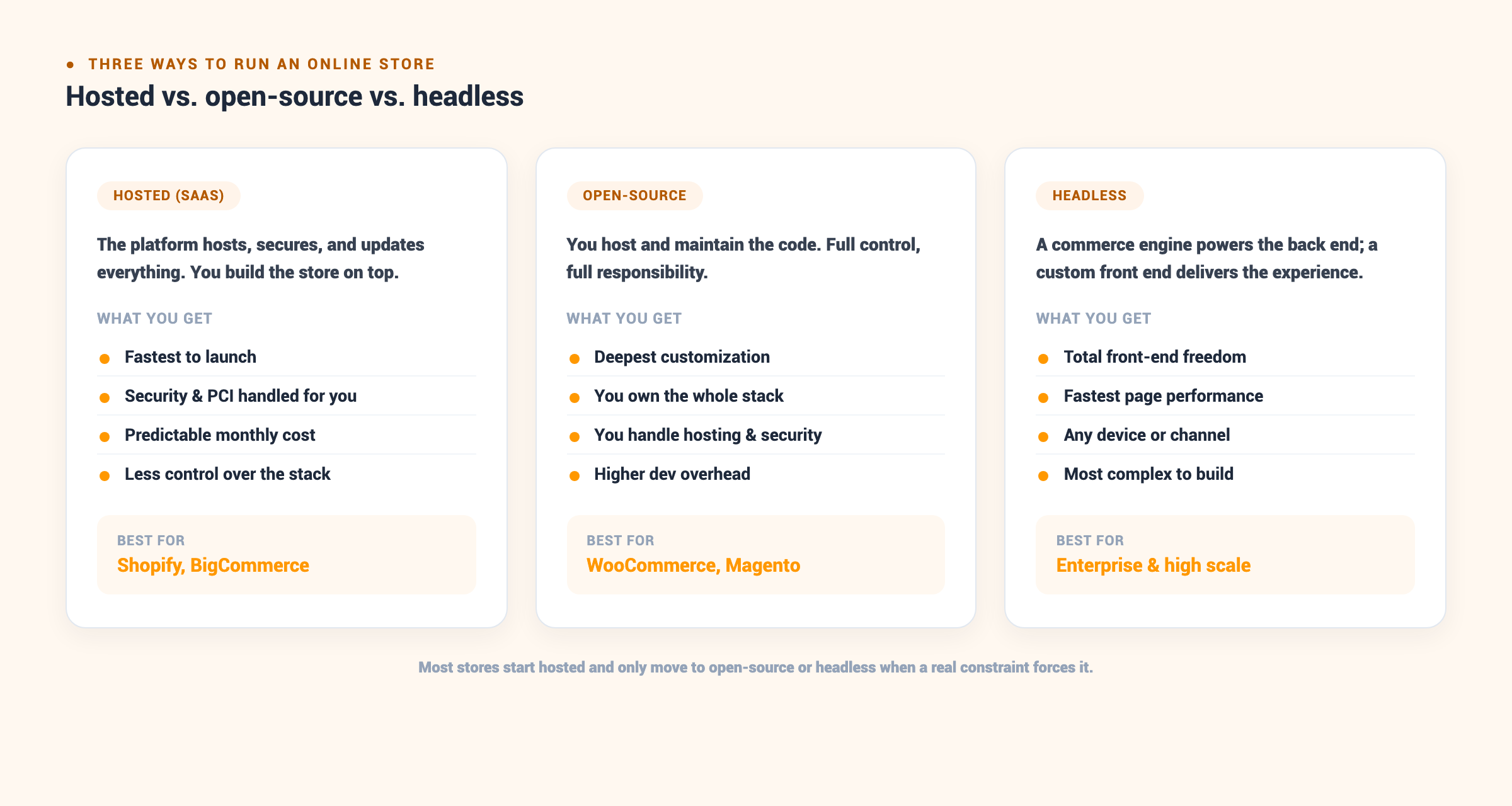
Ecommerce platforms split into three architectures, and that split decides more than any feature comparison: it determines who is responsible for hosting and security, how deeply you can customize, how fast you can launch, and what the platform truly costs to run. Choosing the wrong architecture for your stage is the single most expensive mistake in the entire decision, because correcting it later means a full migration with all the risk that carries.
Hosted (SaaS) platforms
A hosted platform runs everything for you. The vendor owns the servers, ships security patches and PCI compliance, keeps the platform online through traffic spikes, and pushes feature updates without your involvement. Shopify and BigCommerce are the leaders here. You pay a predictable monthly subscription and get the fastest path from signing up to taking orders, often a matter of weeks. The trade-off is control: you build inside the platform’s guardrails, and when you need behavior the platform does not allow, you either find an app or accept the limit. For the vast majority of stores, that trade is worth it, because the engineering you avoid, hosting, uptime, security, is expensive and unglamorous. A hosted platform is the right default unless you have a specific reason it cannot be.
Open-source platforms
Open-source platforms hand you the code. WooCommerce and Magento (Adobe Commerce) are the common choices, and they buy the deepest customization available short of building from scratch, because nothing in the stack is off-limits. The cost is ownership: you arrange hosting, apply security patches, resolve plugin conflicts, tune performance, and carry the risk when something breaks at 2 a.m. during a sale. The license is free, but the total cost of ownership climbs fast once you price in developers and infrastructure. Open-source is the right call for teams with genuine development capacity and a requirement no hosted platform can satisfy, and the wrong call for a lean team that simply wants a store that stays online.
Headless architecture
Headless separates the two halves of a store. A commerce engine, often Shopify or BigCommerce, runs the catalog, cart, and checkout through APIs, while a custom front end built in a framework like Next.js delivers the shopping experience. Decoupling the front end buys total design freedom and the fastest possible page performance, and it lets one commerce back end serve a website, a mobile app, and in-store kiosks at once. The cost is a real engineering commitment: you are building and maintaining a custom application, not configuring a store. Headless earns its complexity for large brands with the budget and the multi-channel need, and punishes smaller teams that adopt it for the prestige without the resources.
The Features That Decide Platform Fit
Architecture narrows the field; a short list of capabilities decides the winner within it. Score any platform against these five before a theme or a brand color ever enters the conversation, because these are the dimensions that force a migration when you get them wrong.
The Best Ecommerce Platforms Compared
Optimum7 builds most often on Shopify Plus and BigCommerce because they cover the widest range of mid-market and enterprise needs with the least friction, so those two get the deepest treatment. The rest of the field is covered honestly below, including the specific store each one fits and the point where it starts to cost more than it returns.

Shopify and Shopify Plus
Shopify is the strongest all-around hosted platform, and the reason is compounding: the largest app ecosystem in ecommerce, a checkout that converts well out of the box and improves without your input, and a build-and-theme ecosystem so deep that almost any need has a solution someone has already shipped. Paid plans start around $39/month and scale through mid and advanced tiers, adding lower transaction fees and more staff accounts as you climb. For a brand-led direct-to-consumer store that wants to launch fast, look polished, and plug in email, reviews, loyalty, and subscriptions without custom work, Shopify is hard to beat.
Shopify Plus is the enterprise tier, starting near $2,300/month on an annual contract, and it exists to lift the ceilings the standard plans impose. Plus adds checkout customization through Shopify Functions and scripts, higher API rate limits for heavy integrations, up to ten expansion stores for multiple brands or regions, and a native B2B layer with company accounts and price lists. It fits brands scaling past the point where standard-plan rule limits and stacked app fees start to bite, which in practice is often the low-to-mid seven figures in annual revenue.
The honest limits are two. First, the deepest checkout and backend logic still lives inside Shopify’s guardrails, so a genuinely unusual B2B flow or a complex configurator needs experienced development to build within the model, and a few requirements simply cannot be met without going headless. Second, merchants who use a payment gateway other than Shopify Payments pay an extra platform fee on top of processing on the lower plans, which nudges stores onto Shopify Payments even when another processor was the first choice. Our guides to Shopify versus Shopify Plus and what Shopify Plus costs work through when the upgrade pays for itself.
Where Shopify Plus rewards investment is the front end. When VAIO wanted a storefront that felt like a flagship consumer-tech retailer, Optimum7 rebuilt the product pages, category pages, homepage, and navigation in custom Liquid and JavaScript, touching no backend at all. The redesign lifted conversion rate 425%, orders 323%, and sales 200%, which is the clearest possible evidence that on a strong platform, design and UX work alone can move the number that matters.

BigCommerce
BigCommerce is the hosted platform built for stores whose complexity would force every other SaaS platform into app-stacking. Where Shopify asks you to bolt on third-party apps for wholesale pricing, tiered customer catalogs, or faceted product data, BigCommerce ships most of it natively, and that single difference decides the platform for a specific kind of seller: industrial, distribution, and B2B brands with deep catalogs and buyer-specific pricing.
The B2B layer is what matters most. BigCommerce includes customer groups that let you segment buyers and show each group its own catalog and pricing, price lists that assign per-customer or per-group prices across thousands of SKUs without duplicating a single product, and, through B2B Edition, quotes, purchase orders, and buyer-account hierarchies with approval workflows. On Shopify, most of that requires Plus plus configuration or custom development; on BigCommerce it is configuration, not engineering. For a distributor running net-30 terms and contract pricing across hundreds of accounts, that gap is the entire decision.
Catalog handling is the other native strength. BigCommerce supports up to 600 product variants per product against Shopify’s lower default ceiling, handles custom product fields and bulk pricing rules without apps, and models the complex option sets that break templated stores. A catalog carrying fitment data, configurable options, or tens of thousands of SKUs sits inside BigCommerce’s native limits where it would need custom work elsewhere.
Two 2026 pricing changes matter for the math. BigCommerce renamed its plans (Standard, Plus, Pro, and Enterprise became Core, Growth, Scale, and Performance) and lowered the sales thresholds that auto-upgrade you to the next tier, so a growing store reaches the next price band sooner than it used to. It also introduced an Open Payment Provider Fee on sales that settle outside an embedded gateway, which narrows the platform’s long-standing “no transaction fees” advantage. The platform still charges no per-order fee when you use a supported embedded processor.
The honest limits are design and ecosystem. BigCommerce’s theme selection is thinner than Shopify’s, its page-builder is one serious stores outgrow, and its app marketplace is smaller, so serious BigCommerce builds invest in custom theme work early. Paid plans start around $39/month and rise through the revenue tiers to a custom Performance plan published from roughly $1,499/month. Where the platform earns its keep is complex builds: when Crystals and Stones launched a subscription-box brand on BigCommerce with a WordPress content layer, the store reached +418% organic traffic and +325% transactions as the catalog and content scaled without fighting the platform. For the direct comparison, see BigCommerce versus Shopify Plus and the cost of the BigCommerce enterprise tier.
Shopify Plus vs. BigCommerce: The Head-to-Head
Shopify vs. BigCommerce is the comparison mid-market and enterprise brands most often run, so here is the direct head-to-head that decides it. The pattern is consistent across the builds Optimum7 has shipped: Shopify Plus wins when the brand is DTC-led, design-forward, and app-driven, because the ecosystem and checkout polish do the heavy lifting; BigCommerce wins when the catalog is complex and B2B is core, because the features you would otherwise rent as apps are built in. The table below is the short version; the deciding question underneath it is simple: is your hardest requirement a customer-experience problem or a catalog-and-pricing one?

| Dimension | Shopify Plus | BigCommerce |
|---|---|---|
| App ecosystem | Largest in ecommerce; almost any need has an app | Smaller, but more built in so fewer apps needed |
| Native B2B | Solid on Plus; some logic still needs custom work | Deepest native B2B: customer groups, price lists |
| Checkout control | Functions and scripts, strong but within guardrails | Flexible, fewer restrictions on checkout edits |
| Variant ceiling | Lower default; complex options often need apps | Up to 600 variants natively per product |
| Transaction fees | Extra fee on non-Shopify gateways; 0.25% share above $1M/mo | None on embedded gateways; Open Payment Provider Fee otherwise |
| Best fit | Brand-led DTC, high-volume, app-driven stores | Industrial, distribution, and B2B with complex catalogs |

WooCommerce
WooCommerce is the open-source plugin that turns a WordPress site into a store, which makes it the natural fit for content-led brands already invested in WordPress. It is free to install and endlessly customizable through the vast WordPress plugin library, and for a blog-driven or media-heavy catalog it keeps content and commerce under one roof, which is a genuine SEO and workflow advantage. The catch is ownership in full: you choose and pay for hosting, keep WordPress and every plugin patched, resolve the conflicts that arise when a dozen plugins share one site, and own performance tuning as the catalog grows. WooCommerce suits teams with development support and a real content moat; it works against a lean team that wants to launch and stop thinking about infrastructure, and it strains under very large catalogs or heavy traffic without serious hosting investment.

Magento (Adobe Commerce)
Magento, now sold as Adobe Commerce, is the heavyweight open-source option for large enterprises with genuinely complex requirements and the in-house engineering to run it. Its flexibility is close to limitless, with native multi-store, multi-currency, and advanced B2B built into the enterprise edition, which is why global retailers and manufacturers still choose it. That flexibility is also its cost: hosting is demanding, specialized Magento developers are expensive, and build cycles run long, so total cost of ownership lands far above the license-free open-source label suggests. Brands choose Magento when no hosted platform can model their catalog or workflows and they have a team to maintain it; they regret it when they adopt that complexity without the engineering budget to match, which is the most common Magento failure Optimum7 is called in to unwind, as covered in our look at why Magento costs more than teams expect.

Volusion
Volusion is a legacy hosted platform that once competed with the leaders and has since fallen behind on features, ecosystem, and mobile performance. Its remaining base is mostly long-tenured stores that launched years ago, and Optimum7’s Volusion work today is almost entirely migrations off it, usually to BigCommerce or Shopify. The platform’s constraints, dated checkout, thin integrations, and limited SEO control, are the same ones that show up in the migration triggers below. If you are on Volusion and feeling the ceiling, Part 7 is written for your situation, and two of the migration case studies below started exactly there.

Wix and Square Online
Wix and Square Online serve the smallest end of the market: solo sellers, local retail adding a web store, and anyone who values a five-minute setup over depth. Both are genuinely easy and inexpensive to start, with drag-and-drop building and, in Square’s case, a tight tie to in-person point-of-sale for retailers. They hit a ceiling fast on catalog complexity, B2B, and SEO control, and that ceiling is low enough that a store growing past a modest catalog or a few hundred orders a month usually starts planning a move to Shopify or BigCommerce. They are a fine place to start and a poor place to scale.
Headless commerce
Headless is an architecture, not a single product: a commerce engine such as Shopify or BigCommerce powers the catalog, cart, and checkout through APIs, while a custom front end, often built in a framework like Next.js, delivers the shopping experience. It buys the fastest possible performance and total design freedom across web, app, and in-store screens from one back end, which is why large multi-channel brands adopt it. The cost is a standing engineering commitment: you own a custom application, not a configured store, and that means a development team on call for the life of the site. Headless is the right endpoint for brands with the scale, the multi-channel need, and the budget, covered in our guides on going headless with Shopify and going headless with BigCommerce.

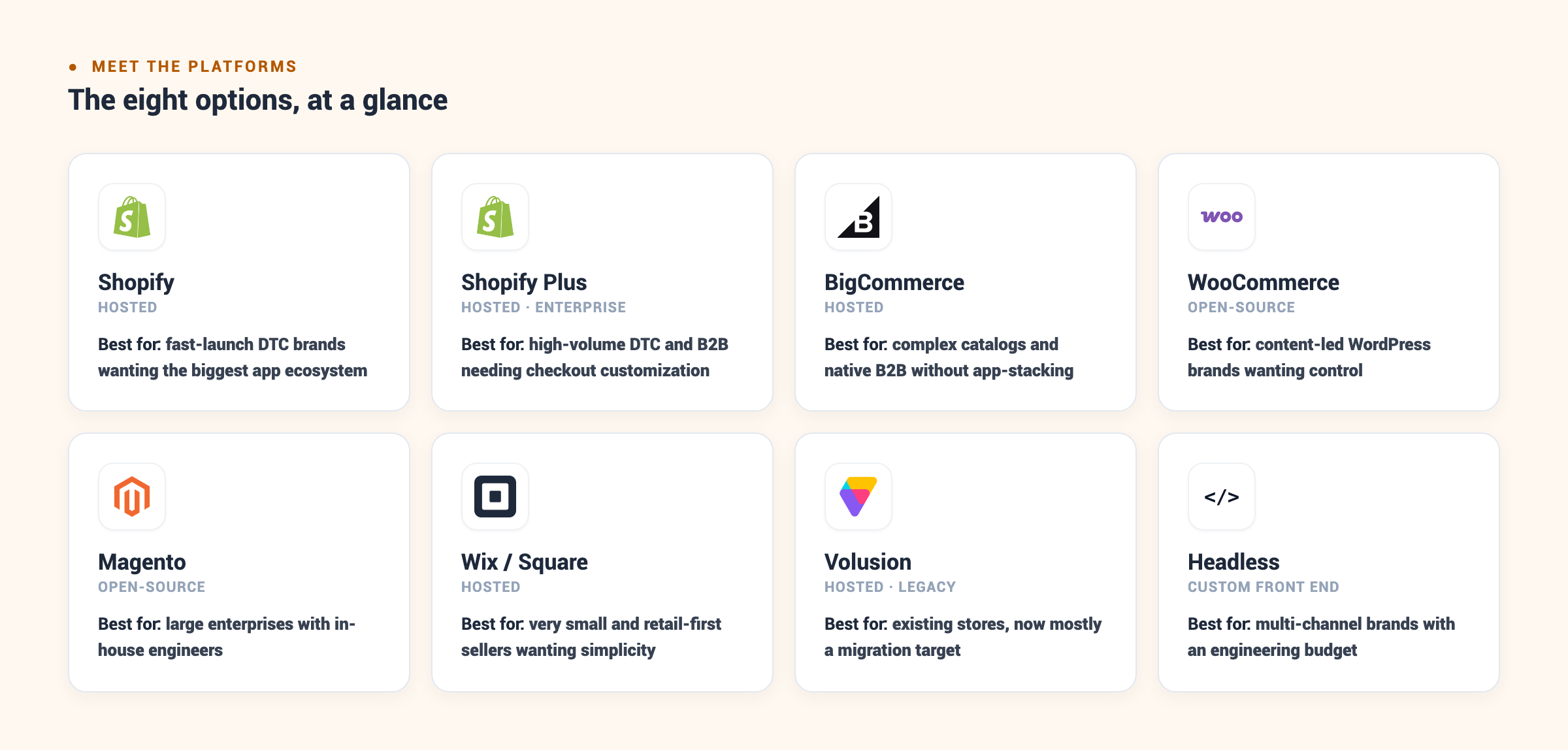
| Platform | Type | Best for |
|---|---|---|
| Shopify | Hosted | Small to mid-market brands wanting speed and a big app ecosystem |
| Shopify Plus | Hosted (enterprise) | High-volume DTC and B2B needing checkout customization at scale |
| BigCommerce | Hosted | Complex catalogs and B2B with native price lists and SKUs |
| WooCommerce | Open-source | Content-led WordPress brands wanting control on a budget |
| Magento (Adobe Commerce) | Open-source | Large enterprises with developers and heavy customization |
| Volusion | Hosted (legacy) | Existing stores now migrating off it |
| Wix / Square Online | Hosted | Very small stores and retail-first sellers wanting simplicity |
| Headless | Custom front end | Multi-channel brands needing bespoke experiences at top performance |
What an Ecommerce Platform Really Costs
The monthly subscription is the smallest and most visible part of what a platform costs. The real number is total cost of ownership: five components that, added over a year, routinely dwarf the sticker price and decide which platform is genuinely affordable for your store. Price the platform on all five, not the plan page.


Put the five together and the ranking often flips. The table below models a mid-market store doing roughly $2M a year across about 5,000 SKUs, using representative figures to show how the components combine. Treat it as an illustrative shape, not a quote: your real numbers depend on processor, app choices, and build scope.
| Cost component | Shopify Plus | BigCommerce | WooCommerce |
|---|---|---|---|
| Subscription | ~$28K | ~$18K enterprise | $0 license |
| Payment fees | Processor rate; extra fee off Shopify Payments | Processor rate; no platform fee on embedded | Processor rate only |
| Apps and extensions | Higher; ecosystem-driven | Lower; more built in | Mixed; free and paid plugins |
| Hosting and maintenance | Included | Included | You pay hosting + upkeep |
| Where the cost lands | Predictable, front-loaded on subscription | Predictable, lower fee exposure | Low license, high development and ops |
The pattern the model exposes is that “free” open-source rarely is, once hosting and developers enter the total, and that a hosted platform’s higher subscription often buys back its cost in avoided engineering. The costs that surprise teams later are the ones that scale with success: transaction fees that grow with revenue, app subscriptions that creep as you add features, and the eventual replatform when the cheap choice hits its ceiling. Our breakdown of what Shopify Plus costs and of migration and custom development cost put real ranges on the two biggest line items.
The Technical Details That Separate Platforms
Once you have a shortlist, four technical dimensions decide the build and the long-term ceiling. These surface late in most evaluations, usually after a contract is signed, which is exactly when they are most expensive to get wrong. Pressure-test every finalist against all four before you commit.


None of these four shows up on a plan-comparison page, and each one has ended a migration that looked fine on paper. The store that vets integrations, PCI scope, international needs, and API limits during evaluation is the store that does not discover a blocker in week three of the build.
How to Choose the Right Platform for Your Store
The best platform for your store falls out of five questions, answered honestly and in order. The first one that returns a hard constraint usually decides the shortlist before the others matter, because a genuine catalog or B2B requirement eliminates most of the field on its own. Work through them before you shortlist a single vendor.
Those five answers resolve into a handful of buyer situations, which is how stores usually land on a platform in practice. Find the one that matches you.
Turn It Into a Scorecard
Once you have two or three finalists, stop reading reviews and score them. Rate each platform one to five on the criteria below, weight the rows that matter most to your store, and the total turns a subjective debate into a defensible decision you can put in front of a board.
Migrating Ecommerce Platforms Without Losing Rankings or Revenue
A platform migration is moving your catalog, customers, orders, and content from one platform to another while preserving the search equity and revenue the old store already earns. Done well, it is invisible to customers and to Google: the same URLs resolve, the same rankings hold, and orders never stop. Done carelessly, it drops rankings and orders the week it launches, and recovery takes months. That gap between a clean migration and a costly one is almost entirely process, which is why the sequence below matters more than the platform you land on.
Signs You’ve Outgrown Your Platform
The trigger to migrate is a constraint you keep paying for, not a competitor with a shinier storefront. The honest signals are specific: app fees stacking month over month to approximate a feature the platform lacks, a checkout you cannot change to fit how your buyers pay, a catalog structure the platform refuses to model, page speed you cannot fix because you do not control the stack, or a platform sliding toward end-of-life like Volusion. When you find yourself building workarounds for the platform in place of building the business, the platform has become the bottleneck. Optimum7’s guide to the signs it’s time to replatform works through each trigger, and the complete migration planning guide covers the full project end to end.
Optimum7 has run this sequence at enterprise scale. When LCE Performance moved from Volusion to BigCommerce, the migration carried 273,000+ historical orders and 154,000+ customer accounts with full transactional detail, rebuilt automotive-specific features Volusion could not support, and preserved 100% of SEO equity with zero downtime and zero data loss at launch.
A migration is also the moment to fix what the old platform capped, because you are rebuilding anyway. When Wellness Partners moved from 3dCart to BigCommerce, the rebuild lifted conversion rate 85% and organic revenue 180%; a Volusion-to-BigCommerce move for Bulb Daddy raised transactions 36% and mobile traffic 71%. In both cases the platform change removed a ceiling the business had been quietly paying for, which is the upside a well-run migration captures on top of avoiding downside.
Migration cost tracks with catalog size, custom functionality, and integration count far more than with the platforms involved, so a small clean catalog moves cheaply while a large store full of custom features is a real project. Our breakdown of ecommerce platform migration and custom development cost sizes the ranges, and Optimum7’s ecommerce migration services handle the full project when the risk is too high to run in-house.
Making Your Platform Perform

The platform is the foundation, and a foundation sells nothing on its own. The stores that win choose well and then invest in the layer on top: findability, conversion, and the custom functionality that removes friction for their specific buyers. The best platform for a store nobody can find still loses to a worse platform that ranks and converts, which is why the platform decision is the start of the work, not the end of it.

This is where platform choice pays off or falls short. A hosted platform that handles the storefront and checkout cleanly frees your team and budget to invest in findability and conversion; a platform fighting your catalog drains that same budget into workarounds that never quite work. Choose for the store you run today with an eye on where it is headed, then spend the effort you save on getting found and converting the traffic you earn.
Frequently Asked Questions About Ecommerce Platforms
What is the best ecommerce platform for a small business?
For a small business, a hosted platform like Shopify or BigCommerce is usually the best fit. Both handle hosting, security, and PCI compliance, let a store launch in weeks, and scale as sales grow. Choose Shopify for the smoothest setup and the largest app selection, and BigCommerce when the catalog is large or B2B features matter from the start.
What is the best ecommerce platform for beginners?
Shopify is the easiest starting point for beginners: guided setup, hosting and security handled, and a large ecosystem of themes and apps. Wix and Square Online are also beginner-friendly for very small or retail-first stores. The goal at this stage is launching and learning what sells, not maximizing customization you do not yet need.
How much does an ecommerce platform cost?
Hosted platforms start around $39/month and scale with sales volume and feature tier, plus payment processing and any app fees. Enterprise tiers like Shopify Plus start near $2,300/month. Open-source platforms have no license fee but carry hosting, development, and maintenance costs that often exceed a hosted subscription once you total a year of ownership.
Is Shopify or BigCommerce better?
Neither is universally better; they win different profiles. Shopify leads on speed to launch, app ecosystem, and DTC conversion. BigCommerce leads on complex catalogs and native B2B features like price lists and customer groups. Industrial and distribution sellers often prefer BigCommerce, while brand-led DTC stores often prefer Shopify.
What is the best ecommerce platform for custom products?
Custom or configurable products usually need BigCommerce or Shopify Plus with custom development, because product configurators, conditional pricing, and compatibility rules break standard themes. The platform provides the foundation; a development partner builds the configurator and validation logic that lets shoppers order the right variant without errors.
What is the best ecommerce platform for marketing?
Shopify and BigCommerce both lead for marketing-driven stores. Shopify has the largest ecosystem of email, loyalty, and ads integrations, while BigCommerce ships stronger native SEO and URL controls. For content-led marketing, WooCommerce keeps commerce and content under one WordPress roof. The deciding factor is which channel drives your growth: apps and paid social favor Shopify, organic search and content favor BigCommerce or WooCommerce.
Do I need a headless ecommerce platform?
Usually not. Headless earns its complexity when you need a bespoke front end across multiple channels, extreme page performance, or a content experience a templated storefront cannot deliver. If a hosted platform runs your storefront, checkout, and catalog without fighting you, headless adds cost and a maintenance burden without a matching return.
Can I move my store to a different platform without losing sales?
Yes, with a proper migration. The keys are field-by-field data mapping, rebuilding custom functionality in staging before launch, and a complete 301 redirect map that preserves SEO equity. Optimum7 has migrated stores with hundreds of thousands of orders while preserving 100% of SEO equity and launching with zero downtime.
How long does it take to launch an ecommerce store?
A simple hosted store can launch in a few weeks. A mid-market build with custom theme work, integrations, and a real catalog runs one to three months. An enterprise migration or headless build takes longer, driven by data volume, custom functionality, and integration count more than by the platform itself.
About the author: Duran Inci is the CEO and Co-Founder of Optimum7, an ecommerce development and digital marketing agency. He helps mid-market and enterprise brands scale revenue through conversion optimization, SEO, and custom ecommerce solutions.