TL;DR: Shopify runs multi-location inventory natively up to 10 locations on every plan below Plus, which lifts the cap to 200. Third-party warehouses attached through a 3PL or fulfillment app do not count against that limit. The limits that stop distributors are order routing and real-time ERP sync, and both are custom-development work on top of the platform.
distributor with four warehouses and a growing catalog rarely asks whether Shopify can track stock in more than one place. It can, and has for years. The pressure surfaces later, usually the first time an order for a contract customer ships from the wrong coast, or a product vanishes from the storefront because one location went negative. Has your team ever had to phone a second warehouse to confirm stock a system already showed as sold? At that point Shopify multi location inventory stops being a setup task and becomes an architecture decision.
This guide is written for the operations and ecommerce leads at B2B distributors and wholesalers who are deciding how far Shopify goes on its own, where Shopify Plus earns its cost, and which pieces have to be built. Every limit below is pulled from Shopify’s own documentation, and every number is current as of this writing. The sections move from what the platform does natively, to the hard caps, to the custom allocation, split-shipment, and ERP integration work that separates a store that tracks inventory from one that runs a distribution operation.
How Shopify Handles Multi-Location Inventory
Shopify tracks a separate inventory count for every product at every active location, and a single storefront can sell from all of them at once. A location in Shopify is any physical place where you stock, sell, or fulfill products: a warehouse, a retail store, a pop-up, a dropshipping app, or a third-party fulfillment center. Turn on multiple locations and each variant carries its own quantity per site, so the product page shows the combined available total while the admin shows where those units sit.
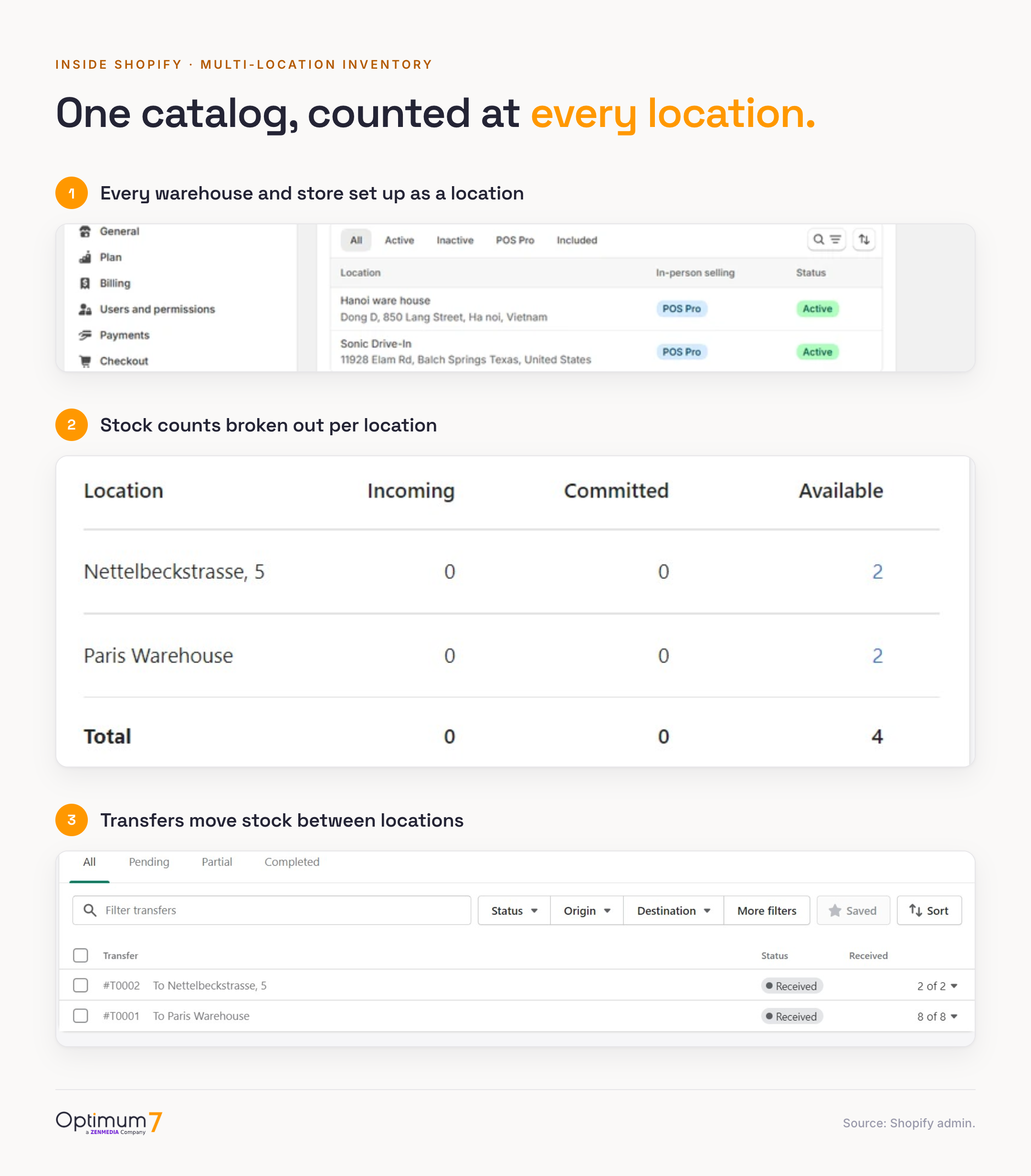
Three native capabilities cover the core of what a mid-size operation needs. Per-location stock lets you hold 400 units of a SKU in Dallas and 120 in Reno and sell both from one listing. Transfers move stock between locations with an expected-arrival state, so units in transit are visible before they land. And location-aware fulfillment means the person packing an order in Reno sees only the Reno line items. For a distributor running two or three of its own warehouses, this is usually enough to replace a spreadsheet and a lot of manual reconciliation.
Omnichannel sellers get a fourth benefit: Shopify treats a retail location and a warehouse the same way, so point-of-sale stock and online stock draw from the same pool. Optimum7 built exactly this for Plant the Future, unifying a Lightspeed retail system with the online catalog so that a sale on the shop floor and a sale on the site never double-counted the same unit. The principle holds whether the second location is a store or a distribution center: one source of truth, several places to sell from.
Transfers deserve a closer look, because they are how stock really moves in a multi-warehouse operation. A transfer records units leaving one location and arriving at another, with an in-transit state so the receiving team knows what is coming and the available total reflects reality before the boxes land. Received quantities update the destination count on arrival, which keeps the storefront honest through a restock. For a distributor rebalancing stock between an East and West DC every week, transfers replace the email-and-spreadsheet routine that lets counts drift in the first place.
What Shopify counts as a location
A location is anywhere stock lives or an order is fulfilled, and the type decides whether it consumes a plan slot. A warehouse you own, a retail store running Shopify POS, and a temporary pop-up all count as active locations. A warehouse operated by a 3PL and a dropship supplier’s stock are treated as locations for inventory, yet they sit outside the plan limit. Knowing which bucket each site falls into is the difference between an architecture that fits on Advanced and one that forces Plus.
The retail row carries real weight for distributors moving into direct sales. Because a Shopify POS store and the online catalog share one inventory pool, buy-online-pickup-in-store and ship-from-store both work against the same counts, which removes the double-count problem that trips up operations running separate retail and ecommerce systems. The commercial upside is concrete: buy-online-pickup-in-store and in-branch pickup are now standard expectations across large retail, so a distributor adding a will-call counter or a branch pickup option is building on a buying pattern customers already know, and on Shopify that counter draws from the same stock pool the online store sells against.
The native system has a clear ceiling, and it is worth naming early. Shopify tracks where stock is accurately. It is far weaker at deciding which location should fulfill a given order, at keeping that count honest when an outside system also changes it, and at letting more than a handful of self-operated warehouses exist at all. Those three gaps define the rest of this guide, and the first of them is a hard number.
The Shopify Location Limit by Plan, and Whether 3PL Counts
Every Shopify plan below Plus caps active locations at 10. Shopify Starter allows 2, Basic, Shopify (now labeled Grow), and Advanced each allow 10, and Shopify Plus raises the ceiling to 200. That cap counts active locations only, so locations you deactivate are released and no longer count against it. For a distributor, the figure to track is the count of your own warehouses that need to stay live at once, since each one consumes a slot.
Do 3PL warehouses count toward the Shopify location limit?
No. A third-party logistics warehouse or dropshipping warehouse connected through a fulfillment app does not consume one of your plan’s location slots. Shopify treats app-managed and fulfillment-service locations as locations for inventory purposes, yet its own documentation states they do not count toward your location limit. A distributor on Advanced can therefore run up to ten of its own warehouses and still attach a 3PL network, a dropship supplier, and an Amazon-fulfilled channel on top, without hitting the cap.
This is the detail competing guides routinely skip, and it changes the math on when a distributor needs Plus. The ten-location ceiling bites only on warehouses you operate and connect yourself. If your expansion is outsourced fulfillment, you may never touch the limit. The merchants who hit it run a large number of owned sites, and their pain is specific: one distributor on the Shopify Community described operating 25 physical warehouses and being unable to add them all without Plus, while also being unable to justify the Plus price on volume alone. A dozen-plus owned locations on modest revenue is the honest trigger for the next decision.
What happens when you reach the location limit
At ten active locations on a non-Plus plan, Shopify stops you from adding an eleventh until something changes. The options fall into four moves, and a distributor usually has more room than the hard number suggests. Deactivate a location you no longer use and the slot frees up immediately. Consolidate two low-volume sites into one. Route the overflow through a 3PL or dropship app, which sits outside the cap. Or move to Plus and its 200-location ceiling. The choice depends on whether the eleventh location is a long-term owned warehouse or a fulfillment relationship you can outsource.
Outsourcing part of fulfillment is a mainstream operating choice. Using a 3PL to hold stock you would rather not warehouse yourself keeps those locations off the plan limit entirely, and it is how a distributor on Advanced can serve more regions than ten owned sites would allow. The approach is common at scale across the economy, which gives a distributor cover to lean on it before jumping to Plus for a location count alone.
When a Distributor Needs Shopify Plus for Multiple Warehouses
A distributor needs Shopify Plus when one of three structural limits forces the move: more than ten owned warehouse locations, an ERP sync that outgrows the standard API throughput, or contract-customer pricing that only Plus can model. Where does your operation hit a wall first, on the location count, the sync speed, or the pricing model? The platform’s marketing leans on a revenue story, and plenty of guides repeat it, yet revenue is the wrong trigger for a multi-warehouse operation. A distributor doing a few million in revenue can run comfortably on Advanced, while a smaller B2B operation with eleven warehouses and a nightly ERP sync needs Plus on day one.
The first trigger is the one already covered: more than ten owned locations. The second is throughput. Shopify’s GraphQL Admin API uses a leaky-bucket model with a plan-based restore rate, and that rate sets how fast an integration can write inventory updates. Standard plans restore 100 points per second, Advanced restores 200, and Plus restores 1,000, a tenfold jump. For a store syncing thousands of per-SKU quantity changes from an ERP on a tight interval, the standard ceiling is where 429 rate-limit errors start appearing and the sync falls behind. Plus buys the headroom that keeps a high-frequency sync current under load.
GraphQL Admin API restore rate by plan
Points per second the bucket refills, which sets inventory-sync throughput
Caption: restore rate by plan, GraphQL Admin API. Shopify.dev.
The jump from 200 to 1,000 points per second is the line a distributor feels when syncing per-SKU counts across a dozen locations. At the Advanced rate, a burst of inventory writes during a morning restock queues and lags behind; at the Plus rate, the same burst clears in real time. For a store that can oversell the moment a count goes stale, that headroom decides whether the sync keeps up during the busiest hour of the day.
The third trigger is B2B. Plus is where Shopify’s native B2B features live, including company accounts, per-company price lists, and catalogs you can assign per company and per location. A distributor that sells to contract customers at negotiated prices, and wants stock and pricing to vary by the buyer’s assigned warehouse, needs those features, and they do not exist below Plus. The buyer-facing side of that setup, bulk ordering and account workflows, is covered in our guide to B2B store design for bulk ordering and spec search. Optimum7 migrated a combined retail and wholesale operation to Shopify Plus on exactly this basis, moving 930,000+ orders and 457,000 customer accounts across two storefronts with zero downtime and zero critical data loss. The wholesale side needed Plus; the retail side came along on the same platform.
Two distributors make the split clear. A single-warehouse brand doing 8 million dollars in direct-to-consumer sales, syncing inventory nightly and selling at published prices, has no structural reason to leave Advanced, and the Plus premium would buy capacity it does not use. An industrial-parts distributor doing 3 million dollars across twelve branches, each with its own stock and a nightly feed from the ERP, needs Plus for the location count and the API throughput before it needs anything else. The revenue gap runs the wrong way for a revenue-based rule, which is why the structural triggers decide it.
Put the three triggers together and the decision gets concrete. If you run ten or fewer owned warehouses, sync inventory on a relaxed schedule, and sell at list price, Advanced is likely fine and the money is better spent on custom routing. If you cross any one of the three structural lines, more than ten owned locations, high-frequency inventory writes, or contract-customer pricing by location, Plus stops being optional. The deeper cost-and-feature comparison lives in our guide on Shopify versus Shopify Plus, and the pricing specifics in how much Shopify Plus costs.
Custom Warehouse Allocation and Order Routing
Shopify can decide which location fulfills an order, but only along three native rules: ranked priority, minimize split fulfillment, and proximity to the customer. Those rules cover a general retailer. They do not cover a distributor that needs to route by product type, by contract customer, or by business logic the platform has no concept of. The distance between generic routing and operational routing is where custom allocation work begins, and it is the usual reason a distributor outgrows the native setup while still inside the location limit.
Start with what native routing gets right. Ranked locations let you set a fixed order of preference, so the platform tries your main warehouse first and falls to the next when stock runs out. Proximity routing picks the location closest to the shipping address, which cuts transit time and freight. Minimize-split tries to keep an order whole in one place. For a single-catalog retailer shipping from two or three warehouses, those defaults work for routine orders.

They break on distributor logic in predictable ways. Ranked priority applies globally, so you cannot say “ship heavy freight items from the West warehouse and small parts from the East” inside one order. Shopify has no native product-type rule or customer-group rule. And practitioners report that even the ranked-location setting enforces the configured rank inconsistently, so orders land at the wrong site and someone reconciles it by hand. One recurring complaint: Shopify offers only the priority list for complex catalogs, with no true nearest-warehouse-by-distance guarantee, which multi-origin sellers hit directly when a European order ships from the wrong origin despite an EU partner being available.
Custom allocation solves this by expressing the rules the business runs on. On Shopify Plus, Shopify Functions and Flow let a developer write server-side logic that assigns fulfillment location by product type, customer company, SKU attributes, or any combination, before the order is routed. For a contract customer whose agreement specifies a dedicated distribution center, the order goes there regardless of proximity. For high-value SKUs that only one secure facility stocks, those line items route to that facility while the rest of the order routes normally. This is the work that makes a Shopify store behave like a distribution system, and it is the core of what Optimum7’s custom ecommerce development team builds for multi-warehouse clients.
A distributor routing rule, worked through
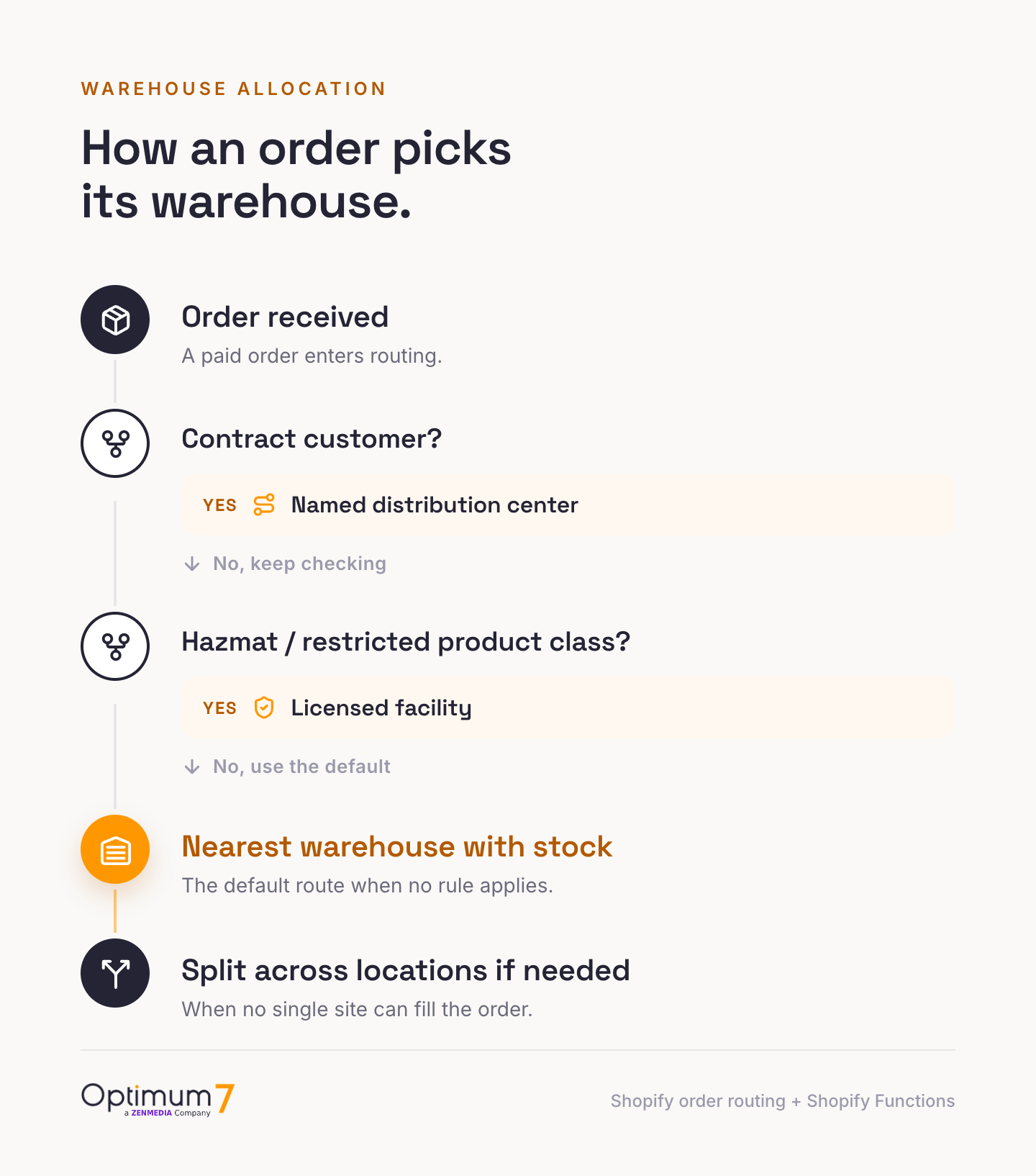
Take a distributor with three warehouses: an East DC, a West DC, and a licensed facility that holds the only hazmat-rated stock. The operating rules are plain in a sentence. Contract customer Acme always ships from the East DC under its agreement. Any hazmat SKU ships from the licensed facility, wherever the customer sits. Everything else ships from the warehouse closest to the buyer. Three rules, and native Shopify can enforce exactly one of them.
Proximity routing handles the third rule and breaks the first two. It ignores the Acme agreement and ships from whichever warehouse is nearest, so a New York Acme order leaves the West DC when stock there happens to rank higher, which violates the contract. It has no concept of a hazmat class, so a regulated SKU can route to a facility with no license to ship it. Ranked priority does not rescue the case either, because a single global order of preference cannot say “East for Acme, licensed facility for hazmat, nearest for everyone else” inside one rule set.
Custom allocation on Shopify Plus expresses all three. A Shopify Function reads the order’s customer company, the line-item product class, and the destination, then assigns each line to the correct location before routing runs: Acme lines to East, hazmat lines to the licensed facility, the rest to the nearest warehouse with stock. The order can still split across those locations, and that is correct here, because the rules demand it. The point is that the split follows the business logic now, and it was Optimum7’s custom work that put the logic where Shopify could act on it.
App-based routing covers the simple cases, and a distributor should reach for an app before a custom build when the rules are generic. Order-routing apps on the Shopify App Store add nearest-location or round-robin logic the native rules lack, and they are the right tool when the need is a sharper version of proximity. They stop at business-specific logic: a contract that names a warehouse, a product class with a legal shipping restriction, a customer group with its own allocation. Those rules live in the business, so expressing them is a custom build on Shopify Functions.
Nearly every distributor builds some custom routing; the open question is how much. A two-warehouse operation with simple geography may ride the native proximity rule for years. A distributor with contract pricing, product-type freight rules, and a secured-stock facility needs allocation logic written to its own contracts. The honest test: write down the sentence that describes how an order should pick a warehouse. If that sentence contains “except when” or “but for customer X,” native routing cannot express it, and the rule has to be built.
Shipping One Order From Multiple Warehouses
Shopify can ship one order from multiple warehouses, and it does so automatically when no single location holds the whole order. Order routing splits the order into separate fulfillments by location, each packed and shipped where the stock lives. For a distributor whose catalog is spread across sites by product category, split fulfillment is unavoidable and often correct. The problem is that Shopify’s split behavior is automatic and blunt, and distributors need control over when it happens and what it costs.
The native behavior creates two opposite failures, and operators report both. In one direction, Shopify splits when you would rather consolidate: merchants describe orders fragmenting across locations with no way to force single-location fulfillment without a third-party app, which multiplies freight and confuses customers who receive three boxes for one order. In the other direction, Shopify fails to split when it should, dumping an entire order on the default location and driving that location’s count negative while other warehouses sit full. Neither behavior respects freight cost or stock reality, because the native logic does not model either.
For a heavy or high-volume distributor, split shipments drive freight and margin. Two cases of product shipping from two warehouses can double the freight on an order that would have cost less consolidated at one site, and no native rule weighs that tradeoff. Consolidation logic, deciding whether to hold an order until one location can fill it, to route by lowest total freight, or to split only above a weight threshold, is custom work. It is also where the real savings sit, because freight is a line item that scales with every split the system makes without thinking.
Reservation logic is the companion piece. A distributor often needs to hold stock the moment an order or a deposit lands, so no single unit gets promised twice across locations. Optimum7 built this pattern for Magnum Ballistics, where a deposit triggers an inventory reservation and the balance payment releases fulfillment, so committed stock is never resold while an order is pending. The same reservation discipline prevents the negative-inventory cascade that pulls products off the storefront, because stock is decremented the moment an order commits, well before pack time could reveal a shortfall.
Seeing native behavior and custom logic side by side shows where the freight savings live. Native Shopify handles the mechanics of a split and leaves the economics to chance; custom consolidation logic weighs the cost before the order breaks apart.
For a distributor shipping heavy or bulky freight, the consolidation column is where margin gets protected across thousands of orders. A single rule that holds a two-line order for one warehouse when the freight math favors it can outweigh the cost of the build within a season.
Real-Time ERP and 3PL Integration for Inventory Sync
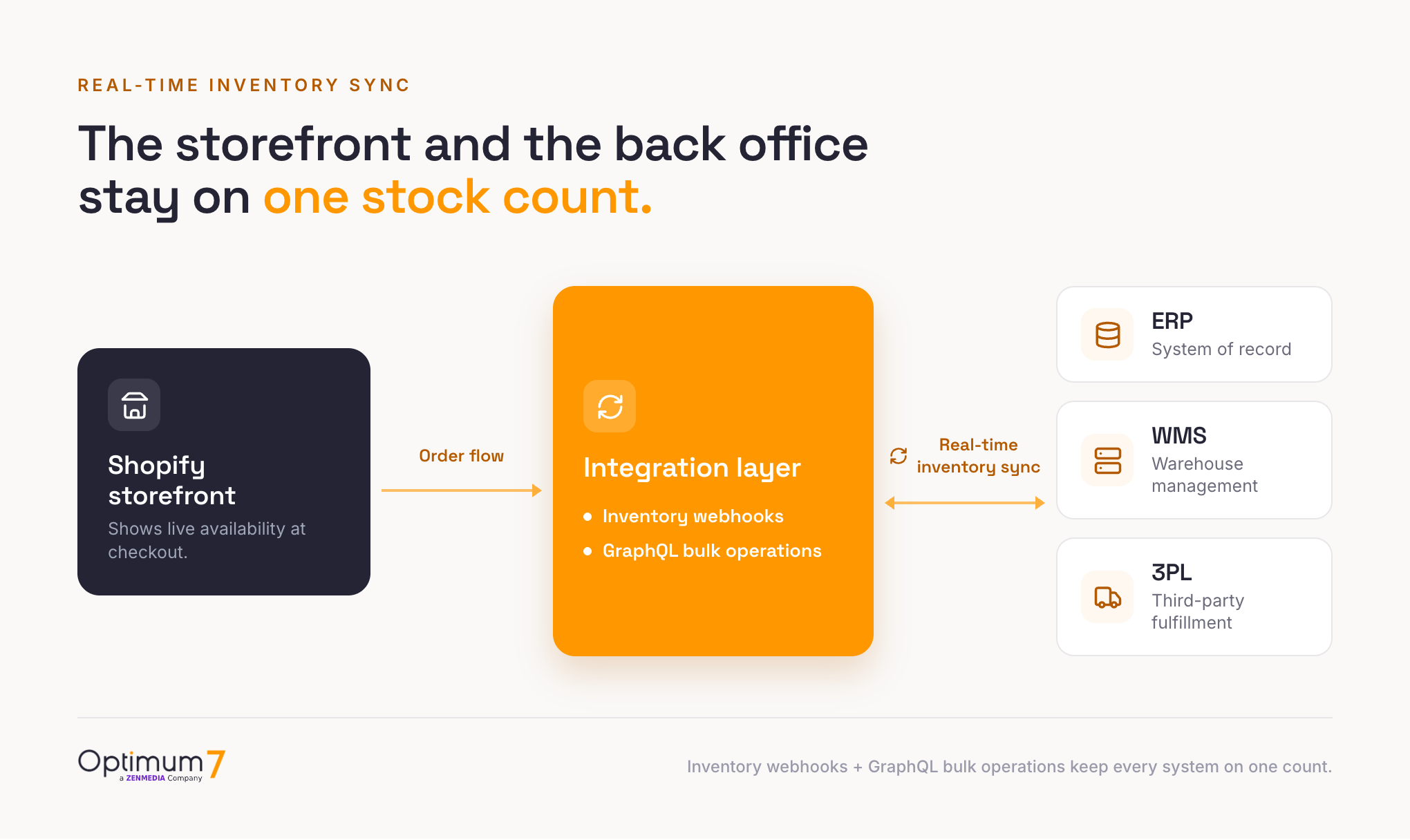
The hardest part of multi-location inventory on Shopify is keeping the count true when an ERP, a WMS, and a 3PL all change it. Shopify runs the storefront and the orders, while the ERP stays the system of record for inventory at a distributor. Real-time inventory sync means every stock change in the ERP reaches Shopify fast enough that the storefront never oversells, and every order in Shopify reaches the ERP fast enough that the warehouse picks it. Getting that loop right is an integration build, and the whole architecture depends on it.
Why this is hard starts with the tooling a legacy back office gives you. A legacy ERP often exposes only four rigid endpoints and no real-time event hooks, so ERP, CRM, and warehouse data cannot push changes as they happen. The only way to connect it to a modern storefront is a custom connector that polls, translates, and reconciles between two systems that were never designed to talk. That connector is the workaround every serious integration becomes, and its quality decides whether inventory stays honest. The wider automation picture for distributors, where inventory sync sits alongside order, pricing, and service workflows, runs through our guide to AI deployment for B2B ecommerce.
The connector carries more than data: it carries the rules for disagreement. When the ERP shows 40 units at a location and Shopify shows 38 because two orders landed during the last sync, something has to decide which number is right and which way to correct it. A connector built without that logic will overwrite live orders or resurrect sold stock, and both reach the customer as a broken promise. Defining the direction of truth per field, inventory flowing from the ERP and order status flowing from Shopify, is the quiet work that separates a sync that holds from one that corrupts the count over time.
Shopify gives the storefront side real tools for this. Inventory webhooks fire on quantity changes, so an integration can react to stock events the moment they happen, with no constant polling loop, and the GraphQL Admin API’s bulk operations run asynchronously and bypass the per-second rate limit, which is how a large catalog syncs without tripping throttles. Two constraints shape the design. Webhook delivery is at-least-once, so the same event can arrive twice and the integration must deduplicate. And because the ERP holds the source of truth, the build needs explicit conflict rules for when the ERP and the store disagree, or the sync quietly corrupts the count it was meant to protect.
The failure distributors worry about is the oversell, and it traces almost entirely to sync lag. When inventory syncs on a schedule, every 15 to 60 minutes, two customers can buy the last unit in the window between syncs, and one order cannot be filled. Shopify operators report exactly this, and the fix is event-driven, near-real-time sync that closes the window. The cascade is worse at a distributor: a count that goes negative at one location can pull the product off the live store entirely, which is why operators describe phoning other warehouses to confirm stock the system already showed as sold. The architecture that prevents this is the whole point of the integration.
Optimum7 has built this class of integration for distributors across platforms, and the warehouse-sync logic transfers directly to Shopify Plus. The platform in the cards below differs; the work does not. These are real-time, two-way integrations between a storefront and a back-office ERP, the same loop a Shopify Plus distributor needs.
The 3PL side of the loop needs the same rigor. When fulfillment runs through a third-party warehouse, order status and tracking have to flow back into Shopify so the storefront and the customer stay current. Optimum7 built a secure 3PL integration layer for MedixSelect that monitors order-status changes at the fulfillment partner and passes tracking detail back to the store, closing the loop between an outsourced warehouse and the customer’s order page. Whether the warehouse is yours or a partner’s, the inventory truth has to move both ways, in time to matter. For distributors standing up this architecture from scratch, our guide on building a B2B ecommerce platform for distributors covers the surrounding systems, and industrial ecommerce automation covers the operational side.
How a real-time ERP integration gets built
A reliable integration follows a fixed sequence, and skipping any step is where oversells and data drift creep in. The order below is the one Optimum7 runs for distributor builds, and each step protects the ones after it. The slow parts are the connector and the reconciliation, because they carry the weight of a legacy ERP and the reality of live order volume.
The reconciliation step earns its place because the first week of live sync is a stress test no staging environment reproduces. Real buyers hit real stock at real speed, and a count that drifts by a few units across twelve locations surfaces fast. A build that treats the cutover as the finish line ships the oversell it was meant to prevent, so the reconciliation window is part of the scope, written into the timeline from the start.
How Long a Shopify Plus Build With ERP Integration Takes
A Shopify Plus build with real-time ERP integration typically runs twelve to twenty weeks in Optimum7’s experience, and the ERP is almost always what sets the clock. A storefront migration alone moves fast. The integration, the custom allocation logic, and the reconciliation rules are where the weeks go, because they have to be designed around the specific ERP, the catalog’s complexity, and the warehouse processes already in place. A modern ERP with clean APIs lands near the shorter end; a legacy system with four rigid endpoints and no event hooks lands near the longer one.
The schedule breaks into recognizable phases. Discovery and data mapping come first, defining which system owns which field and how a conflict resolves, and this phase protects the entire build. The storefront and theme work runs in parallel. The integration layer is the long pole: building the connector, wiring webhooks and bulk sync, writing the dedupe and conflict rules, then testing against real order volume until the count stays honest under load. Custom routing and reservation logic layer on top. A staged cutover and a reconciliation period close it out, because the first week of live sync is where edge cases surface.
Two variables move the number more than any other. The first is the ERP’s integration surface: real-time hooks and documented APIs shorten the build, while a legacy system that needs a polling connector and heavy translation lengthens it. The second is catalog and routing complexity: a few thousand SKUs with simple geography is quicker than a large catalog with contract pricing, product-type freight rules, and dedicated-facility routing. A scoped build on a replatform is a different clock than one on a live store; our Shopify Plus migration guide and the broader B2B ecommerce migration guide walk through how the storefront and the integration schedules interlock. Picking the team for the work is its own decision, and our guide to choosing a Shopify Plus agency covers what to look for.
A distributor does not have to build all of this at once, and sequencing the work keeps the first release small. The location setup, transfers, and native routing go live on day one with no custom code. The real-time ERP sync is the next phase, because it carries the highest risk and the highest value, and it deserves its own testing window. Custom allocation and split-shipment logic layer on after the sync is proven, once the counts are trustworthy enough to route against. Phasing this way keeps a distributor selling across locations early and tightening the operation in stages, with no wait on one large cutover, and it spreads the cost across quarters so the investment is easier to approve against the revenue it protects.
The pattern under every one of these decisions is the same. Shopify multi location inventory gives a distributor a strong foundation and a clear set of limits, and the work that turns the foundation into an operation is custom allocation, split-shipment control, and a real-time integration built around the systems already running the warehouse. If the question is whether Shopify can run a multi-warehouse distribution business, the answer is yes, with the integration work that any serious platform would require. The platform choice itself is covered in our guide to choosing an ecommerce platform, and the headless option for high-volume catalogs in going headless with Shopify. The distributors who get this right treat multi-location inventory as an operations system with a storefront attached, and they build the integration and allocation layers with the same care they give the warehouse floor itself.
Frequently Asked Questions
How many locations can you have on Shopify?
Every plan below Plus caps active locations at 10, except Starter, which allows 2. Basic, Shopify (Grow), and Advanced each allow 10, and Shopify Plus raises the limit to 200. Deactivated locations are released and do not count against the cap.
Do 3PL warehouses count toward the Shopify location limit?
No. A third-party logistics or dropshipping warehouse connected through a fulfillment app does not consume a plan location slot. Shopify treats these as locations for inventory but excludes them from the limit, so the cap applies only to warehouses you add and operate yourself.
How does Shopify decide which location fulfills an order?
Shopify routes by three native rules: ranked location priority, minimizing the number of split shipments, and proximity to the shipping address. It has no native rule for product type or customer group, so routing by those criteria needs Shopify Functions or a custom app on Plus.
Can Shopify ship one order from multiple warehouses?
Yes. When no single location holds the whole order, Shopify splits it into separate fulfillments by location automatically. The split is automatic and cannot be disabled natively, so controlling when an order consolidates versus splits, and at what freight cost, requires custom logic or a third-party app.
Can you set fulfillment priority by product type on Shopify?
Not natively. Shopify’s ranked-location priority is a single global order of preference that applies to the whole order. Routing heavy freight from one warehouse and small parts from another inside the same order requires custom allocation logic built with Shopify Functions, available on Plus.
When does a distributor need Shopify Plus for multiple warehouses?
When the constraint is structural: more than ten owned warehouse locations, a high-frequency ERP sync that needs the faster API throughput, or contract-customer pricing and catalogs assigned by location. The triggers are structural, so a smaller B2B operation with eleven warehouses needs Plus before a larger single-warehouse store does.
Can Shopify integrate with an ERP for real-time inventory?
Yes, through inventory webhooks and the GraphQL Admin API, with bulk operations for large catalogs. Because the ERP stays the system of record, a reliable build needs event-driven sync, deduplication for repeated webhooks, and conflict rules. Scheduled batch sync is what causes overselling, so real-time integration is the goal.
About the author: Duran Inci is the CEO and Co-Founder of Optimum7, an ecommerce development and digital marketing agency. He helps mid-market and enterprise brands scale revenue through conversion optimization, SEO, and custom ecommerce solutions.