


TL;DR: Going headless means running a custom front end (Hydrogen or Next.js) on Shopify’s backend, connected by the Storefront API. It buys full design control and omnichannel selling, at the cost of engineering time and upkeep. Headless pays off for high-volume brands with a UX problem a theme cannot solve; for a typical store, a modern Liquid theme still wins.
Going headless with Shopify means replacing the built-in theme with a custom front end that pulls data from Shopify through an API. The backend still runs the catalog, cart, and checkout; the storefront becomes yours to build in React or another framework. So when is that extra control worth the extra engineering, and when is a standard theme the smarter build? This guide walks through the 2026 stack, the real costs, and the decision.
Shopify itself positions its headless tools for advanced, high-customization builds. For a typical store, its recommendation is a modern Liquid theme. For the brands that genuinely fit headless, it delivers a storefront a theme cannot match. Knowing which group you are in is the first decision, so this guide starts there.

Headless Shopify Separates the Storefront From the Backend
In a standard Shopify store, the theme and the backend are one system. Going headless splits them: Shopify keeps running products, cart, checkout, and orders, while the front end becomes a separate application that reads and writes through the Storefront API. The two talk over GraphQL, so one backend can power many front ends at once.
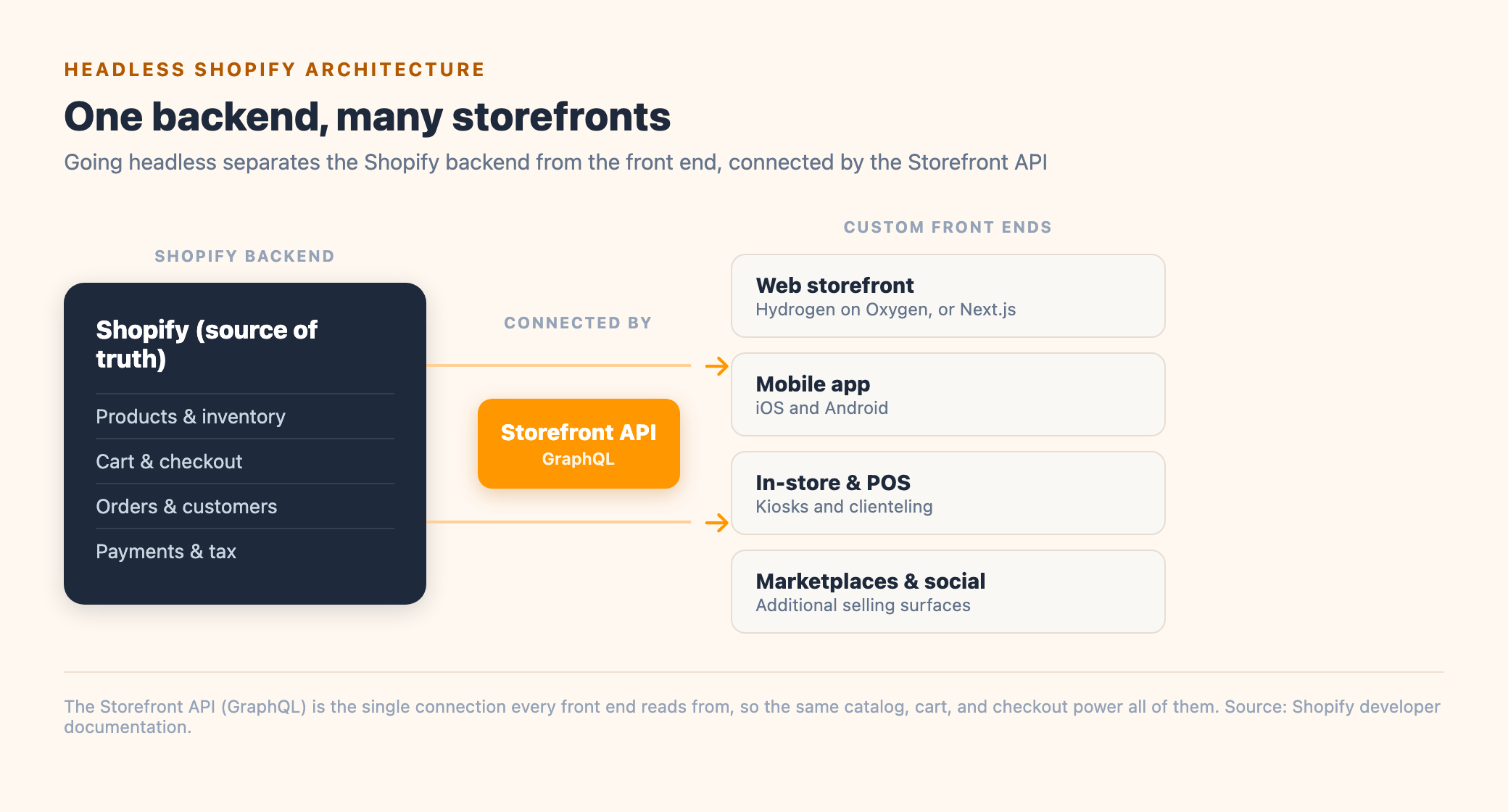
One point trips people up, so it is worth stating plainly: a headless Shopify store still runs on Shopify. Checkout, payments, and the order pipeline stay inside Shopify, and below the Plus tier the Shopify checkout is required. Headless changes the storefront you build and control, while the commerce engine underneath stays the same. That is the appeal: custom freedom on the front end, and Shopify’s reliability on the parts you would not want to rebuild.
The 2026 Headless Shopify Stack: Hydrogen, Oxygen, and the Storefront API
A headless Shopify build has four moving parts. Shopify provides the first three as a first-party stack, which is what makes headless on Shopify more supported than a fully custom rebuild on another platform. The fourth, a CMS, is the piece teams forget and later regret.


The stack changed in 2026, and the change matters for anyone budgeting a build. Hydrogen moved off Remix and onto React Router 7, landing in the 2026 releases on the 2026-04 API version. New projects default to React Router today, so a build started now looks different from one shipped a year ago.
A larger shift is coming. In June 2026, Shopify and Vercel announced they are rebuilding Hydrogen to be open source and runtime agnostic, so its commerce primitives can run with Svelte, Nuxt, Next.js, or a custom framework. That work is a developer preview today, so a store going live this year still ships on the React Router version of Hydrogen. The direction is worth knowing before you commit to a stack, since it will make the front-end choice more open over time.
For a build shipping now, the practical choice is Hydrogen or Next.js. Hydrogen wins for commerce-first stores: cart hooks, product components, and Oxygen hosting are built in. Next.js wins for content-heavy sites, multiple backends, or a team already invested in it, at the cost of wiring up caching and revalidation yourself. Optimum7 builds on both and picks per project, so the decision follows the store itself.

| Factor | Hydrogen | Next.js |
|---|---|---|
| Best fit | Commerce-first storefronts | Content-heavy or multi-backend sites |
| Commerce tooling | Cart, product, and Customer Account API built in | You wire up cart logic and API caching yourself |
| Hosting | Oxygen, included on Shopify Plus | Vercel or a host of your choice |
| Content and CMS | Pairs cleanly with Sanity for content | Deep ecosystem for editorial workflows |
When Headless Is Worth It, and When Liquid Is the Better Call
Headless earns its cost when a theme structurally cannot do what the business needs. So how do you know if that is your store? Three signals point to it: you are selling across three or more surfaces (web, app, kiosk, marketplace) from one catalog; you need a storefront experience Liquid cannot build, like a real-time product configurator or deep personalization; and you have the revenue, usually $5M+ a year, and the engineering capacity to run it. Miss those and a modern Liquid theme on Online Store 2.0 does the job for less.

| Dimension | Liquid theme (Online Store 2.0) | Headless (Hydrogen) |
|---|---|---|
| Front-end control | Sections and blocks within the theme | Full control in React; any UX you can build |
| Selling surfaces | Web storefront plus Shopify channels | Web, mobile, kiosk, and more from one backend |
| Build cost and time | Theme cost, weeks to launch | Six figures, months to launch |
| Team required | A themer or small dev team | Senior React engineers, ongoing |
| SEO and maintenance | Handled by Shopify automatically | You configure SEO and own the upgrade cycle |
Custom front-end work pays off well before you reach headless, which is the honest way to weigh it. Optimum7 rebuilt the Shopify storefront for laptop retailer Vaio as a Liquid and JavaScript project, no headless architecture involved, and the store recorded a +425% conversion rate. Headless extends that same control further, for brands whose ambitions have outgrown what a theme can express. If conversion is the goal, conversion rate optimization on a well-built theme is often the higher-return first step.
What a Headless Build Costs and How Long It Takes
A headless Shopify build is typically a six-figure project, and the range is wide. The work breaks into discovery and architecture, front-end development, CMS setup and integrations, an SEO-safe migration, and QA, and each phase adds to the total. A focused build commonly runs $30,000 to $100,000; a full storefront with a CMS, custom features, and integrations more often lands in the $100,000 to $250,000 range, over four to ten months. The number moves most with catalog size, the integrations you need, and how much custom UX you are building.

Upkeep is the cost that surprises teams. Hydrogen tracks Shopify’s release calendar, so someone has to own the upgrade cycle as a standing job. Practitioners who have shipped headless describe budgeting for breaking changes every quarter and staffing a senior React engineer to stay on top of them. Plan for a maintenance retainer or an in-house owner from day one.
The apps that break tend to fall into three groups, and each has a clear path forward:
Headless Removes Shopify’s Built-In SEO Handling
On a standard theme, Shopify handles the SEO plumbing for you: sitemaps, canonical tags, meta data, and structured data all come configured. Go headless and that becomes your job. The single biggest risk is rendering: a client-side-only storefront serves an empty page until JavaScript runs, and search engines and AI crawlers deprioritize a page they cannot read. Server-side rendering or static generation is mandatory on a headless build.
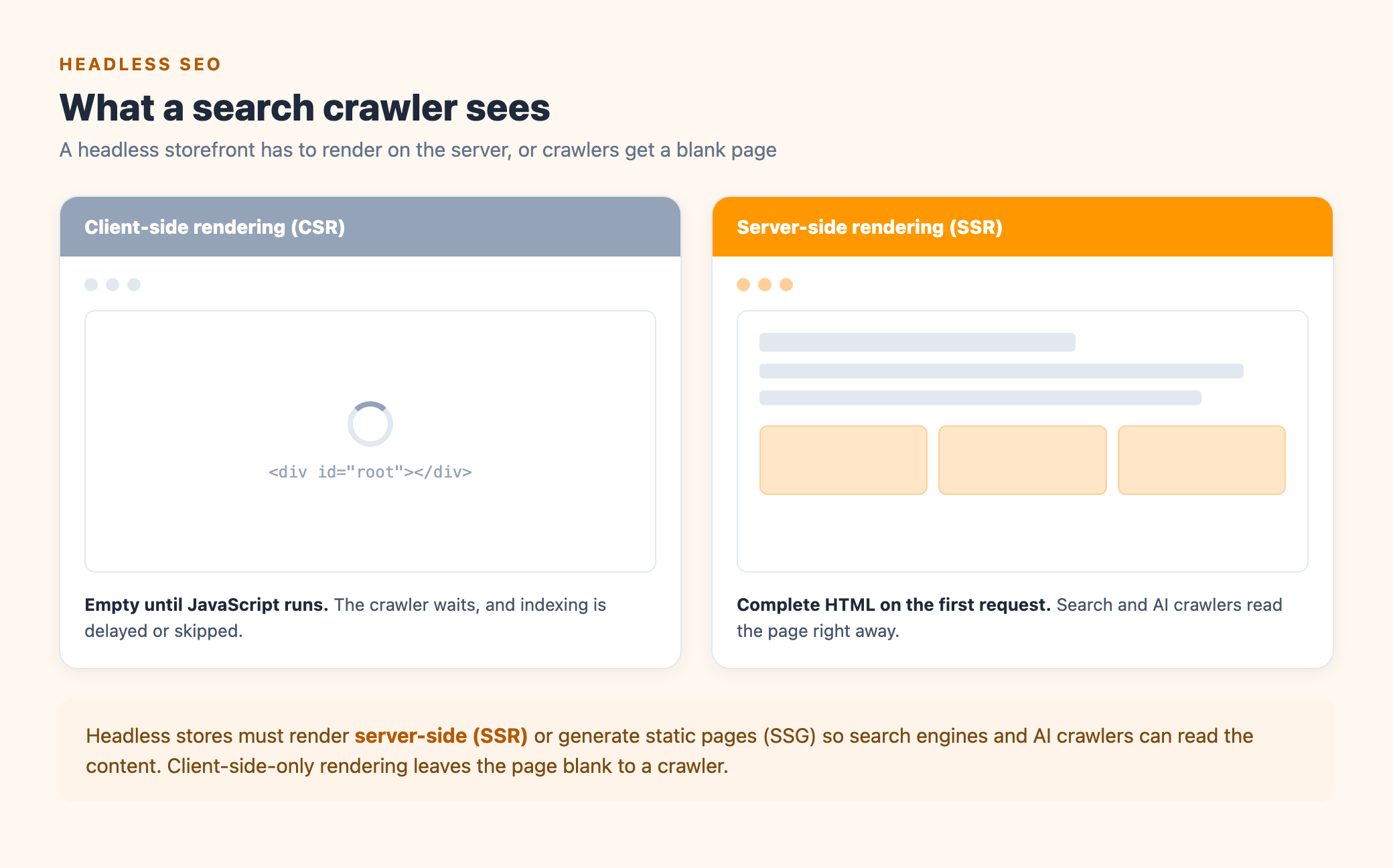
Google can execute JavaScript, but its second rendering pass often lags the first by days or weeks, so a client-side-only storefront risks slow or partial indexing. Server-rendered pages hand the crawler complete content on the first request, which is why SSR and SSG are the baseline for headless SEO.
Beyond rendering, you configure canonical tags, JSON-LD structured data, hreflang, and sitemap submission by hand. If the build is a migration from an existing theme, keep the URL structure identical and 301 anything that changes, because redirect and canonical errors during a replatform can cost real organic traffic. A headless build handled well holds its rankings; handled carelessly, it is where headless projects most often go wrong. The SEO fundamentals a theme hands you for free are exactly the ones a custom storefront has to earn back deliberately.
How to Go Headless With Shopify, Step by Step
Once the decision is made, a headless build follows a clear path. The order matters: the teams that struggle usually skipped the confirmation step or left SEO and maintenance to the end.
This is usually an agency project, because it needs senior React engineers and a team that has done SEO-safe migrations before. Optimum7’s Shopify development team builds and maintains headless storefronts end to end, and also handles the replatforming when a headless move is part of a larger migration. If you are deciding between platforms in the first place, our guide to choosing an ecommerce platform is the place to start; when you are ready to scope a build, start with a conversation.
Frequently Asked Questions
Is Shopify Hydrogen still headless if it uses Shopify checkout?
Yes. Headless describes the decoupled storefront front end. A Hydrogen store runs a custom front end you fully control, while checkout, payments, and orders stay inside Shopify. Keeping Shopify checkout is an advantage: you skip rebuilding the most sensitive part of commerce.
Do you need headless Shopify for good SEO?
No. A standard Liquid theme handles SEO well and does it automatically. Going headless can improve performance and control, but only if you render server-side and configure canonicals, structured data, and sitemaps yourself. Done carelessly, headless can cost you rankings.
How much does a headless Shopify build cost?
Plan for a six-figure project. Focused builds commonly run $30,000 to $100,000, and full storefronts with a CMS and integrations often reach $100,000 to $250,000, over four to ten months. Ongoing maintenance is a separate, standing cost, so budget for it from the start.
Should you use Hydrogen or Next.js for a headless Shopify store?
Choose Hydrogen for commerce-first stores: cart and product components and Oxygen hosting are built in. Choose Next.js for content-heavy sites, multiple backends, or a team already using it. Both read from the Storefront API, so either can deliver a fast, custom storefront.
Does going headless break my Shopify apps?
It can. Apps that work by injecting a script tag into a Liquid theme, common for reviews, loyalty, and analytics, do not run on a headless front end. Audit your app stack before you commit, and plan to rebuild or replace the ones that depend on the theme.
Can you go headless without an in-house developer?
Not realistically. Headless needs senior React engineers to build it and someone to own the upgrade cycle afterward. Brands without that capacity partner with an agency for the build and a maintenance retainer, or stay on a Liquid theme until the team is in place.
About the author: Duran Inci is the CEO and Co-Founder of Optimum7, an ecommerce development and digital marketing agency. He helps mid-market and enterprise brands scale revenue through conversion optimization, SEO, and custom ecommerce solutions.