

TL;DR: Wix builds a working site fast and now posts the best Core Web Vitals scores of any major builder. The problems are structural: no site export, no template switching, plan costs that climb, and hard ceilings on ecommerce and custom functionality. Here is where each limit bites, and what to do when you hit one.
Wix will put a working website on the internet faster than any agency will. Type a prompt into its AI builder, pick from more than 2,000 templates, drag a few blocks, and you can be live by dinner. For a portfolio or a hobby site, that speed is the whole point, and Wix delivers it well.
The problems with Wix websites show up later, once the site has a job to do. If your business doubled next year, could your website come along? Companies arrive at Optimum7 after hitting the same wall: the site that took a weekend to launch has no export button, no path to a new design, and a monthly bill that keeps stepping up. The seven reasons below are limits built into the platform itself, current as of 2026, and every one of them is documented in Wix’s own Help Center or visible on its own pricing page, with screenshots included.
Search for Wix reviews and you will find two internets: happy hobbyists and frustrated business owners. Both groups are describing the same product. Parts of this piece defend Wix, because naming what it does well makes the seven real problems harder to dismiss and easier to verify. The seven reasons carry the argument; if you only need the answer for your situation, the verdict-by-business-type table further down settles it in one row.
What Is Wix?
The company behind it was founded in 2006 and has traded on the Nasdaq under the ticker WIX since 2013. Its product family in 2026 spans the classic Wix Editor, the agency-oriented Wix Studio, an AI site builder that generates a first draft from a text prompt, and the Spaces by Wix mobile app for managing a site from a phone. Behind all of them sits the same infrastructure and the same business model: a subscription that unlocks features by tier.
How does Wix work in practice? You build in a browser tab, and your subscription tier decides which features are switched on. There is no software to install, no server to maintain, and no code to manage, which is precisely the pitch, and for its target user it holds up.
“Hosted” is the load-bearing word in that description. The convenience of never touching a server comes from the same property that produces every problem on this list: your website exists only inside Wix’s infrastructure, in a format only Wix can run.
7 Reasons Not to Use Wix for a Business Website
The list starts with the constraint no workaround touches and ends with the ones you can partially design around. Weigh each against the plan you intend to buy, because several only bind at specific tiers.
1. No Way to Export Your Wix Website
Wix states this one itself, in its own Help Center: sites built in the Wix Editor or Wix Studio cannot be exported to another host, and there is no supported way to export a Wix website to HTML. The wording deserves a direct quote, because an agency’s paraphrase is easy to dismiss and the vendor’s own sentence is not.
The export path, mapped precisely, is short:
- What you can download: store products and contacts, as CSV files from the dashboard.
- What stays behind: every page, the layout and design, image galleries, form entries, SEO settings, reviews, and the entire blog.
What happens to three years of blog posts when the platform they live on has no export button? Wix’s Help Center lists blog export as a feature request you can vote on, which means the answer today is copy and paste, one post at a time. For a ten-page site, that is an afternoon. For a content library built over years, it is a rebuild project with a real budget.
Platforms built on portable data behave differently. When LCE Performance moved from Volusion to BigCommerce, Optimum7 migrated 273,000+ orders, 154,000+ customer accounts, and 6,700+ products with zero data loss and 100% of SEO equity preserved, documented in the LCE Performance migration case study. That project was possible because Volusion, for all its own limits, let the data leave.
2. Templates Are Permanent Once You Build
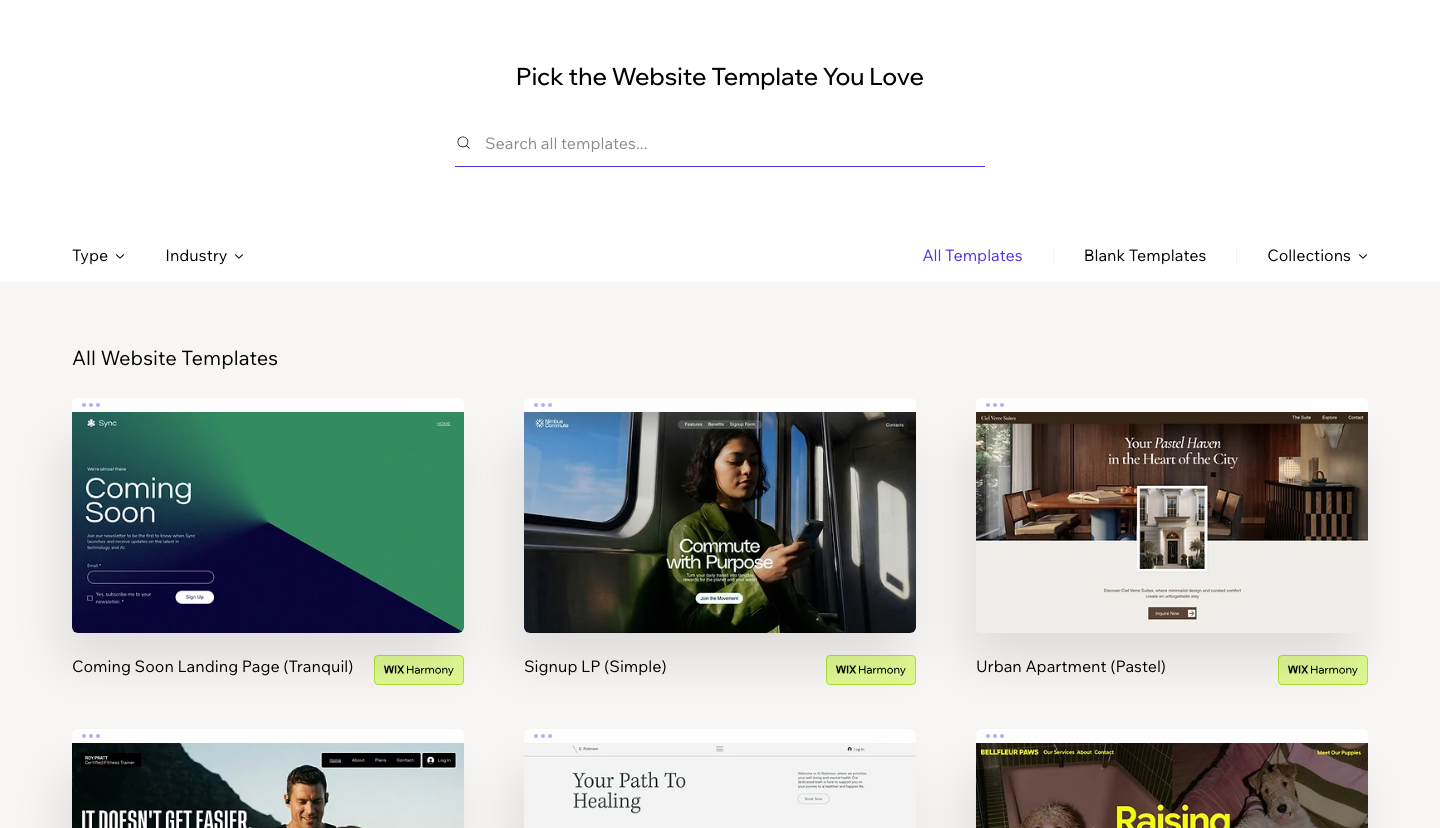
“Pick the website template you love,” the gallery above says, and the sentence is more binding than it looks. Once a site is built on that template in the classic Wix Editor, it stays there: Wix’s documentation confirms that switching an existing site to a new template is not possible, and the workaround it offers is creating an entirely new site and moving content over by hand.
A redesign on Wix therefore means starting over. The template you choose in week one, usually before you know what the business needs from its website, becomes permanent infrastructure. Growing companies refresh their design every few years; on Wix each refresh begins from a blank canvas, and any search rankings tied to page structure have to be re-established on the new build.
The design ceiling extends past the template decision. The classic Editor is a freeform canvas that keeps a separate desktop and mobile version of every page, doubling the verification work on each edit, and elements that look aligned on one viewport drift on another. Wix’s answer to this is real responsive design in Wix Studio, which is a genuine fix sold as a separate product with its own plan ladder. Responsiveness, a default property of the modern web, is packaged at Wix as a professional upgrade.
3. Free and Cheap Plans Advertise Wix on Your Site
The free plan hosts your site on a wixsite.com subdomain and displays Wix branding on every page. Connecting a custom domain requires a paid plan. A business site carrying another company’s ads on a shared subdomain reads as temporary to customers, and visitors who notice it draw conclusions about how established the business is before reading a word of your copy.
One correction to a claim that circulates in older articles, including a previous version of this one: paid Wix plans have supported custom domains for years, so “you can’t use your own domain on Wix” is outdated. The accurate version is narrower and still matters. Everything below the paid tier advertises Wix, and the free tier was never a serious option for business use.
4. Wix Pricing Climbs as Your Needs Grow
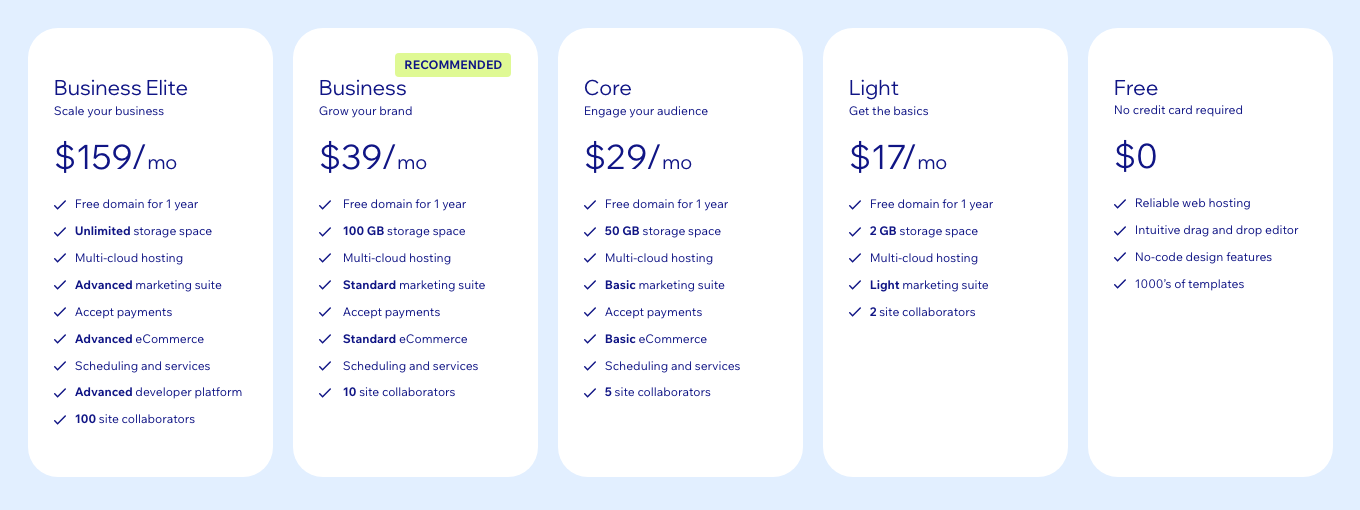
Wix premium plans in August 2026 run $17 to $159 per month on annual billing: Light at $17, Core at $29, Business at $39, and Business Elite at $159. The screenshot above is Wix’s own pricing page, captured the week this article was updated, because builder pricing changes quietly and often.
The ladder looks gentle until you map features to tiers, and the tier boundaries are where the real pricing lives. Accepting payments requires Core at minimum. Light includes 2 GB of storage, roughly enough for a brochure site with modest imagery; Core lifts it to 50 GB. Site collaborators jump from 2 on Light to 5 on Core and 10 on Business, so the moment a bookkeeper and a marketer both need dashboard access, the plan follows them upward. Each capability a growing business considers routine sits one tier higher than the last one.
Then come the costs outside the subscription. The free domain covers year one and renews separately after that, paid App Market apps bill on top of the plan, and card processing takes its cut of every sale. None of these charges is scandalous on its own. Together they put a serious small-business site on Wix in the same monthly range as managed WordPress hosting or an entry Shopify subscription, without the portability either alternative provides.
Run the arithmetic over a realistic ownership window. Three years on Core costs $1,044 in subscription fees alone; three years on Business Elite costs $5,724. At those figures the “cheap website” framing stops describing reality, because the money buys a rented site you cannot take with you. An equivalent three-year spend on an open platform buys an asset: transferable files, a portable database, and the freedom to change hosts when a better deal appears.
5. Wix SEO Has a Structural Ceiling
Start with the part of the old argument that no longer survives contact with data: Wix is not slow anymore. HTTP Archive field data shows Wix passing Core Web Vitals on 82% of origins, the best result among major platforms and far ahead of WordPress at 50%. Articles still calling Wix slow are recycling 2019; Wix rebuilt its infrastructure over several years, and the turnaround is measurable. Distrust any Wix critique that skips this, including older versions of this one.
Core Web Vitals Pass Rates by Platform
Share of origins passing all three Core Web Vitals on mobile
HTTP Archive CrUX Report, November 2025, via WebVitals.tools
The ceiling sits above page speed, in the parts of SEO you cannot reach. Take URL structure as the concrete example: every Wix blog post lives under a fixed /post/ prefix that cannot be changed or removed, so a content hub organized by topic directory, standard information architecture on any open platform, is off the table. The pattern repeats across the stack: server-level configuration does not exist, crawling and rendering behave however Wix ships them, and a technical fix that takes a plugin or a template edit elsewhere is unavailable whenever Wix has not built a setting for it.
Wix covers the basics well: meta titles and descriptions, 301 redirects, structured data fields, automatic sitemaps. Basics win uncontested niches; competitive ones are decided above that line, which is why SEO services for stores concentrate on category architecture, crawl control, and page-level engineering that hosted builders do not expose.
Content operations hit the same wall. Blog posts cannot leave the platform, taxonomy control is thin, and functions WordPress handles natively require app workarounds. A local service site lives comfortably inside those limits; a store fighting for category rankings against BigCommerce and Shopify merchants runs out of toolset early.
A workable rule for judging the fit of Wix’s SEO toolset: count your money keywords and your competitors. A dentist ranking for fifteen local terms against other dentists on the same builder platforms will do fine. A retailer chasing hundreds of category and product terms against stores with dedicated SEO engineering is bringing built-in settings to a fight the other side wins with custom work. The mechanics behind that judgment, from crawl to compounding rankings, are mapped in Optimum7’s guide to how SEO works.
6. You License the Website; Wix Owns the Platform
Wix’s export article contains a sentence worth reading twice: “the content you build on Wix belongs to you.” The content. The website itself, the running combination of design, code, and infrastructure, belongs to the platform, and your use of it is a subscription license governed by terms you did not negotiate. Wix can change features, retire products, adjust prices, or close accounts that violate its terms, and your backups exist only as version history inside the same account.
Product retirement has already happened once. Editor X, Wix’s previous professional builder, stopped taking new sites after Wix Studio launched, and existing Editor X sites were moved to the Studio editor on Wix’s schedule. The transition was handled responsibly, and that is exactly the point: even a well-managed platform decision happened to those users, for a product they had built businesses on.
For ordinary subscription software, this arrangement is a fair trade. A website is different, because on a platform with no export, losing the platform means losing the site. None of this makes Wix a scam; the company is profitable, publicly traded, and professionally run, and its hosting carries SSL and enterprise-grade security. The question worth asking before signing up is what you keep if you ever have to leave. On Wix, the answer is a CSV of products and contacts.
7. Hard Limits on Ecommerce and Custom Functionality
Wix eCommerce handles a straightforward catalog competently: physical products, standard variants, basic shipping rules. The ceilings are documented. A store tops out at 50,000 products, each product at 1,000 variants, and each product at 6 option types, numbers a fashion retailer with size, color, and fit combinations can exhaust far sooner than they suggest.
Above the documented caps sit the undocumented ones: the features growing stores request that no setting or app provides. B2B price lists per customer group, ERP and inventory syncing, multi-warehouse fulfillment, product configurators, and fitment search are custom development on any platform; the difference is that open platforms let developers build them, and Wix’s Velo scripting layer stops well short of that depth. The App Market covers common needs with a selection a fraction of the size of Shopify’s, and every app operates inside the same platform limits.
Optimum7 builds custom ecommerce functionality for exactly these requests, and the card below shows what that looks like when the platform allows it. When the same request arrives from a Wix store, the project starts with a platform migration, because there is no supported way to build it in place.
Wix Studio and the AI Builder in 2026
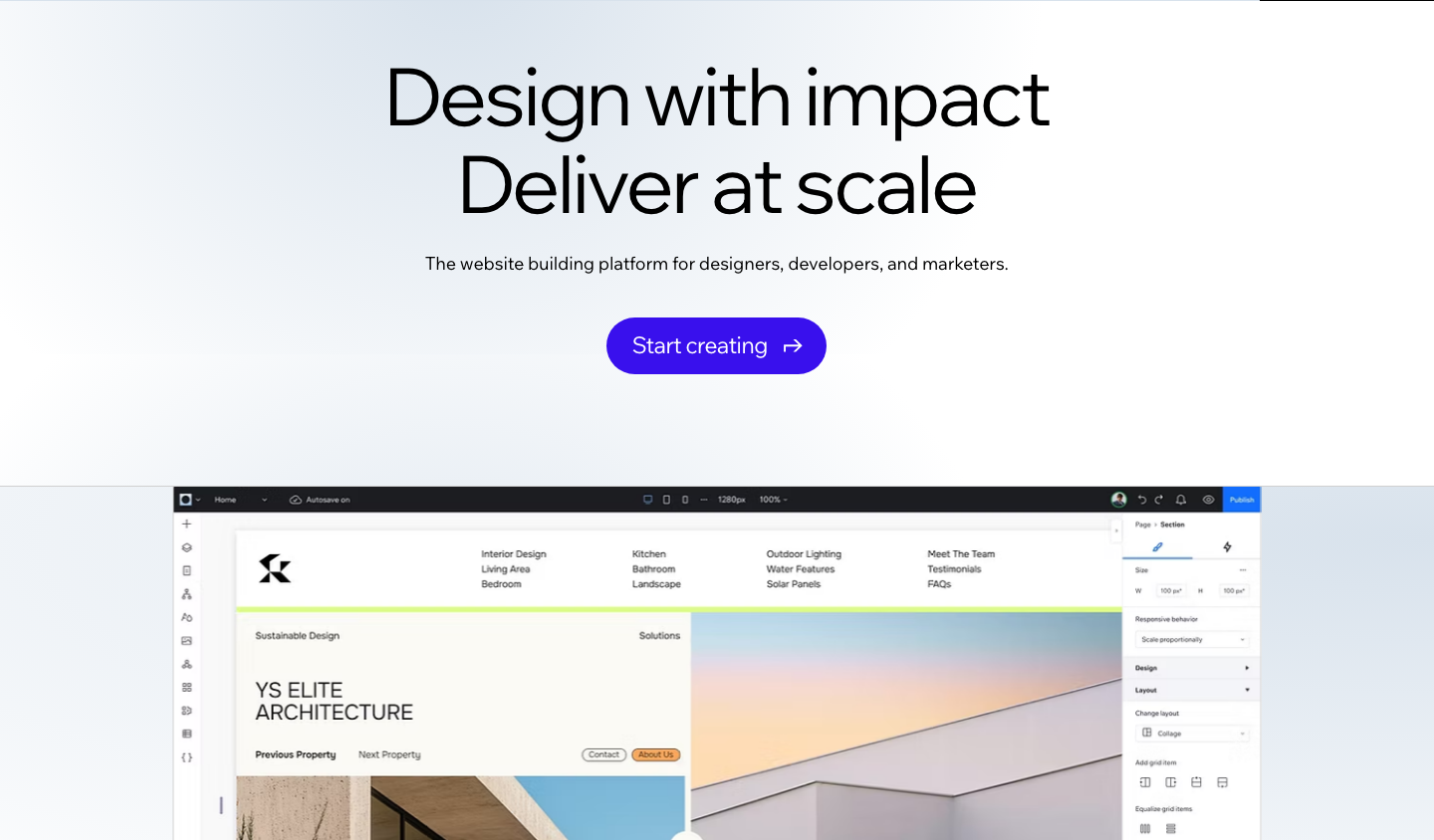
Two products dominate Wix’s current marketing, and both deserve a fair reading before you weigh the seven reasons. Wix Studio is the professional tier: true responsive design, CSS-level styling, reusable design assets, and client-management workspaces aimed at agencies and freelancers. It absorbed Editor X’s capabilities and is a legitimately better design tool than the classic Editor. The AI builder sits at the other end of the skill curve, generating a complete draft site from a short text prompt, and it is the fastest zero-to-published path Wix has ever shipped.
Neither product changes the structure underneath. Studio sites run only on Wix’s servers and fall under the same export policy quoted in reason one. AI-generated sites are classic Wix sites with the same plan ladder and the same caps. Both products make it easier to get onto the platform; neither adds a way off it. Evaluate them as better front doors to the same building.
When Wix Is a Reasonable Choice
An honest list of Wix’s losing scenarios implies a list of winning ones. Wix is worth it when the site’s job is simple, the content volume is small, and nothing about the site needs to compound in value over time.


Mapped against the business types Optimum7 sees weighing this decision, the verdicts sort cleanly:
| Business type | Verdict on Wix | Better long-term home |
|---|---|---|
| Local service business | Fine indefinitely while the site stays informational | Wix or WordPress |
| Portfolio or personal brand | Fine; low content volume keeps the exit cheap | Wix or Squarespace |
| Content-led brand building an audience | Poor fit; the blog cannot be exported and URLs are locked to /post/ | WordPress |
| Store planning to grow past a first catalog | Poor fit; product caps, app depth, and SEO ceilings arrive together | Shopify or BigCommerce |
| B2B or custom-workflow ecommerce | Wrong platform; the required features cannot be built on Wix | BigCommerce or Shopify Plus with custom development |
A decision test for borderline cases: estimate what it would cost to rebuild your planned site somewhere else in two years, including the content you will have written by then. If that number stays trivial, Wix’s convenience wins and you should take it. If the number makes you wince, you have already learned which platform category you belong on, before spending a dollar.
Wix vs WordPress, Squarespace, and Shopify
Platform choice comes down to what you keep and what you can change. The table compares the four options business owners weigh most often, on the dimensions this article covers.

| Factor | Wix | WordPress | Squarespace | Shopify |
|---|---|---|---|---|
| Site export | None; products and contacts as CSV only | Full: all files and the database move with you | Content export in XML; design stays behind | Products, customers, and orders as CSV |
| Design changes | Template is permanent; redesign means rebuild | Switch themes at any time | Restyle freely within its template system | Switch themes at any time |
| Hosting control | Wix servers only | Any host you choose | Squarespace servers only | Shopify servers only |
| Extensions | App Market, modest selection | Largest plugin library on the web | Small, curated extension set | Large commerce-focused app store |
| Best fit | Simple sites launched fast | Content-heavy sites needing full control | Design-led portfolios and small sites | Dedicated online stores |
The one-line versions: Squarespace shares Wix’s hosted trade-offs with stronger design guardrails and fewer apps. WordPress trades convenience for full ownership and an unmatched plugin library. Shopify is the commerce-native option, and it hands you complete product, customer, and order exports on the day you decide to leave. Budget builders like Hostinger and GoDaddy share Wix’s hosted model with thinner feature sets, so the portability calculus stays the same. For stores weighing the field, Optimum7’s guide to choosing the best ecommerce platform goes deeper on the commerce side.
How to Move a Website Off Wix
Because Wix has no export, moving off is a rebuild with a data-salvage step, and pretending otherwise sets budgets wrong. The process runs in five stages, and the fourth decides how much of your search traffic survives.
Optimum7’s Shopify migration guide and BigCommerce migration and replatforming guide document the full process for each destination, and its ecommerce migration services team scopes Wix exits regularly. The upside waiting on the other side of a rebuild is real:
Frequently Asked Questions About Wix
Is Wix legit and safe to use?
Yes. Wix is a publicly traded company founded in 2006, and its hosting includes SSL, DDoS protection, and managed security updates. The risks are contractual and strategic: your site cannot be exported, your template cannot be changed, and your access is a license Wix controls under its terms of service.
Is Wix good for small business?
For a service business that needs a brochure site, a contact form, and bookings, Wix works well at low cost. A product business planning to grow hits the export lock-in, custom-feature limits, and rising plan costs within a year or two. Match the platform to where the business is heading.
How much does a Wix website cost?
Premium plans run $17 to $159 per month on annual billing as of August 2026, and accepting payments requires the $29 Core plan or higher. Budget beyond the subscription for domain renewal after the free first year, paid apps from the App Market, and card processing fees on every sale.
Can you export a Wix website to another platform?
No. Wix’s documentation states sites cannot be exported or hosted elsewhere. Store products and contacts download as CSV files; pages, design, and blog posts do not. Leaving Wix means rebuilding the site on the new platform and setting 301 redirects for every indexed URL to protect rankings.
What is the difference between Wix and Wix Studio?
Wix Studio is the professional tier of the same platform, aimed at agencies and designers. It adds true responsive design controls, CSS-level styling, and client-management workspaces that the classic Wix Editor lacks. The fundamentals stay identical on both: no site export, permanent templates, and hosting on Wix servers only.
Why is Wix so hard to use once a site grows?
The drag-anywhere editor stores desktop and mobile layouts separately, so every change needs checking twice. As pages multiply, the editor slows and small layout breaks accumulate across breakpoints. The freedom that makes the first page easy to build is exactly what makes page fifty tedious to maintain.
How long does it take to move a site off Wix?
Scope decides it. A five-page brochure site moves in days. A store with hundreds of products, customer records, and years of blog posts is a multi-week project, because pages rebuild by hand and every indexed URL needs a mapped 301 redirect before the domain cuts over. The content inventory is the best predictor.
Choosing a platform is far cheaper than leaving one. If you are planning a new build, or an exit from Wix, talk to Optimum7 about scoping it before you commit.
About the author: Duran Inci is the CEO and Co-Founder of Optimum7, an ecommerce development and digital marketing agency. He helps mid-market and enterprise brands scale revenue through conversion optimization, SEO, and custom ecommerce solutions.