

TL;DR: GoDaddy is a legitimate company and a weak choice for a business website. Renewal pricing raises the advertised cost by 25 to 50 percent, the builder blocks code and SEO control, three linked breaches ended in a 2025 federal security order, and builder sites cannot be exported. Hobby sites do fine there; growing businesses outgrow it fast.
GoDaddy sells more domains than any company on earth, and Optimum7 has spent two decades rebuilding websites for businesses that started there. When was the last time a renewal invoice made you re-read the plan you thought you bought? That invoice, and what sits behind it, is where this review starts.
The pattern repeats across the projects that land on our desk: a business launches on GoDaddy because the first-year price looked unbeatable, grows for two or three years, then hits a wall made of renewal charges, builder limitations, and a site that cannot move anywhere else. This review covers the full picture with verified numbers: what GoDaddy genuinely does well, the real cost math, the builder’s ceiling, the security record that ended in a federal order, how it stacks up against Wix, Bluehost, and WordPress, and the exact steps for moving off it.
What Is GoDaddy and What Is It Used For?

The homepage above says it plainly: GoDaddy leads with a domain search box and a promotional first-year price, and everything else hangs off that funnel. GoDaddy is a domain registrar and web services company. Businesses use it to register domain names, rent shared hosting, build sites with its Websites + Marketing builder, and buy add-ons like business email, SSL certificates, and marketing tools. Since 2024 the company has folded those tools into Airo, an AI layer that generates a starter site, logo, and marketing copy from a short questionnaire.
Is GoDaddy legit? Completely. It is a publicly traded company (NYSE: GDDY) that has operated since 1997, its purchases process correctly, and its phone lines answer. Legitimacy and fit are separate questions, though. A registrar built to sell 81 million domains optimizes for volume: standardized plans, aggressive cross-selling, and support scripts built to close tickets with an upgrade. A business website that needs custom functionality, technical SEO, or room to grow sits outside that optimization target, and every section below documents one place the mismatch shows up.
GoDaddy Pros and Cons
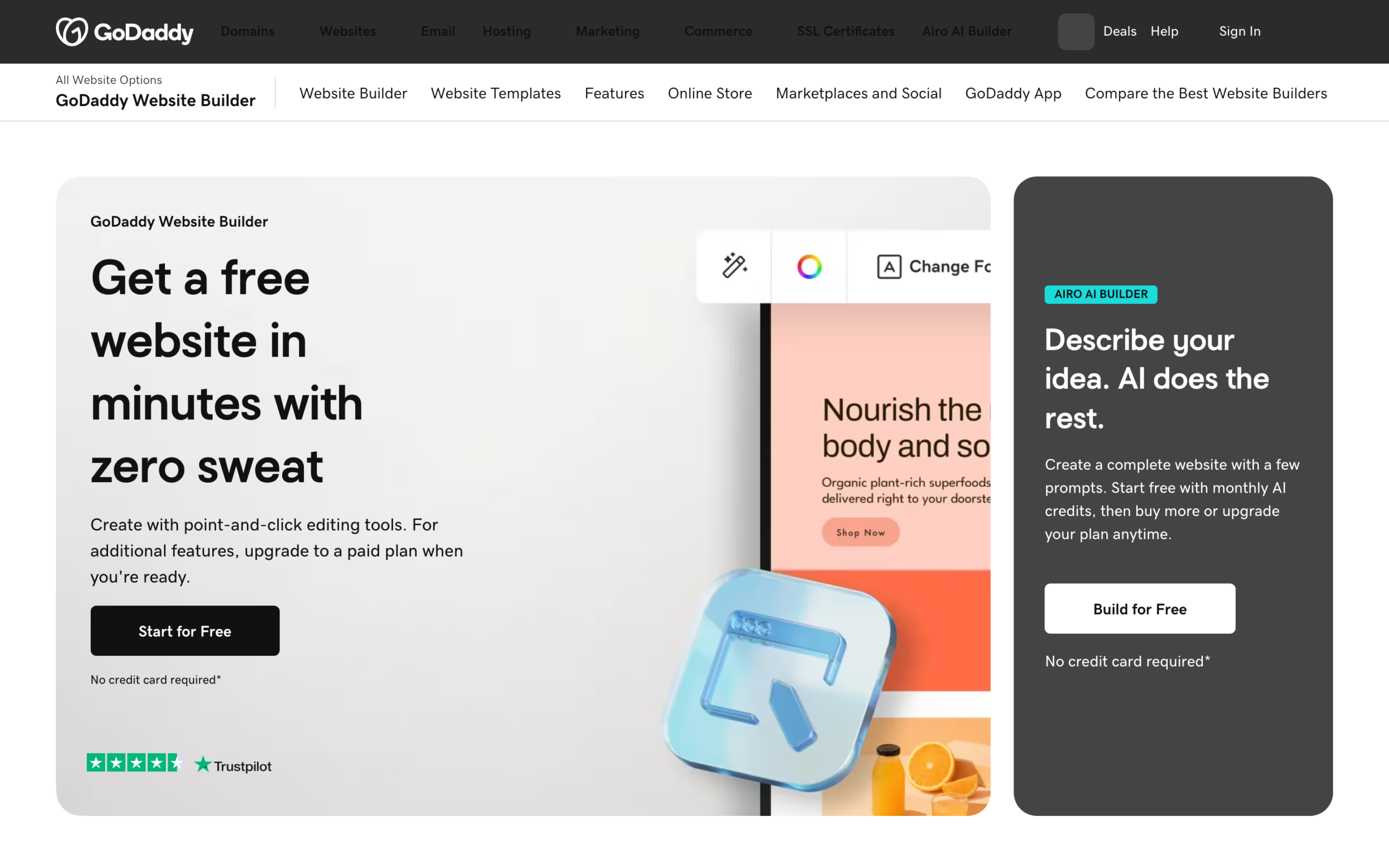
The builder page above is the pitch: a free website in minutes, no credit card, a Trustpilot badge underneath. A fair review starts with what GoDaddy does well, because it does several things well. Domain search and checkout take minutes. The Airo builder produces a presentable one-page site faster than any agency could. Phone support answers around the clock, which few budget hosts offer. Customers broadly agree on the transactional experience.
Read those reviews closely and a split appears: the praise describes buying, the complaints describe owning. Renewal billing, the website builder’s limits, security history, and what happens when a customer tries to leave dominate the negative side. The table below maps both columns; the sections that follow take each weakness apart with numbers.

| Area | Where GoDaddy delivers | Where it costs you |
|---|---|---|
| Domains | Fast search, huge TLD selection, easy first purchase | Renewal roughly double the at-cost registrars; protection tiers sold as add-ons |
| Website builder | Live site in under an hour; AI drafts content for you | Section-based layouts only, minimal code access, thin SEO controls, no export |
| Hosting | Cheap entry pricing; managed WordPress tier benchmarks respectably | Shared plans throttle CPU; backups and staging cost extra or do not exist |
| Security | Post-2025 practices run under independent assessment | Three linked breaches from 2019 to 2022; an FTC order now governs its program |
| Support | 24/7 phone and chat, rare at this price point | Front-line scripts push upgrades before fixes on technical tickets |
| Ownership | Domains transfer out with a standard unlock process | Builder sites have no export path; leaving means rebuilding from zero |
The Real Cost of a GoDaddy Website
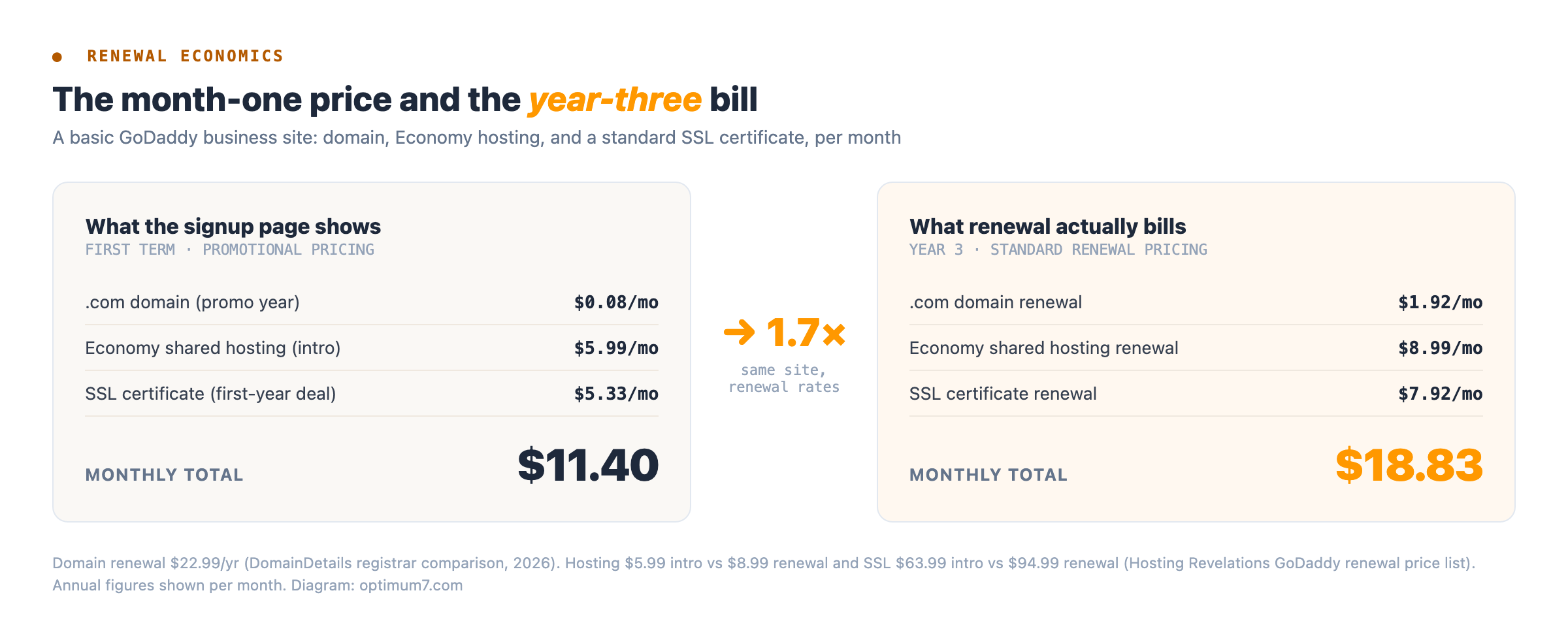
The price on the signup page applies to the first term only, and the first term often requires paying two or three years upfront to get it. Is the money you save in year one still savings by year three? Run the numbers on the most basic business setup, a domain plus Economy hosting plus a standard SSL certificate, and the same site that signs up at $11.40 a month renews at $18.83 a month: a 65 percent jump with nothing added.
GoDaddy Shared Hosting: Renewal Increase Over Intro Price
Percentage added to the advertised monthly rate at renewal, by plan
Calculated from published intro and renewal rates. Hosting Revelations, 2024.
Exact figures move with promotions, so treat the pattern as the finding: budget the renewal rate, plus the add-ons the intro bundle included free, before comparing GoDaddy to any alternative. On a three-year horizon the total regularly lands above a quality independent host that never discounted in the first place.
GoDaddy Domain Renewal Prices vs Other Registrars
Domains show the markup most cleanly because a .com costs every registrar the same wholesale rate. Cloudflare and Porkbun pass that rate through with little or no margin; GoDaddy renews the identical product at roughly double the at-cost price, then sells domain protection upgrade tiers on top of it.

| Registrar | Renewal / year | 5-year total |
|---|---|---|
| GoDaddy | $22.99 | $92.95 |
| Namecheap | $13.98 | $61.90 |
| Porkbun | $10.99 | $54.95 |
| Cloudflare | $10.44 (wholesale, zero markup) | $52.20 |
The Add-On Stack Pads Every Invoice
Log in to complete a simple task and the dashboard routes you through offers first: domain protection tiers, email upgrades, SEO packages, security add-ons. Renewal notices arrive bundled with new products, and declining one prompts a retention screen offering another. The cumulative effect is paying separately for things the wider market gives away.
SSL is the clearest example. Let’s Encrypt has issued free, automatically renewing certificates since 2016, and quality hosts integrate them by default. GoDaddy sells certificates that renew near $95 a year for the same padlock. Daily backups, basic landing page changes, and email follow the identical pattern: built in elsewhere, line items here. Each one is small; together they are why the year-three bill in the diagram above looks nothing like the signup page.
GoDaddy Website Builder Review: Where the Ceiling Sits
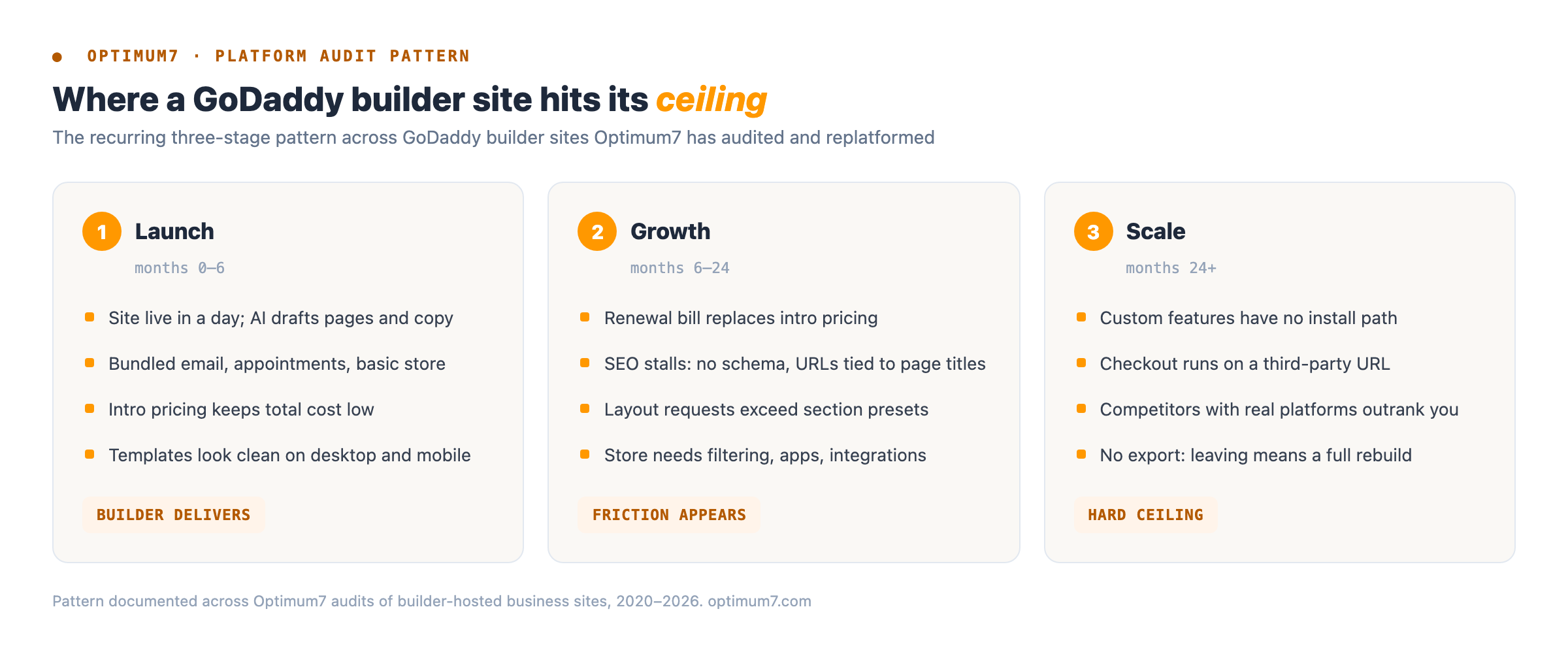
Websites + Marketing assembles pages from pre-designed sections, and that constraint defines everything downstream. You pick from the layouts GoDaddy provides, adjust text and images, and stop there. The diagram above is the arc Optimum7 documents on audit after audit: the builder genuinely delivers for the first six months, friction shows up as the business grows, and somewhere past year two the site becomes the thing holding the business back.
The SEO ceiling is the expensive part. Entry plans expose only basic controls through the SEO Wizard, page URLs are generated from page titles, and there is no path for injecting schema markup, custom scripts, or header code on the plans small businesses buy. If your product pages cannot carry structured data, what happens when competitors’ pages show review stars and pricing in search results while yours show a bare blue link? That gap compounds monthly, and no template setting closes it.
GoDaddy Airo Review: Faster Setup, Same Limits

Airo changed how fast a GoDaddy site appears, and changed nothing about what it can become. The AI interviews you about your business, then generates a starter site, logo options, social posts, and email drafts in minutes. For a placeholder page, that is genuinely useful. Underneath, the output is the same section-based builder with the same locked code, the same URL behavior, and the same missing export, now produced faster and in higher volume.
There is a competitive wrinkle worth naming: AI generation pulls from the same template pool for every customer in your category. Two landscapers in the same city who both answer Airo’s questionnaire get sites that read and look like siblings. Differentiation, the one thing a business website exists to create, is the one thing an AI template generator cannot produce.
Why GoDaddy’s SEO Packages Fall Short
GoDaddy sells SEO as an add-on, historically under the Search Engine Visibility name and now folded into Airo Plus tiers. The tools generate automated suggestions: add meta tags, submit a sitemap, sprinkle keywords. Every item on that list is either free elsewhere or already table stakes, and none of it touches what ranking a business site takes: site architecture, content that answers real queries, internal linking, page speed, and structured data, none of which the builder exposes in the first place. Optimum7’s full guide to how SEO works walks through that entire engine, from crawl to revenue, and makes plain how little of it an automated checklist covers.
Optimum7’s SEO team regularly takes over sites that paid for the add-on for years and still carry the same template-level problems the tool cannot see; the before-and-after of that work is documented in our SEO case studies. Selling an optimization subscription for a platform whose plans block the optimizations is the upsell model in its purest form.
GoDaddy Security: Breach Timeline and the FTC Order
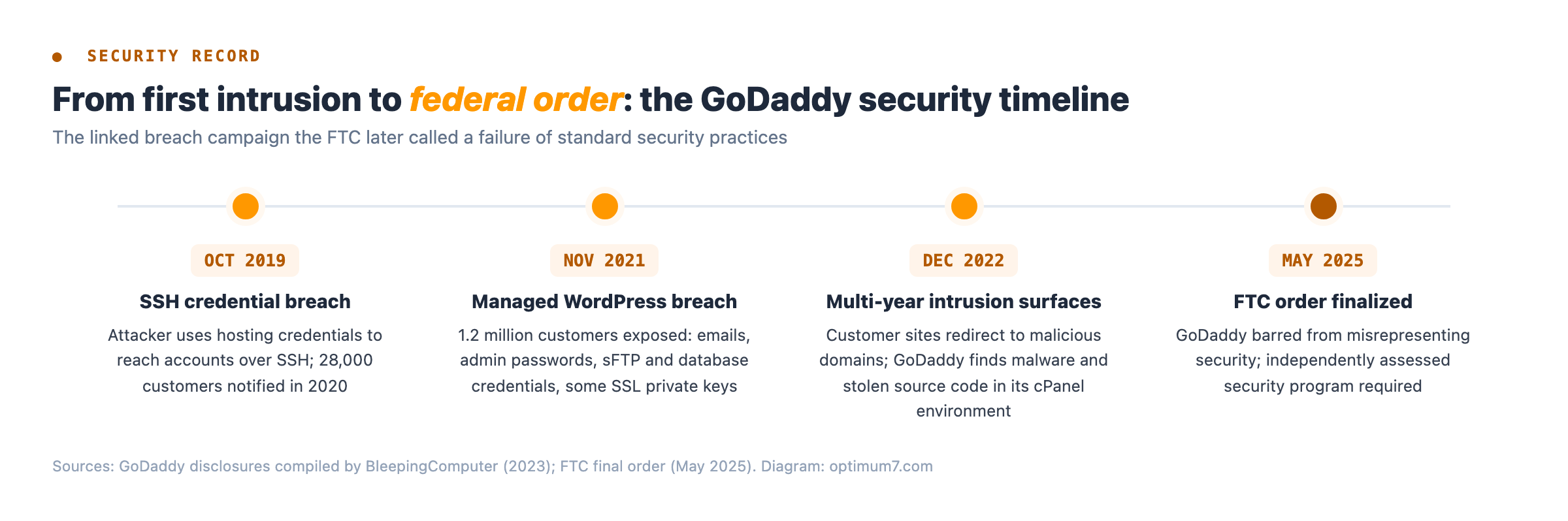
Security is where GoDaddy’s record moved from anecdote to federal enforcement, and the timeline matters because the incidents were connected. An attacker reached customer accounts over SSH in October 2019. In November 2021, a breach of the Managed WordPress environment exposed 1.2 million customers’ email addresses, admin passwords, sFTP and database credentials, and some SSL private keys. In late 2022, customers reported their sites redirecting to malicious domains, and the investigation found intruders had spent years inside the cPanel shared hosting environment, stealing source code and installing malware along the way.
The Federal Trade Commission’s response is the part a business owner should weigh. The FTC alleged GoDaddy marketed “award-winning security” while skipping standard protections like multi-factor authentication and threat monitoring. GoDaddy settled, and the resulting order now dictates how it must run security.
Trust failures show up at the individual level too. In a widely discussed Hacker News thread from 2026, a customer documented GoDaddy transferring their domain to a stranger without verification documents, then insisting through support appeals that correct paperwork existed. For a business, the domain is the asset everything else depends on, and process failures around it are disqualifying.
GoDaddy Hosting Performance and Support Quality
Honesty requires saying the raw speed numbers have improved, and independent monitoring backs that up. The structural limits of the shared environment remain: your site shares CPU and memory with thousands of accounts on the same server, resource throttling kicks in exactly when a promotion sends you traffic, and the tooling professionals rely on is missing or metered.
That 99.95% figure sounds strong until you convert it: roughly four and a half hours of downtime per year, timed randomly. A content site shrugs that off. A store doing $5,000 a day in revenue loses real money, and without a staging environment every plugin update and theme change happens on the live site, where mistakes are public.
Support deserves the same two-sided reading the Trustpilot data got. The 24/7 phone line is real and the agents are friendly, and the escalation path for a genuinely technical problem is where the model shows. Front-line agents work from scripts whose resolution branch frequently terminates in a plan upgrade or an add-on, because the compensation structure rewards attachment. A business with a broken checkout at 2 p.m. on a Tuesday needs an engineer, and engineers sit behind tiers the script protects.
GoDaddy vs Wix, Bluehost, and WordPress
GoDaddy wins the comparison on setup speed and loses it almost everywhere else. The table shows the pattern; the matchups below answer the three specific questions people bring to this page.

| Factor | GoDaddy Builder | Wix / Squarespace | WordPress (self-hosted) |
|---|---|---|---|
| Design control | Fixed sections, no element-level editing | Drag-and-drop, large template libraries | Unlimited; any theme or fully custom build |
| SEO control | Basic fields; URLs tied to page titles | Solid on-page controls, some structural limits | Full control of markup, speed, and architecture |
| Apps and integrations | A handful of built-in connections | Hundreds of first- and third-party apps | Vast plugin library plus custom code |
| Portability | No export; rebuild required to leave | Limited export (content, some data) | Full export; moves between hosts freely |
| Best fit | Hobby pages, temporary one-page sites | Portfolios, small service businesses | Businesses competing on search and content |
Wix vs GoDaddy
Both lock you into a proprietary platform, so pick by how far the platform lets you go before the lock matters. Wix pushes that ceiling considerably higher: several times the template selection, an app market with hundreds of integrations, drag-and-drop placement at the element level, and stronger built-in SEO controls. GoDaddy counters with faster setup and bundled email marketing on cheaper tiers. For any site expected to grow, Wix wins this matchup; for a page that exists to exist, GoDaddy’s speed is fine.
GoDaddy vs Bluehost
This one is closer than the search volume suggests, because both companies sell the same product: cheap shared hosting with steep renewal pricing and add-on economics. Bluehost leans harder into WordPress, with one-click installs and WordPress-specific support tiers, and its intro pricing tends to run lower. Choosing between them optimizes the wrong variable. The platform decision, builder versus WordPress versus a commerce platform, moves revenue and rankings; the shared-host brand behind it mostly moves the invoice.
GoDaddy vs WordPress
People compare these two constantly, and they are different kinds of things. GoDaddy is a company selling a closed builder and hosting; WordPress is open-source software you can run on any host, including GoDaddy’s own servers. The practical difference is ownership: a WordPress site’s theme, content, database, and code belong to you and move with you, while a GoDaddy builder site exists only inside GoDaddy. A business that treats its website as an asset builds on the thing it owns, with professional WordPress development when the stakes justify it.
Is GoDaddy Good for eCommerce?
For a store with real inventory and growth plans, no. The builder’s commerce tier handles a small catalog with basic payments through GoDaddy Payments, and the limitations stack from there: checkout runs on a third-party URL, product options and filtering stay primitive, there is no app marketplace for shipping, tax, or ERP integrations, and the catalog cannot be exported when you outgrow it. Every one of those is a conversion or operations problem that grows with order volume.
Dedicated commerce platforms exist because selling online is a different engineering problem from publishing pages. Shopify and BigCommerce give a merchant inventory management, abandoned cart recovery, native payments on your own domain, and app stores built for commerce; a quick pass through our Shopify pricing calculator shows the real monthly delta is smaller than it looks from the outside. The result of moving from a constrained platform to a real one shows up in revenue, and Optimum7 has measured it directly across its ecommerce case study library. Which platform fits which store is a decision with its own trade-offs, mapped in Optimum7’s guide to the best ecommerce platform for selling online.
What Optimum7 Finds When Auditing GoDaddy Sites
Review sites test builders for a week; an agency lives with the aftermath for years. These five findings recur across the GoDaddy builder and shared hosting sites Optimum7 has audited before replatforming, and none of them appear on a feature comparison page.
When GoDaddy Is a Fine Choice
Criticism earns credibility by admitting the counter-cases, and GoDaddy has real ones. A personal project, a hobby blog, an event page with a six-month lifespan, or a placeholder site for a business still validating its idea: all of these fit the builder’s economics, and none of them will ever feel the ceiling.
Buying a domain on GoDaddy and hosting elsewhere also works without friction. DNS records point anywhere, so plenty of businesses register there and run their site on a dedicated host or platform. The registrar table above still argues for moving the registration eventually, and a domain purchased at GoDaddy locks you into nothing as long as you keep it unlocked and transferable. Run through this list before you commit either way:
How to Move a Website Off GoDaddy
If the ceiling is already pressing, the move is more routine than it feels from inside. The sequence below is the one Optimum7 runs on ecommerce migrations and builder rebuilds alike; the order exists to protect the two things that cannot be recovered if lost, your content and your rankings.
The sequence holds at any scale. When LCE Performance replatformed from Volusion to BigCommerce, this same inventory-map-redirect discipline moved 273,000+ orders and 154,000+ customer accounts with zero data loss and 100% of SEO equity preserved; the full numbers are in the LCE Performance Volusion-to-BigCommerce migration case study. A GoDaddy builder site is a far smaller job than that, which is the point: the process is proven well above the weight class this move requires.
GoDaddy Alternatives for a Business Website
The right alternative depends on what the website has to do for the business. Three routes cover nearly every case Optimum7 sees, and each one preserves the two things GoDaddy’s builder takes away: control over how the site competes in search, and the freedom to leave with your asset intact.


Registrar-wise, the table earlier tells its own story: Cloudflare and Porkbun renew a .com at roughly half GoDaddy’s rate with privacy included. If the site already lives on GoDaddy and the ceiling is starting to press, Optimum7’s web design team rebuilds builder sites on open platforms with content, rankings, and redirects handled, and our development team takes on the custom functionality a template could never hold. Talk to us before the next renewal invoice arrives and we will scope what a move costs against what staying costs.
Frequently Asked Questions
Is GoDaddy legit?
Yes. GoDaddy is a publicly traded company founded in 1997 that manages roughly 81 million domains for over 20 million customers. Purchases go through, domains register correctly, and support answers. The criticism in serious reviews targets pricing practices, platform limitations, and its security history, never its legitimacy as a business.
Is GoDaddy safe to use?
Safer than it was, with history worth knowing. A linked breach campaign ran inside GoDaddy’s hosting environment from 2019 to 2022, exposing 1.2 million Managed WordPress customers at its peak. The FTC finalized an order in May 2025 requiring an independently assessed security program, which raises the floor going forward.
Are GoDaddy websites good?
They are fast to launch and fine for simple needs. A GoDaddy builder site loads quickly and looks presentable, and it caps out early: section-based templates, thin SEO controls, minimal integrations, and no export path. Businesses that depend on search traffic or custom features hit those limits within the first year or two.
What is GoDaddy used for?
GoDaddy is used to register domain names, host websites, and build simple sites with its Websites + Marketing and Airo tools. It also sells business email, SSL certificates, and marketing add-ons. Domain registration remains its core: about one in five registered domains worldwide sits under GoDaddy management.
How much does a GoDaddy website really cost?
Budget the renewal rate, never the advertised rate. Intro prices apply to the first prepaid term only; hosting then renews 25 to 50 percent higher, a standard SSL certificate renews near $95 per year, and a .com renews at $22.99. A basic site that starts near $11 a month runs near $19 a month by year three.
Is GoDaddy good for a small business website?
For validating an idea or holding a web presence, yes. For a small business that plans to win customers through its website, the builder works against the goal: no structured data, no conversion testing, generic AI templates, and renewal economics that outprice better platforms. Growth-minded small businesses outgrow it fastest.
Is paying for GoDaddy SEO worth it?
No. The SEO add-ons generate automated suggestions, meta tags, sitemap submission, keyword hints, that free tools already cover, while the builder blocks the work that moves rankings: site architecture, structured data, page speed, and content strategy. Paying to optimize a platform that prevents optimization solves the wrong problem.
Can you buy a domain on GoDaddy and host your website elsewhere?
Yes, and it works without friction. Point your domain’s DNS records at any host or platform and the site runs there while the registration stays at GoDaddy. Keep the domain unlocked and know the transfer process, since moving the registration itself to another registrar takes an EPP authorization code.
About the author: Duran Inci is the CEO and Co-Founder of Optimum7, an ecommerce development and digital marketing agency. He helps mid-market and enterprise brands scale revenue through conversion optimization, SEO, and custom ecommerce solutions.