


TL;DR: Ahrefs Batch Analysis pulls backlink and authority metrics for up to 1,000 URLs in a single run for one credit, so you can compare a whole prospect or competitor list at once. The value is reading the columns correctly: prioritize referring domains and URL Rating over raw Domain Rating, then turn the export into pursue, disavow, or discard decisions.
Understanding your website’s backlinks is the base layer of any serious SEO effort, and checking backlinks one URL at a time does not scale. Ahrefs Batch Analysis is built for volume: it returns backlink and authority metrics for a long list of URLs in a single run, so an entire prospect list, a competitor set, or your own site sections land side by side in one table. If you manage links for more than a handful of pages, how long would it take to check 200 URLs one at a time?
This guide walks through the full workflow: opening the tool, formatting your URL list, running the batch, and reading every column in the results. It also covers the step that decides outcomes, which is what to do with the numbers once they load. Treat the bulk backlink checker as a triage layer: it points you to the sites worth a closer look, and a manual check confirms what to trust.
Bulk Backlink Analysis vs. Checking One URL at a Time
Bulk analysis turns backlink research from a manual chore into a filtering exercise. You paste one list and read Domain Rating, referring domains, and traffic estimates for every target in a single view, skipping the per-domain trips into Site Explorer that would otherwise eat an afternoon. The scale matters because the open web is mostly pages that never earn enough links to rank for anything.
Links are one of Google’s core ranking factors, separating the pages that rank from the pages nobody sees. Checking 200 competitor URLs one at a time would take the better part of a day; a single batch returns the same profile data in one run, freeing your hours for the decisions that move rankings. That speed is the entire point of a bulk backlink checker.
Where to Find Batch Analysis and What One Run Costs
Batch Analysis sits in the top navigation bar of your Ahrefs dashboard, next to Site Explorer and Keywords Explorer. Open it and you get a single field labeled Target URLs, a protocol selector, and a target mode dropdown. There is no complicated setup: the tool is designed to take a list and return a table.
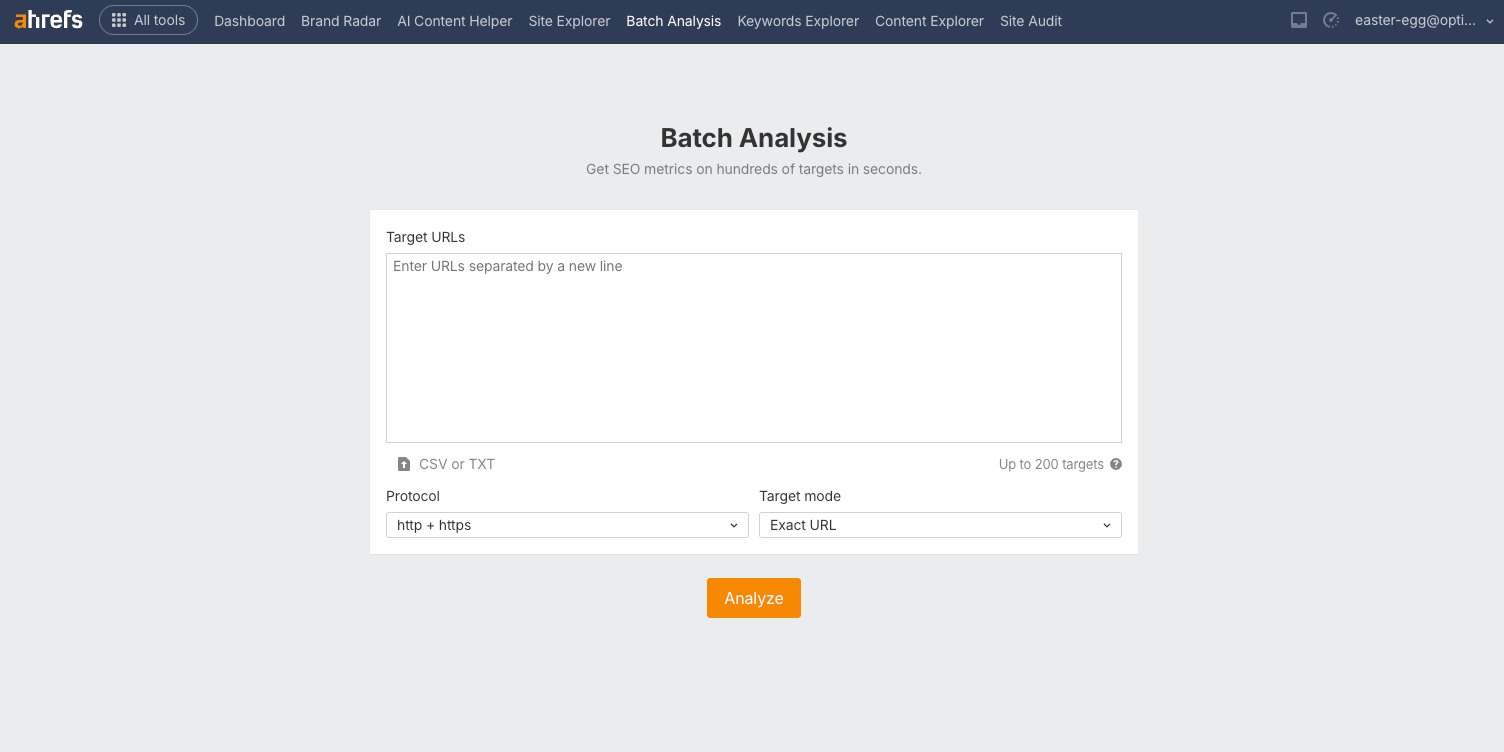
The per-run limit depends on your plan. A single batch covers up to 200 targets on Standard, 500 on Advanced, and 1,000 on Enterprise, and the whole batch costs one credit regardless of how many URLs you include. Older tutorials still quote a flat 200-URL cap, so the plan-based limits are worth confirming before you build a large list.
Because one credit covers a whole batch, your real constraint is the plan tier and the CSV export limit, so build each list up to that ceiling. A well-built list of 200 competitor URLs returns the same one-credit charge as a lazy list of five, which rewards careful prep.
Build Your URL List Before You Run Anything
Clean input is what separates a useful batch from a confusing one. Export the URLs you want to grade from your sitemap, a competitor scrape, or a prospect sheet, then format them as plain text with one URL per line. Remove duplicates and stray tracking parameters so each row maps to a real target.
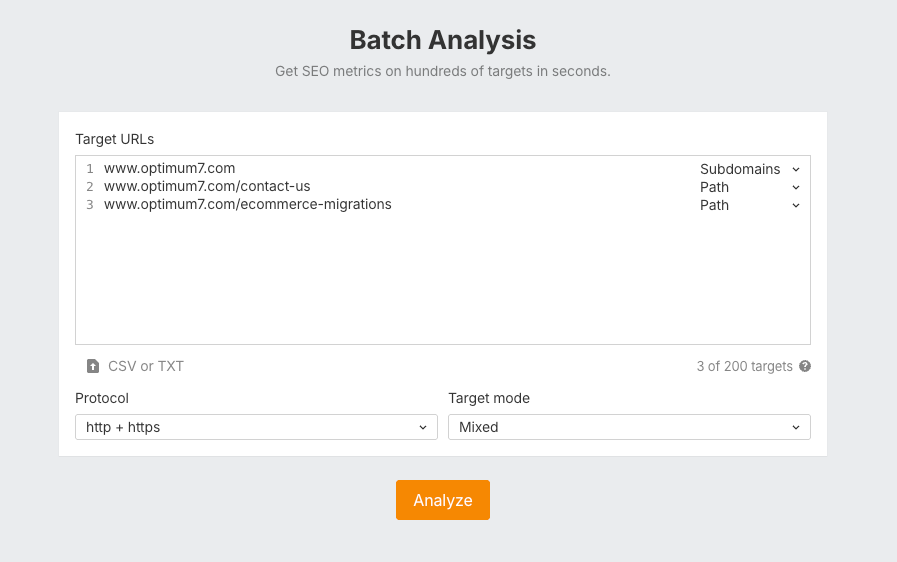
The target mode dropdown is the setting that quietly decides your numbers. Exact URL returns links to that single page, Subdomains rolls up everything under a subdomain, and Domain counts the whole site. Ahrefs also lets you set the mode per row, so a mixed list can grade one competitor at the domain level and a specific landing page at the exact-URL level in the same run.
Run the Batch and Read the Results Table
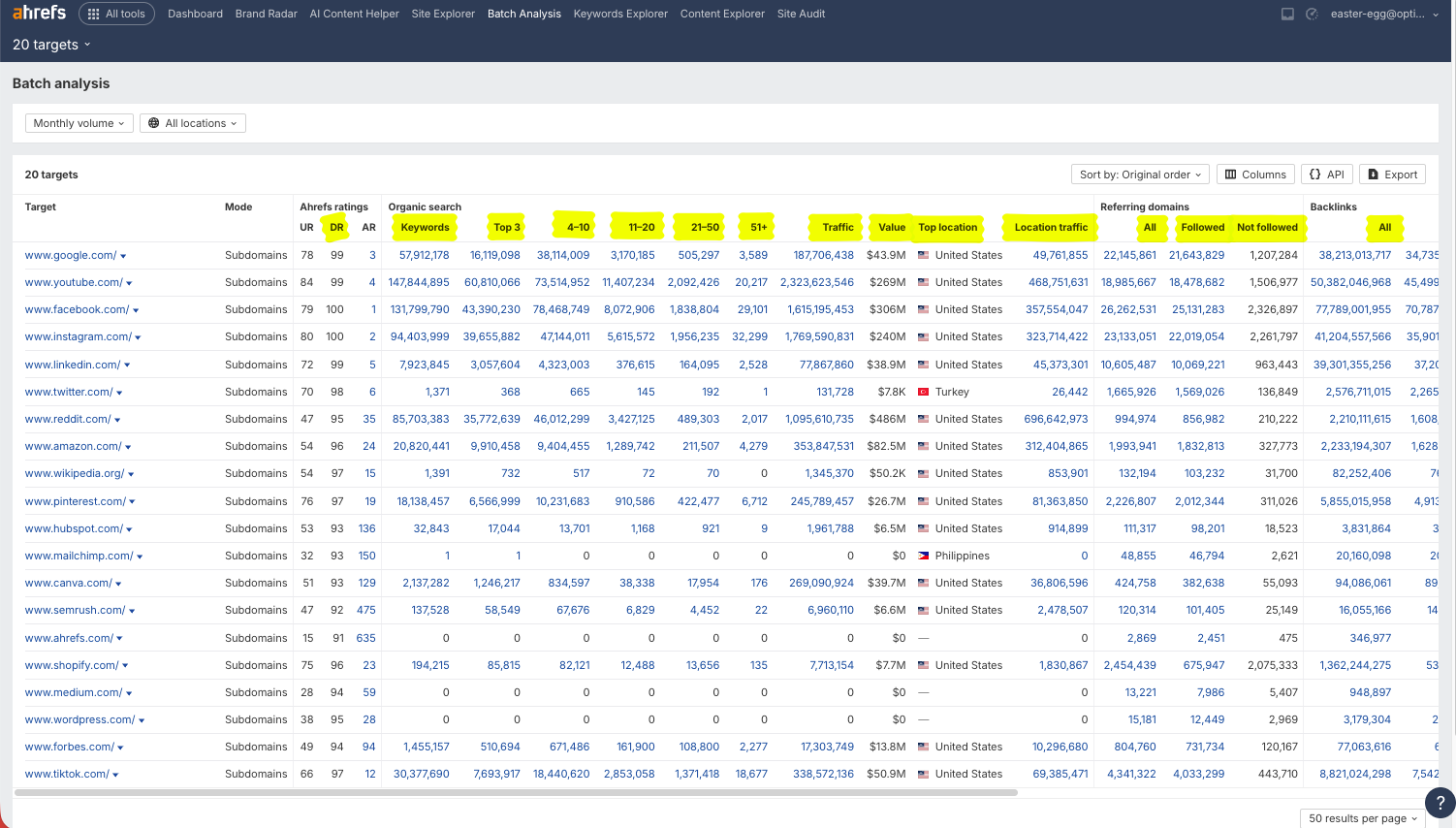
Click Analyze and the results load into one wide table, one row per target. You can toggle traffic estimates between Monthly and Average volume, filter by country, and export everything to CSV for downstream sorting. The results table groups into eight key metrics, and reading them in the right order is what makes the batch useful.
| Column group | What it shows | Why it matters |
|---|---|---|
| Ahrefs ratings | URL Rating, Ahrefs Rank, Domain Rating | Relative link strength at page and domain level |
| Organic search | Keywords by position band, traffic, traffic value, top location | How well the links convert into visibility |
| Paid search | Paid keywords, ads, traffic, cost | Signals a competitor’s ad investment on a topic |
| Referring domains | All, followed, and not-followed linking domains | The truest measure of link diversity |
| Referring IPs | Unique IPs and subnets | Flags link networks hiding behind one host |
| Backlinks | Total, followed, nofollow, redirect, internal | Volume, useful only alongside referring domains |
| Outgoing links | Linked domains, followed links, total outgoing | Signs a site sells or trades links |
Sort the table by referring domains first. The Backlinks group splits the total into link types, followed, nofollow, redirect, and internal, but those counts are easy to inflate; a diverse set of linking domains is much harder to fake and maps more closely to real authority.
How to Read Domain Rating, URL Rating, and Ahrefs Rank
The three Ahrefs ratings look similar and measure different things. Reading all three together gives the complete backlink profile and is where a bulk analysis proves its worth, because Domain Rating on its own hides too much. Each score is relative to Ahrefs’ own link index, so treat them as comparisons within your list.
| Metric | What it measures | How to use it in a batch |
|---|---|---|
| Domain Rating (DR) | Backlink strength of the whole domain, on a 0 to 100 scale | A first-pass filter; it ignores traffic and relevance |
| URL Rating (UR) | Backlink strength of the specific page, built on PageRank principles | Closer to ranking reality, since Google ranks individual pages |
| Ahrefs Rank (AR) | Global rank of every site by link strength, where lower is stronger | Quick sense of scale; AR 5,000 sits far below AR 500 |
A high-UR page on a modest-DR domain will often pass more value than a low-UR page on a famous high-DR site. So when a batch shows two prospects with the same DR, which one is the better link? The target with the stronger page-level URL Rating and more referring domains wins. DR gets the attention; UR and referring domains earn the decision.
“Ahrefs recalibrates Domain Rating over time, and a tighter model can strip points from a site overnight. A single DR number should start a review, and never close one.”
The Domain Rating score is also the easiest metric to inflate through rented links and private networks, which is why a domain can hold a strong DR with almost no real traffic. Cross-check DR against the organic traffic column: a high rating paired with near-zero visitors is the classic signature of a manipulated backlink profile. The URL Rating metric is harder to game because it counts page-level links only, so a single strong page cannot inherit the whole domain’s score.
Referring Domains Tell You More Than Backlink Counts
If you read one column carefully, make it referring domains. The page with the most backlinks often loses to one with fewer links from more domains: 10,000 backlinks from 12 domains is far weaker than 400 backlinks from 300 domains, because search engines value the number of independent sites vouching for a page more than the raw link tally. Batch Analysis splits this into all, followed, and not-followed, and the followed count is the one that carries ranking weight. Backlink quality matters more than backlink quantity, and referring domains are the column that measures it.
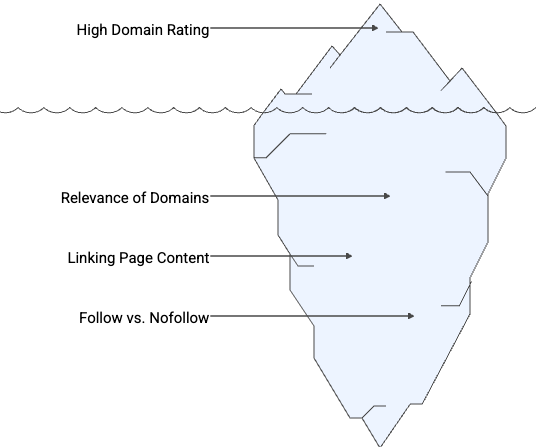
In practice this means you scan the referring-domains column for two patterns. A high followed-domain count with steady organic traffic is a healthy, pursue-worthy backlink profile. A high backlink count with a low referring-domain count is a warning sign that the links come from a handful of repetitive sources, which is exactly the kind of profile you keep off your own site.
Turn the Batch Into Link-Building Decisions
A results table is only worth the action it drives. Once the batch loads, run a consistent pass: sort by referring domains, filter to followed links, then flag any row where Domain Rating and organic traffic disagree. Every target then falls into one of three buckets.
The same pass maps your competitors’ backlinks. Drop a rival’s key pages into a batch, sort by referring domains, and you have a ranked map of the sites linking to them. From there, a systematic pass over those referring domains shows which of them you can realistically earn new links from too.
Disciplined link acquisition is what moves these numbers. Optimum7 ran targeted outreach for BSI, a payroll tax compliance software brand, earning backlinks from finance, HR, and business software sources alongside technical SEO and content work. The organic footprint grew from a near-zero base into a real acquisition channel.
Where Batch Analysis Stops and What to Use Next
Batch Analysis is a triage layer, so it shortlists targets and never certifies them. Every prospect that clears the bulk pass still needs a manual look inside Site Explorer at its individual linking pages, anchor text, and link velocity before you commit outreach time. The tool tells you where to look; you still decide what to trust.
For substitutes, Majestic offers a bulk backlink checker with its own Trust Flow and Citation Flow scores, and Moz exposes bulk Domain Authority through its API. Semrush is the tool people expect to compare here, yet it has no true batch-analysis equivalent for in-depth backlink data, which is a genuine reason Ahrefs stays the default for bulk work. If you want lightweight tools for spot checks between batches, our roundup of free SEO extensions for Chrome covers the ones worth installing.
There is a forward-looking wrinkle worth knowing before you treat link counts as the whole story. When Ahrefs studied 75,000 brands, off-site brand mentions correlated far more strongly with AI Overview visibility than backlinks did, which changes what a bulk audit is scanning for.
Referring domains still anchor classic rankings and remain a fair proxy for reach, so the durable move is to track link signals and brand mentions side by side. That combination is the backbone of modern SEO for AI-based search engines.
Reading a batch well is a skill, and acting on it consistently is a program. If you want a team that turns bulk backlink data into a ranking and link-acquisition plan, Optimum7’s SEO services build that workflow around your site and your competitors.
Frequently Asked Questions
What is Ahrefs Batch Analysis used for?
Batch Analysis grades backlink and authority metrics for a full list of URLs or domains at once. SEO teams use it to vet link-building prospects at scale, compare a set of competitors, evaluate domains before acquisition, and spot guest-post opportunities without checking each site one at a time.
How many URLs can Ahrefs Batch Analysis check at once?
The per-run limit is set by your plan: up to 200 targets on Standard, 500 on Advanced, and 1,000 on Enterprise. The whole batch costs a single credit no matter how many URLs you include, so it pays to fill each run to your plan’s limit.
What is the difference between Domain Rating and URL Rating?
Domain Rating measures the backlink strength of an entire domain, while URL Rating measures the strength of one specific page. Because Google ranks individual pages, URL Rating tracks ranking potential more closely, and it is harder to inflate than a domain-wide score.
What are referring domains in Ahrefs?
Referring domains are the count of unique websites linking to a target, separate from the total number of backlinks. One site can send hundreds of backlinks but still counts as a single referring domain, so a high referring-domain count signals broad, credible endorsement.
Is Domain Rating a reliable metric?
Domain Rating works best as a first filter. It reflects only backlink strength, ignores traffic and relevance, and can be inflated with rented links. Ahrefs also recalibrates DR over time, and a stricter model can pull scores down across the web, so always cross-check DR against organic traffic.
How many credits does a Batch Analysis run cost?
A single Batch Analysis search of up to 200 URLs costs one credit. One credit covers the entire batch, so grading 200 domains together is far cheaper than running each one individually through Site Explorer. Higher plans lift the per-batch cap to 500 or 1,000 URLs at the same single-credit cost.