





AI Search & Filter Preview Tool
for eCommerce Stores
Paste a category URL and preview a smarter product filtering experience built from your actual product data.
See how structured filters improve product discovery before installing anything.
Instant Category
Page Scan
Smart Attribute
Detection
Filter UI Preview
on your Layout
No Installation
Required
Design the Discovery Layer
On most eCommerce stores, category pages rely on basic sorting and generic filters like price or brand. That works for small catalogs. It breaks down when you have variants, technical specs, compatibility rules, or large inventories.
When filters are missing, incomplete, or poorly grouped, customers scroll. They guess. Then eventually they leave.
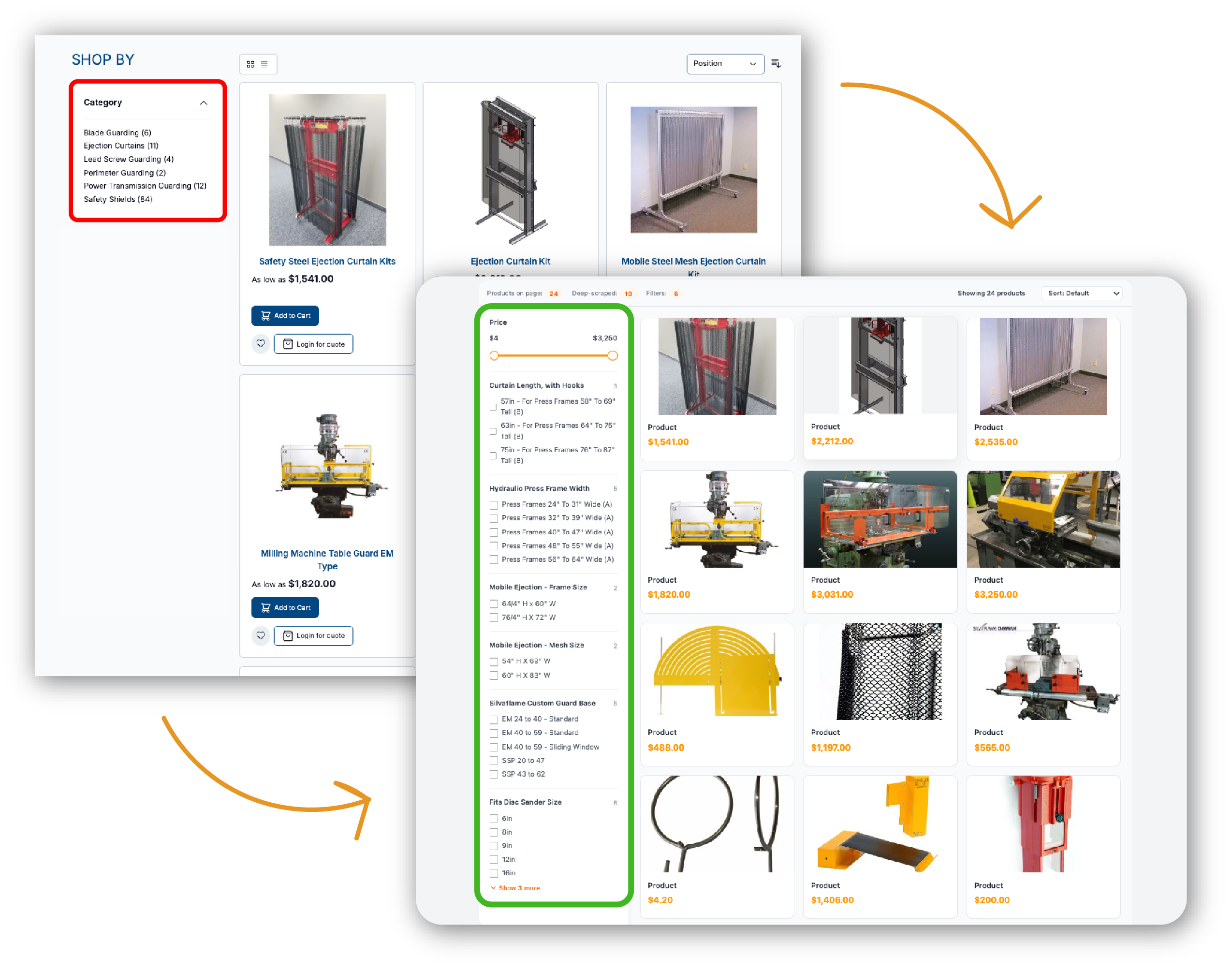
This tool rebuilds your category page filtering structure based on your real product attributes so you can see how a structured filter system would change browsing behavior.
Presets and Use Cases
Some stores only need minor filter cleanup. Others lack attribute-based filtering entirely.
This preview makes that visible by highlighting how your category page handles attribute visibility, grouping, and narrowing across your actual catalog.

Large Category Pages
Best for categories with 20+ products. Reveals whether customers can narrow efficiently or are forced to scroll.

Variant-Heavy Collections
Best for size, color, material, or option-rich products. Shows whether variant attributes are filterable at category level.

Specification-Driven Catalogs
Best for technical, industrial, or B2B listings. Highlights missing spec filters such as capacity, compatibility, or dimensions.

Compatibility & Fitment Products
Best for model-based or conditional product catalogs. Exposes gaps in compatibility-based narrowing logic.
Find Structural Gaps in Your Category Filtering
Filtering problems rarely look dramatic. A missing attribute. A long ungrouped list. A panel that technically works but does not narrow meaningfully. Across a category page, those small gaps accumulate. Browsing slows. Comparison requires effort.
Hidden options
Specifications exist inside product pages but are not filterable at listing level.
Flat filter structure
Attributes appear in long stacks without hierarchy or grouping.
Incomplete narrowing
Filters remove products inconsistently or fail to reflect actual catalog structure.
Mobile overload
Collapsed drawers and dense lists increase friction on smaller screens.
Misaligned labels
Filter names differ from how customers search or describe products.
Price-only reliance
Sorting replaces narrowing when attribute filtering is weak.
How the AI Search & Filter Preview Tool Works
The system analyzes your public category page and reconstructs filtering logic using detected product attributes and catalog patterns. In seconds, you can compare how different product option displays affect clarity, grouping, and selection flow.
Step 1:
Paste a Category URL
Enter the full URL of any public collection or category listing page to begin analysis of its product and attribute structure.
Step 2:
Catalog Structure Detection
The system scans product titles, descriptions, specifications, variant attributes, and repeated fields across listings
Step 3:
Filter Construction
Detected attributes are organized into logical filter groups based on repetition, structure, and relevance within the category.
Step 4:
Review the Live Preview
Your category page is rendered with a structured filter panel applied so you can evaluate grouping, visibility, and narrowing behavior before any implementation.
Want This Filtering System Live on Your Store?
If the preview exposes gaps in your category filtering, we can implement
a production-ready filter system tailored to your platform and catalog.
We align attribute logic, grouping, and mobile behavior so narrowing works
cleanly inside your existing theme.
FAQ
-
Is the AI Search & Filter Preview Tool free to use?
Yes. You can paste a public category URL and preview structured filtering without installation or account creation.
-
Does this tool modify my live store?
No. It generates a separate simulation based on your public category structure. Your storefront remains unchanged.
-
Which platforms does this support?
The system analyzes publicly accessible HTML and works with Shopify, WooCommerce, BigCommerce, Magento, Wix, and custom builds depending on how product data is structured.
-
What happens if I like what I see in the preview?
If the preview improves product discovery, we can integrate a production-ready filtering system into your store.
Learn more about our advanced filtering implementation here.
We can refine filters to match how customers search, optimize filter order and grouping, and improve mobile filter usability based on your catalog structure.
-
Do you store my category page data?
The page is analyzed to generate the preview. No source code or product data is stored after the simulation is created.
-
How long does implementation take?
Timing depends on catalog size, attribute complexity, and theme structure. After reviewing your URL, we provide a scoped recommendation.