Inspiration
Searching YouTube for inspiration I stumbled on to the intro of the classic 1967 spider-man cartoon series. While watching I realized that the animation was very basic. It was the paper doll sort of animation that lends itself perfectly to css3. Hmmm… “I could something like that with a little css3″, I thought.
Character & background art
CSS3-MAN
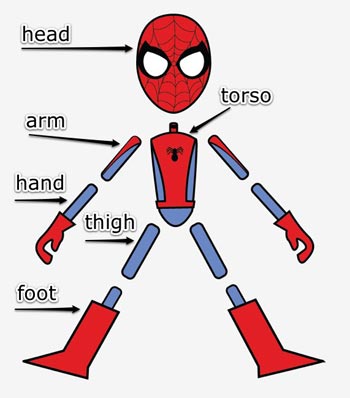
The character art was created in adobe illustrator and copy/pasted into photoshop for export. When designing a character for animation. Carefully plan all the pieces that will compose your character. I decided on simple shapes and built each part of the body separately, like a marionette. This allowed me to re-use some graphics. By building the character like a marionette. I was able to simplify the animation process.
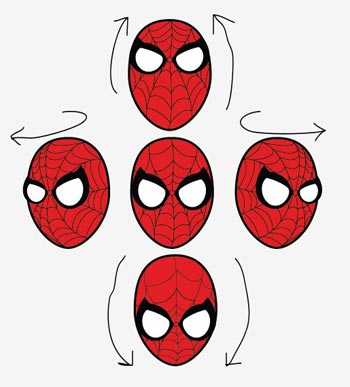
As previously stated, the graphics originated in illustrator. Vectors paths and points make it simple to adjust the artwork. For instance, If you need spidey looking up or down. Simply adjust the position of the eyes and webbing on the head shape to complete the illusion. You can clean up any extra lines by simply moving the point or deleting it.
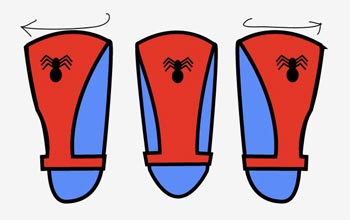
Same applies for the torso, legs and arms. By adjusting the orientation of the chest design and belt we can fake the rotation of a 2d element. Moving the arms and/or legs a little behind and a little in front of the torso creates the illusion of a subtle 3rd dimension.
BACKGROUND
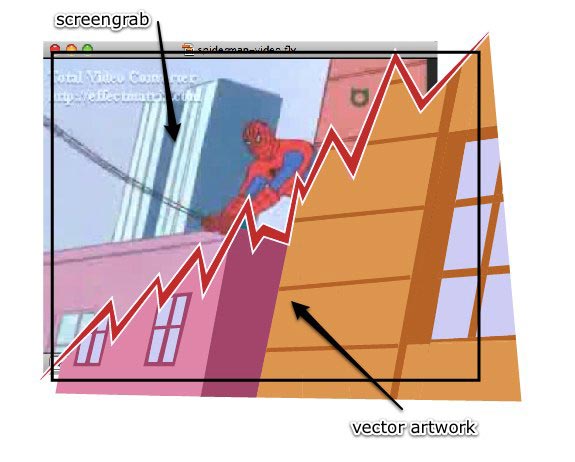
The cityscape’s were also created in illustrator. But they started as plain screen-grabs. I captured certain parts of the video as it played. Then pasted them into illustrator. I created another layer above the screen-grab. Drawing paths over the screen-grabs images. Using it like tracing paper. When graphics were done, I trashed the screen-grab layer.
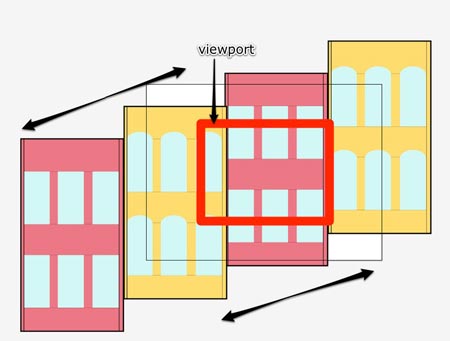
Just like the character. When creating these cityscape graphics you must think a little in advance about how the pieces must fit together. Background images used for scrolling and zooming should be 2 or 3 times wider and/or taller to allow for panning left, right, up, or down. The same applies for zooming in and out.
Now we have our finished character and background graphics. We can begin setting up our graphics for animation.
Complex CSS3 character animation and rigging
CHARACTER RIGGING
One of the trickiest parts to creating these css3 character animations is the rigging of joints or skeleton so that they hinge and rotate believably. The most important property is the transform-origin property. The transform-origin property uses x,y coordinates to determine the point from which animation or transformations occur. (If you want a full explanation of css3 animation properties please read my last article.) In order to determine the accurate transform-origin point for our arm and leg graphics we’re going to use a simple trick.
Notice how the foot graphic (1) is much wider than the thigh graphic (2). It would be impossible to match up the transform-origin point on these two pieces.
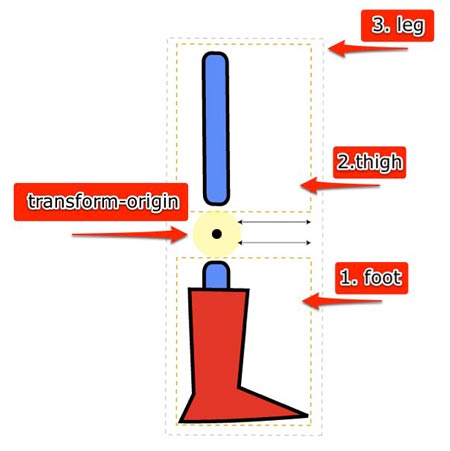
However, If we match the width of the thigh (2) with the width of the foot (1)… That’s it! By increasing the width of the canvas area of the thigh to match the width of the foot we can accurately match the rotation points of these “hinges” using the css3 transform-origin property. By giving the thigh image a wider canvas area we can move the thigh graphic left or right to line it up with the foot graphic.
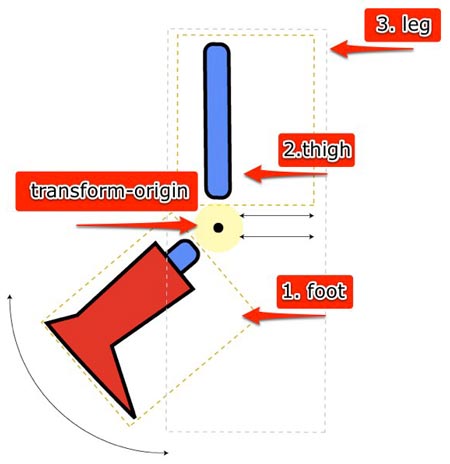
We can now ascertain that these two pieces will have the exact rotation points via css3 transform origin. By setting the transform-origin for foot to (x) number of pixels from the left we can guarantee that the foot will rotate from exactly where the bottom of the shin is located.
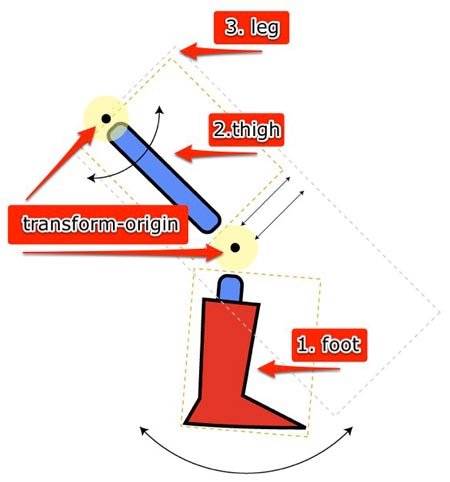
Now we can apply the same transform origin coordinates to the top of the leg div (which wraps around thigh & foot). By rotating the leg div we rotate its children too. This means that the leg div rotates both the thigh and foot graphics at the same time. Mimicking the functionality of a skeleton. Which allows us to have the foot moving along its own rotation path while also rotating along the path of the whole leg. Its important to nest items because this allows you to have multiple animation paths without having to recalculate their position constantly.
If I rotate the thigh and foot without first wrapping them in a leg div how would I also make the foot rotate upon the axis of the leg? It would be near to impossible. And it would look horrible. By nesting and breaking down the animations into their major body parts and just animating one major body part at a time and utilizing the animation of children I can achieve complex (for css) animation combinations.
Creating the illusion of the character zooming in required that the images be created at a bigger size. Then implementing them into the html mark-up at a smaller size. There are two ways to do this. Using the scale transform property or using the image width property. By increasing the image width over a key-framed animation you give it the illusion of growing or zooming into the screen. We can make a 500 pixel wide image then insert it into the html at 5% of its size. We are then able to make it smaller or bigger by increasing the height or width via css3.
Complex Character Animation
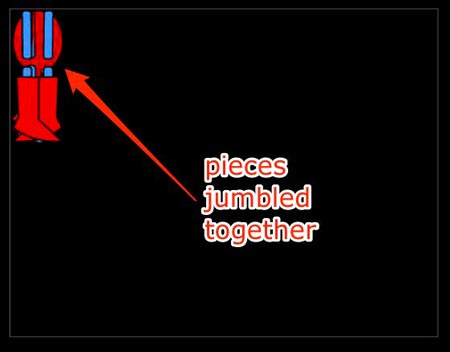
When building a character composed of precisely placed elements. Being able to visually construct the character is essential. When we first place all the different pieces for our character into the html. They are all jumbled up together.
Firefox 3.x has implemented css3 moz-transform-origin and moz-rotate. Which means I can use firebug developer tool to visually position the character’s body parts where they belong. This makes setting up the start and end positions/rotations for the characters pose simple.
To begin, we set up the characters body parts in the start position. I just adjust the values to where I need them in order to get the proper first position. I visually adjust the rotation and position values of the graphic using firebug.
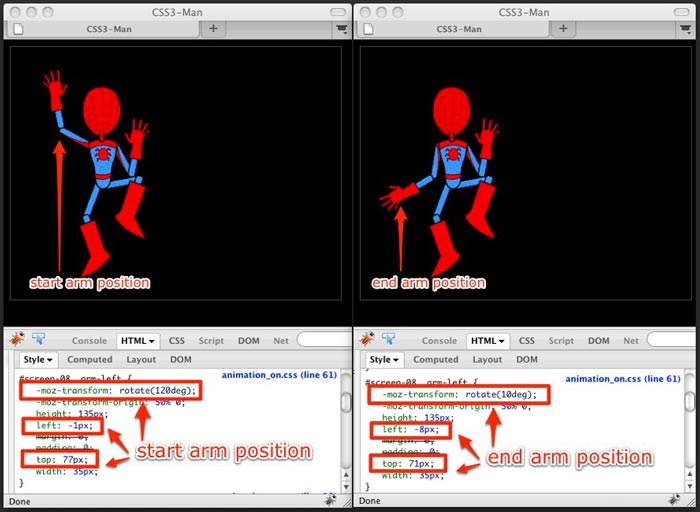
This allows me to gain pixel perfect precision over where I want the graphic placed. Using firebug like this takes the guesswork out of animating something as technical as different body parts. I just visually adjust the values to where I need them to get the proper first position. We then place those coordinates into the css.
Now we have to figure out the end positions for our animation. We use the same technique. Adjusting the values to accommodate the end position and plug those values into the css as well. Finally, I place these values in the ‘start’ and ‘end’ parts of the css3 keyframe function. Then we check the animation in webkit. Webkit does the rest of the magic on its own.
By using firefox and chrome together I was able to find the start and end points to each body part and then allow @keyframes to fill in the blanks.
Putting it all together
Believe it or not, the biggest road block I encountered when creating this css3 cartoon was switching the scenes at the correct moment to coincide with the css3 animation. I used jquery’s built in delay function to flip through the scenes and activate the next scene. As I’m writing this I realize that I probably could have pulled off the scene switching with css3 animation as well. But I’m not sure – as I haven’t thought it all the way through.
We used the built in animation delay function on css3 to begin animating the scenes just as they were activated by jQuery. Another challenge I had was that I had no control over when the animation started. I had to preload all the elements. Because there was no way to start all of the animations on just one click throughout the entire flick. And if all the elements are not loaded when the animations start running it gets jumpy.
Including the audio soundtrack was almost too easy. I just inserted a simple html 5 audio tag. (Gosh, I’m falling for html 5).
Anthony Calzadilla is a real cool dude at Optimum7.com
Optimum7.com © 2010 All Rights Reserved.


140 Comments
Wow, it’s amazing but… why bother?
In five years when this standard can compete with flashtools available today, the tools for creating flash will be much better then today. Can it catch up?
You can do so much more with flash than just animation. But… AS3 will never replace C#.
Very nice! BRAVO!
Wow, this is really awesome. “Amazing.” You’ve rekindled my excitement for HTML5 and CSS3. Nice job and well done!
For all of you who are saying this or that is better than the other: Use the right tool for the job. Yes, this animation could have been done better, faster, more widely available if done with Flash, but this is a proof of concept; A demonstration at where non-Flash technology is, and the direction in which it’s going. It’s not suggesting that one technology will replace the other.
I expect HTML5 and CSS3 will continue to improve over the coming years, but Flash will always have its place. We, as multimedia developers, have more tools to from which to choose. Use the right tool for the job. (I love the hammer and the screwdriver analogy.)
Looks like absolute garbage. It’s inexplicable how lazy people have gotten, that this is tolerated as “animation.”
While I admire your work and passion…….. anyone who thinks they are going to be competitive making a living creating animations like this is drinking way to much draino.
@Kris if thats rekindled your interest in HTML5 and CSS3 I have quill and ink technology which will rekindle your interest in the Middle Ages.
Peace.
This works in 6% of browsers and spikes CPU usage. Other HTML5 apps such as google wave crash and are sluggish. If you want something to work everywhere you have to use XHTML 1.0 and CSS 1. I have been hearing this excitement about HTML 5 and JS this and that but I have yet to see anything amazing. I challenge these developers come up with something really great and start a site like FWA to showcase it.
Well, You should have made it in flash… It’s pixely and when my android phone tries to play it, it just shows random frames and mostly pieces of the spiderman in backgrounds that don’t belong to that shot. Also there is no sound what so ever. And my phone runs flash like a charm… Allthough it runs a little slow right now. But hey, it’s a budget phone. Though, when HTML5, CSS3, and stuff finally come up with something to animate that actually works well and gives good results, phones will have developed so well that Flash will run as good as on any PC or Mac. Why try to improve on something that already works so well?
kind regards,
Niels Beekes
Animator (http://www.aniforce.nl/)
Dude this must have taken so long. I Knew it was possible but now it’s reality. Well done
@Jill, XHTML 1.0 and CSS1 don’t work in my Lynx. Now what am I supposed to do?
The DVD format was released in 1995. In 1999 it had a little less than 5% household penetration, and the discs and players were expensive. Clearly, therefore, VHS was the superior format, since it was cheap and everyone had one. Right?
Keep breathing folks… It’s an experiment! @rjw summed it up well. Now get yourselves a girlfriend.
Wow that looks like a Flash 5 animation. Are we going to see a lot of this with HTML5 along with skip animation? I bet it took way too long to build too. The animation so far with HTML5 looks like where we were at with Flash 10 years ago.
You are right, but DVD brings major improvements for the users. html5/css3 dont.
but now you are going to change flash to html5/css3 – and you would like to show that nearly everything flash currently does is possible in html5, but it is not the same. ever seen the type renderer in flash? forget html+css. also: flash blocker wont work then
you will be penedrated by ads in the future, so where is the improvement?
and: every browser has its own render engine, different video formats etc. why should a media agency take this effort to test all browsers instead developing for only ONE flash player?
i dont want to be misunderstood: i am happy about the improvements html5/css3 would bring, and i will use these – of course. but i am not blue-eyed, not every new version of anything has ONLY improvements.
“New open standards created in the mobile era, such as HTML5, will win on mobile devices (and PCs too). Perhaps Adobe should focus more on creating great HTML5 tools for the future, and less on criticizing Apple for leaving the past behind.”
-Steve Jobs
jQuery evidently has a long way to go.
Well it works great on my computer and it looks amazing as well. I’m kind of shocked that all of the animation was done with just code.
Congrats for putting in the effort and extra points for making it Spider-man!
This is a great example of how all of the hype and chatter about html5 is so ridiculous. Ok, kudos to you for taking the time to make this. But, as has been stated, this is primitive beyond belief compared to what Flash is capable of. By the time html5 reaches the place where Flash is (at least 5 years) Adobe will have Flash running circles around it. There’s also no decent authoring tools for html5 and, again, when they arrive they won’t be able to do the things that Flash can do NOW. html5 has it’s place for sure, it is better to use it for certain things but you are not going to replace the robust features and performance of Flash for doing animation and complex interactivity.
WoW! this is as amazing as spider-man
This is a good way to show what CSS3 can do…
Thanks!
If anything, this animation proves why flash is necessary (and will be for a long time)…
that crappy spiderman barely moves… sorry I had to say that, I’m not even a web designer, but seems obvious to me
while it is amazing that you can do this in html5 and css3, i can just imagine how long this would take to do. great job, but, i dont see this replacing flash by any means.
The animation was primitive, but it’s a proof-of-concept, and for that it works superbly. Trying to compare this to Flash is stupid. Flash is a mature product, HTML5 and CSS3 are still in their early days.
If you don’t understand why you might use Flash or HTML5/CSS3 in different contexts, you need to learn more about web development.
(and will be for a long time)…
How much does Flash pay you to say that?
Ok, it is technically impressive, all right. But graphically, it sucks big time! I hope that Steve Jobs does not count on that kind of animations to justify the Flash restriction on Apple products, because he might have to wait for a good 5 years before seeing anything merly as good as Flash happening with HTML5!
Let’s us admit that cartoon type animation on the web will be done in Flash for a very long time. CSS and JQuery can be used for slideshows and moving things across the screen (albeit sometimes clumsily). It seems to work well for gradients and dropshadows and particle effects, but Flash IDE will be used anytime that the timeline is more advantageous than programattic animations.
Congratulations on the great project. Well done.
I’m wondering how you avoid sprite flicker? I ran your Ajax animation on a Mac Book Pro with 2.66 Ghz CPU. I didn’t see any flicker, even when you moved the background image.
Is there some sort of frame swapping going on?
-Frank
None of these comments speak to the true point that authoring in flash is expensive. Yes Adobe practically gives it product away to students, only to lock them in for years by updating the platform every year with a new upgrade fee. The real benefit to this example is that the author used open tools with very minimum start-up fee. For him to create this with Adobe it would cost him $500 US just to draw the animation, tack on CSS & flash authoring he is at $2000 not including a machine powerful enough to run it.
Contrary to the Flash FUD in these comments the Internet is about interactivity which means the more people enabled to communicate the better the medium will become. Flash has its place in that purpose just as HTML5 will have its place.
Sorry, Que, but I must let you know that FlashDevelop is an opensource software allowing you to create ActionScript 3 projects for free…
let me begin by saying THANK YOU to the author for creating this animation. it really is outstanding! i can’t understand why so many folks keep pointing back at “oh flash would have done a better job, would have been faster, would have been easier” – that’s NOT the point.
seriously – the people leaving comments like “I’m not even a web designer, but seems obvious to me”… that statement completely negates itself. LOL. you cleary don’t get it, and it is not for you.
truly, what the author has accomplished here gives us an idea of what is *possible* with HTML5/CSS3. who gives a crap if it’s not perfect? doesn’t mean it HAS to be used that way (or perhaps even SHOULD be used that way)… it is the concept that matters most here, and it certainly has piqued my interested in what CAN be accomplished with HTML5/CSS3.
again: many thanks to the author – i am very grateful.
..k..
Extraordinary effort. Thanks for sharing. I applaud your generosity.
Hate to have to be blunt here, but if you’re not a web developer, your opinion about this project doesn’t really hold much weight.
Anyone actually in the industry should see this as a great first step into not getting rid of Flash entirely (because that will never happen), but getting rid of it where it’s cumbersome. I started my career relying heavily on Flash for interactivity and now develop 100% of my interactivity with AJAX because it’s just easier to work on, expand, fix, troubleshoot, hand off to someone else to work on, and scale up or down. My bosses likes that because
1. They don’t have to buy another Flash license and
2. Because the less time spent on development means the less money he has to spend.
Not to degenerate into another Flash vs. HTML5 argument, my point is that while this animation does suck because it’s basically nothing but a bunch of fundamental motion tweens from Flash5, the fact that it’s being done entirely client side without any plug-ins is extraordinary and stands on its own.
This is pretty god damn impressive if you ask me.
Just an awesome piece of work!! Even if this is slower than doing it in flash, I still applaud your creativity (which I’ve got absolutely none of). It’s tough doing this for browsers and with HTML5 around the corner, this is a perfect example for the devs to show their bosses why one should ditch developing for plugins and use some native browser technology. Kudos Anthony!!!
@Que
Actually, you could produce the image assets in GIMP (or any other free image editor), then you could download the FREE flex sdk and FREE actionscript coding environment “FlashDevelop”, then put together a better-performing, coded animation in a fraction of the time.
Technically, Flash development doesn’t have to cost anything at all.
That aside, it’s always nice to see people pushing the limits of what tech can do.
You animation demonstrates the possibilities of the HTML5 medium admirably, how long did it take? It worked very well on my computer
thank you
Deirdre
Great work!! While not the most practical for current real world situations, it’s absolutely an eye opener to what can be achieved with HTML5/CSS3.
I think I’m going to be pushing this over flash for some of my restaurant clients. I doubt my animation will be as intense as this, but considering that the iphone/ipad doesn’t support flash and google will be able to index this better, it’s an option that needs to be addressed.
A little less flash and little bit more HTML5/CSS3 might just be what is needed for my clients who rely heavily on social media and google rankings and want the flashy openings…
Not impressed at all. It acted like a very bad image rotator. I was hoping that I could use this as an alternative to flash ads.
I take that back. I guess Firefox isn’t quite there yet. Looks fine in Chrome. I just have to wait for the browsers to catch up.
Very Very impressive!
Everything starts somewhere (including flash) and here comes reality! Unfortunately for flash dudes, we understand they feel threatened by the capabilities of html5/css3 catching up.
Bill Gates was quoted in 1981 saying “No one will need more than 637 kb of memory for a personal computer” http://en.wikiquote.org/wiki/Bill_Gates. He later ate his words.
DON’T STOP IMPROVING. I believe flash is almost at the end of the line for four main reasons:
1. Technologies keep changing as soon as you think you have it all figured out, something else crawls out of the woodwork.
2. Too many competitors of Adobe Flash and Lots of variations for it plus better products for coding flash now exists that use different raw materials (something that was unthinkable two years ago.) Different raw materials equal different product at the end of the day. Different product means different rules of the game.
3. Although computers and other digital electronic devices that have RAM in them continue to be more powerful and are growing bigger and better, so are applications and OSs memory requirements for them. No where in history including recent history does it even hint that bigger RAM translates to means that applications will perform better. That is just but a consequence. Application developers require more RAM so they can help users do more (pushing the RAM boundaries). More is not necessarily better. Better product is a result of better workmanship/skills (which by the way, depends so much on the tools used). css3 uses RAM better (not the other way round -> better RAM). It’s the Most likely to be the one that gets adopted in the future as the tool of choice. Applications are the ones that push RAM not vice versa. Gadgets that show flash better is because the codec are available free to the manufacturers (more of a business reason than a technical one) and support provided via subscription (which hurts in the long run.) So Java and Flash were adopted for the same reason: Code once, run everywhere (cross-platform capability.)
4. Remember corporations are still competing. Check out websites for the top or best performing companies, firms, institutions, etc, or serious firms like NOKIA (e-commerce sites), GOOGLE, NASDAQ, YAHOO, government sites, etc that you know of. This are the guys who pay money, and none of them will pay anyone to play with their information on the screen (and especially their clients. Try working with them). Check out their code: HTML! or at least most part of their pages are. If flash is available, its carefully used or used responsibly (meaning only where absolutely necessary: i.e. only where html/css or java cannot go for now). Bandwidths are important even if they come almost free. Pages have to load faster. People want information when they want it (not wait for it); They also want it the way they want it (more like the way they expect it). And they want that information to behave they way they want it to (like when they want to save a pages for later reference – which mostly happens offline). With so much information on the internet, people have very little time to check out all of the information on one website. They want to move on if they can’t see it there, or at least see a pointer.
To close it up, Anthony Calzadilla is one important dude on the internet pointing us to the next step in www which is already there. He’s in the footsteps of Tim Berners-Lee when you choose to see things clearly. It’s a choice.
This made me smile, especially the awesome theme tune. I well really excited for the time (that seem so far away) that all browsers are compliant. Awesome animation
That sure is impressive, but, I would never try something like that as a substitute for Flash.
Fun, but absurd. Also the image quality and the quality of animation is not really top notch to say the least.
Most animators usually use special tools for their jobs anyway like Anime Studio Pro (aka Moho), Animate, ToonBoom Studio Pro etc. Those tools can either export Flash or QuickTime movies. I usually prefer to export movies nowadays anyway, because the playback is smoother and there are no synching problems.
The style sheets must be a mile long. It seriously bumps my processor speed. Trying to hand-code this on a daily basis as a professional animator would be tedious. How about writing an interface that will speed up the process? The first time I played it, it came across as a slideshow, not in sync. When I replayed it, I could see the actual animation. It does a fairly faithful job of mimicking the opening credits to the original cartoon series. Peter Parker would be proud. Now get out of the dark computer cave and get some air.